
RessourcenzentrumAnleitung
So erhalten Sie eine Liste von Benutzern mit dem Vermerk 'Passwort läuft nie ab'
So erhalten Sie eine Liste von Benutzern mit dem Vermerk 'Passwort läuft nie ab'
Netwrix Auditor für Active Directory
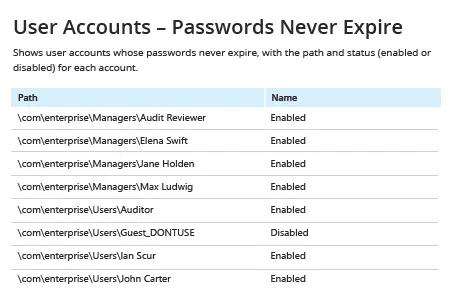
- Starten Sie Netwrix Auditor → Navigieren Sie zu „Berichte“ → Öffnen Sie „Active Directory“ → Gehen Sie zu „Active Directory - Zustand zu einem bestimmten Zeitpunkt“ → Wählen Sie „Benutzerkonten – Passwörter laufen nie ab“ → Klicken Sie auf „Anzeigen“.
- Um den Bericht regelmäßig per E-Mail zu erhalten, klicken Sie auf die Schaltfläche „Abonnieren“ und wählen Sie den gewünschten Zeitplan.
Native Auditierung
- Öffnen Sie die Powershell ISE → Erstellen Sie ein neues Skript mit dem folgenden Code und führen Sie es aus, indem Sie den Pfad für den Export angeben:
      # Import the AD module to the session

Import-Module ActiveDirectory

#Search for the users and export report

get-aduser -filter * -properties Name, PasswordNeverExpires | where {
$_.passwordNeverExpires -eq "true" } | Select-Object DistinguishedName,Name,Enabled |
Export-csv c:\data\pw_never_expires.csv -NoTypeInformation
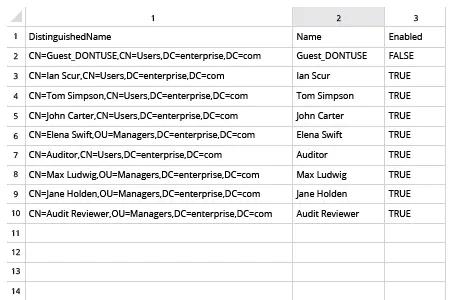
- Öffnen Sie die vom Skript erstellte Datei in MS Excel.
Teilen auf