
How to Audit Who Accessed Data in MS Teams and SharePoint Online
Netwrix Auditor for Sharepoint
- Run Netwrix Auditor → Navigate to “Reports”.
- Expand the “SharePoint Online” section → Go to “SharePoint Online Activity” → Select “All SharePoint Online Activity by User”.
- Click “View Report”.
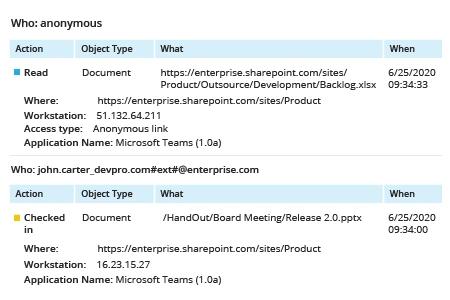
Learn more about Netwrix Auditor for SharePoint
Native Auditing
- Open the Office 365 Security & Compliance dashboard.
- Go to Search -> Click “Audit log search”.
- In the Activities filters, choose “File and folder activities”, and then click “Search”
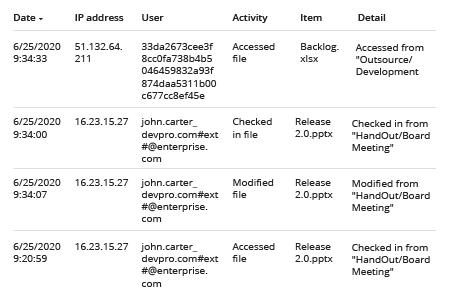
4. To review the path to the affected document, click the event and browse through the Details sections to see the “Object Id”:
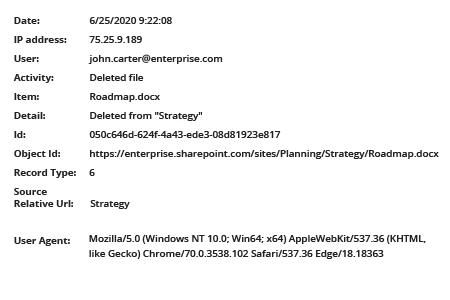
5. To group the events by the user who was accessing data, you’ll need to download the data into a .csv file and sort the data there.
A better way of monitoring data access in MS Teams and SharePoint Online
Business users store documents, spreadsheets, presentations and many other types of files on their SharePoint and MS Teams sites — and can share any of this content with others inside or outside the organization in just a few clicks. Therefore, closely monitoring access is essential for data security. Moreover, most compliance regulations require data access auditing to prove that you have control over sensitive data.
While the native Office 365 Unified Audit Log does enable you to review access events, its filtering options are so limited that IT professionals often have to spend a significant amount of their precious time refining and analysing access events, increasing the risk that dangerous or malicious activity will go unnoticed.
Netwrix Auditor enables organizations to meet strict compliance requirements and reduce the risk of data exposure by providing comprehensive, automated monitoring of access to data in SharePoint and MS Teams. Using its flexible search function, you can easily fine-tune your search criteria to quickly sift through events. In addition, you can subscribe anyone to exactly the reports they need, reducing your workload while keeping everyone properly informed. You can also set up both threshold-based and event-based alerts to stay on top of any suspicious activity.
Share on