
How to Detect Who Modified Mailbox Permissions in Exchange Online
Native Auditing
- Open Exchange Administrative Console in Internet Explorer → Navigate to "Compliance management"→ Click on "Auditing" → Select "Run the admin audit log report".
- To see all configuration changes made during the specified period, fill out the start date and the end date fields → Click "Search".
- Sort the list by cmdlet and find the "Add-MailboxPermission" cmdlet → Click on it for details.
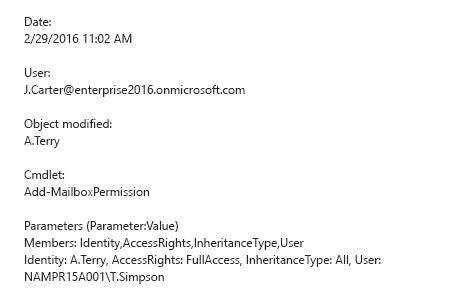
- To find out who changed permissions, refer to the "User" section. To find out which mailbox permissions were changed and how, refer to the "Parameters" section.
Netwrix Auditor for Exchange
- Run Netwrix Auditor → Navigate to "Search" → Click on "Advanced mode" if not selected → Set up the following filters:
- Filter = "Data source"
Operator = "Equals"
Value = "Exchange Online" - Filter = "Details"
Operator = "Contains"
Value = "Access Rights"
- Filter = "Data source"
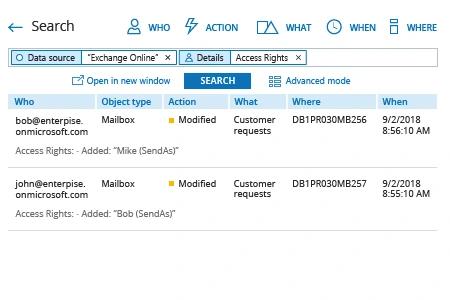
- Click the "Search" button and review what changes were made to access rights.
Share on