
Cómo obtener un informe de permisos NTFS
Auditoría Nativa
- Abra el Powershell ISE.
- Ejecute el siguiente script, ajustando los campos “OutFile” y “RootPath”:
      $OutFile = "C:\Temp\Permissions.csv" # Insert folder path where you want to save your file and its name
$RootPath = "\\Pdc\Shared" # Insert your share directory path
$Header = "Folder Path,IdentityReference,AccessControlType,IsInherited,InheritanceFlags,PropagationFlags"
# $Header = "Folder Path,IdentityReference,AccessControlType,IsInherited,InheritanceFlags,PropagationFlags,FilesystemRights"
$FileExist = Test-Path $OutFile
If ($FileExist -eq $True) {Del $OutFile}
Add-Content -Value $Header -Path $OutFile
$Folders = dir $RootPath -recurse | where {$_.psiscontainer -eq $True}
foreach ($Folder in $Folders){
$ACLs = get-acl $Folder.fullname | ForEach-Object { $_.Access }
Foreach ($ACL in $ACLs){
$OutInfo = $Folder.Fullname + "," + $ACL.IdentityReference + "," + $ACL.AccessControlType + "," + $ACL.IsInherited + "," + $ACL.InheritanceFlags + "," + $ACL.PropagationFlags
# If you need detailed file system rights in your report, add the following at the end of previous line:
# + "," + ($ACL.FileSystemRights -replace ',','/' )
Add-Content -Value $OutInfo -Path $OutFile
}}
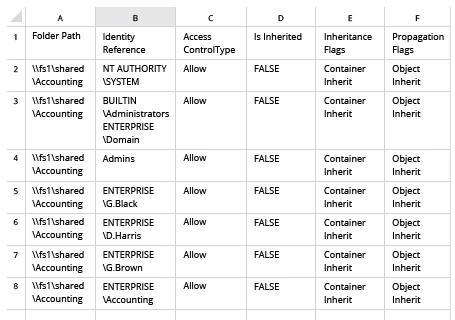
- Abra el archivo producido por el script en Microsoft Excel:
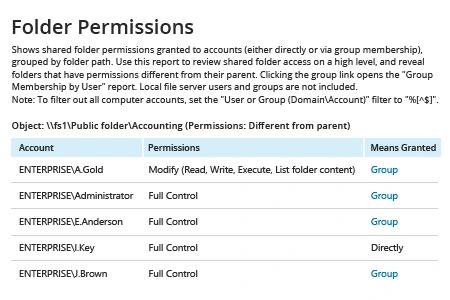
Netwrix Auditor para Windows File Servers
- Ejecute Netwrix Auditor → Vaya a “Informes” → Abra “Servidores de Archivos” → Acceda a “Servidores de Archivos – Estado en el Tiempo” → Seleccione el informe “Permisos de Carpeta”.
- En el filtro “Object UNC Path”, especifique la ruta a su recurso compartido de archivos (por ejemplo, “\\Myserver\Myshare”).
- Haga clic en “Ver Informe”.
Para recibir el informe por correo electrónico de manera regular, simplemente haga clic en la opción "Suscribirse" y especifique el horario y los destinatarios.
Compartir en