
Cómo recordar a los usuarios que cambien sus contraseñas antes de que caduquen
Solución nativa vs. Netwrix Auditor for Active Directory
Netwrix Auditor for Active Directory
- Ejecute Netwrix Password Expiration Notifier → Seleccione su dominio → Haga clic en “Editar” → Haga clic en “Activar alertas de caducidad de contraseña” → Haga clic en “Guardar”.
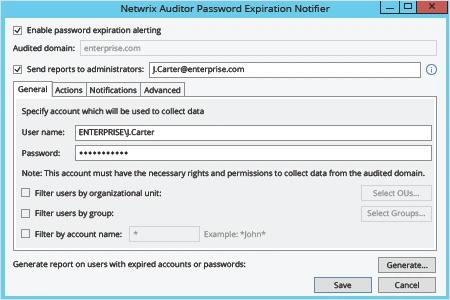
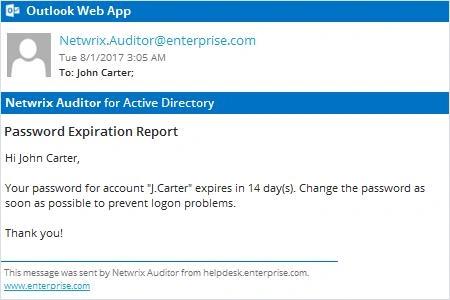
Netwrix Auditor enviará automáticamente un correo electrónico de notificación de expiración de contraseña de Active Directory a cada propietario de cuenta cuya contraseña esté a punto de caducar.
Auditoría Nativa
- Copie, modifique y guarde el siguiente script utilizando PowerShell ISE:
      #requires -module ActiveDirectory

<#
.SYNOPSIS
Script will scan Active Directory for accounts with expiring passwords

.DESCRIPTION
Script will scan Active Directory for accounts with expiring passwords and will send customized email to users

.PARAMETER Domain
.PARAMETER specifies which domain search will be performed against

.PARAMETER Cred
The PS credential to use to query AD (if not using the logged in credential)

.PARAMETER SearchBase
The OU path to search for user accounts in

.PARAMETER PasswordExpirationThreshold
Specifies accounts where this value exceeded will be emailed

.PARAMETER Subject
Which subject shall be put into email

.PARAMETER From
Which address shall be used as a FROM field in Email

.PARAMETER EmailServerAddress
SMTP relay address

.PARAMETER FailoverEmail
Emails address where all errors will be sent to

.PARAMETER LogFilePath
The path to where the informational log file is generated by this script.
#>

[CmdletBinding()]
Param(
[string]$Domain = $env:USERDNSDOMAIN,
[PSCredential]$cred,
[string]$SearchBase,
[string]$UserSearchString = '*',
[int]$PasswordExpirationThreshold = 14,
[string]$Subject = "Password Expiration Notification",
[string]$From = "J.Carter@enterprise.com",
[string]$EmailServerAddress = "mail.enterprise.com",
[string]$FailoverEmail = "J.Carter@enterprise.com",
[string]$LogFilePath = 'D:\Temp\ServiceAccountExpirations.log'
)

begin {
function Write-Log($Message) {
$MyDateTime = Get-Date -Format 'MM-dd-yyyy H:mm:ss'
Add-Content -Path $LogFilePath -Value "$MyDateTime - $Message"
}
try {
$MaxPasswordAge = (Get-ADDefaultDomainPasswordPolicy -Server $Domain).MaxPasswordAge.Days
Write-Log -Message "The max password age for the $Domain domain is $MaxPasswordAge"
if ($PasswordExpirationThreshold -gt $MaxPasswordAge) {
throw "The value '$PasswordExpirationThreshold' specified as the password expiration threshold is greater than the max password age for the domain" }

[string]$EmailTemplate = @'
<html> <body> <font SIZE="6" COLOR="#ff0000"> <p ALIGN="CENTER" style='font-size:20.0pt;font-family:"Times New Roman";color:#CC0000;mso-bidi-font-weight: bold'>Password Expiration Notice</p> </font><font style='font-size:14.0pt;font-family:"Times New Roman";color:#1C1C1C;mso-bidi-font-weight:bold'> <p>Dear $FirstName $LastName,</p> <p>Your password in <U> $domain </U> domain will expire in $DaysBeforeExpiration days. Please change it as soon as possible to make sure your account does not get locked out. To change your password press CTRL+ALT+DEL and select "Change Password". </p> <p>Please review the guidelines below as they are necessary for successfully updating your password.</p> <p>PASSWORD MUST:</p> <dir> <p>Be at least 8 total characters</p> <p>Contain at least one uppercase character</p> <p>Contain at least one numeral</p> <p>Not be the same or similar to the last 5 used passwords</p> <p>Be used for at least 24 hours before changing again</p> </dir> <p></p> <p>If you enter an incorrect password 5 or more times, your account will be locked and you will need to contact the Help Desk for assistance. </p> </font><font SIZE="4" style='font-size:13.0pt;font-family:"Times New Roman";color:#CC0000'> <p ALIGN="CENTER">*** Please do not respond to this e-mail. <BR>Direct any questions or concerns regarding this issue to the IT Help Desk. <BR> For information on how to contact the Help Desk, please visit </font> <a HREF="http://helpdesk.enterprise.com"> <font SIZE="4" COLOR="#0000ff"><u> http://helpdesk.enterprise.com/ </u></font> </dir> </font></b> </body> </html>
'@
} catch {
Write-Log -Message $_.Exception.Message
exit
}
}
process {
try {
$GetAdUserParams = @{
'Filter' = { (Enabled -eq $True) -and (PasswordNeverExpires -eq $false) -and (samAccountName -like $UserSearchString)}
'Properties' = 'PasswordLastSet', 'PasswordExpired', 'PasswordNeverExpires','EmailAddress'
}
if ($SearchBase) {
$GetAdUserParams.SearchBase = $SearchBase
}
if ($Cred) {
$GetAdUserParams.Credential = $cred
}
$Today = Get-Date
$Users = Get-ADUser @GetAdUserParams | Where-Object { $_.PasswordLastSet -and !$_.PasswordExpired }
Write-Log -Message "Found '$($Users.Count)' total expirable AD user accounts"
$ExpiringUsers = [System.Collections.ArrayList]@()
foreach ($User in $Users) {
$UserPwdExpireDate = $User.PasswordLastSet.AddDays($MaxPasswordAge)
$DaysUntilExpire = ($UserPwdExpireDate - $Today).Days
$FirstName = $User.GivenName
$LastName = $User.Surname
if ($DaysUntilExpire -le $PasswordExpirationThreshold) {
Write-Log -Message "The user $($User.samAccountName)'s password will expire in $DaysUntilExpire days"
$EmailBody = $EmailTemplate.Replace('$FirstName', $FirstName).Replace('$LastName', $LastName).Replace('$DaysBeforeExpiration', $DaysUntilExpire).Replace('$domain', $Domain)
Send-MailMessage -To $User.EmailAddress -From $From -Subject $Subject -BodyAsHtml $EmailBody -SmtpServer $EmailServerAddress -Priority High -UseSsl
$ExpiringUsers.Add($User) | Out-Null
}
}
Write-Log -Message "'$($ExpiringUsers.Count)' accounts found with expiring passwords within $PasswordExpirationThreshold days"
} catch {
Write-Log -Message "$($_.Exception.Message) - $($_.InvocationInfo.ScriptLineNumber)"
}
}
- Automatice la ejecución de scripts con Task Scheduler.
Aprende más sobre Netwrix Auditor for Active Directory
Recuerde a los usuarios cambiar sus contraseñas para maximizar la productividad del usuario y reducir la carga de trabajo del servicio de asistencia
Muchas de las mejores prácticas requieren el cambio regular de contraseña para fortalecer la seguridad de los datos corporativos y los sistemas críticos contra amenazas internas y externas. Pero si los usuarios ignoran las notificaciones para cambiar sus contraseñas, o no las reciben en absoluto — por ejemplo, si trabajan de forma remota — deben esperar a que los administradores de la mesa de ayuda restablezcan sus contraseñas vencidas, afectando la productividad en general. Para minimizar la carga de trabajo de la mesa de ayuda mientras se mantiene una política de seguridad de contraseña fuerte, los profesionales de TI necesitan una forma más eficiente de notificar a sus usuarios sobre la expiración de la contraseña.
Netwrix Auditor for Active Directory permite a los profesionales de TI obtener una visibilidad completa de lo que está sucediendo en Active Directory y Group Policy. También puede enviar correos electrónicos de notificación que recuerdan a los usuarios cambiar sus contraseñas antes de que expiren; los administradores de TI incluso pueden personalizar las alertas para especificar el número exacto de días restantes antes de la expiración de la contraseña. Además, los administradores de TI reciben informes resumidos que muestran qué cuentas de usuario están a punto de expirar sus contraseñas. Estas alertas e informes permiten a los profesionales de TI mejorar la seguridad sin sacrificar la productividad de los usuarios o del servicio de asistencia.
Compartir en