
Centro de recursosGuía práctica
Cómo detectar quién otorgó permisos de acceso completo al buzón de otro usuario
Cómo detectar quién otorgó permisos de acceso completo al buzón de otro usuario
Auditoría Nativa
- Abra el Exchange Management Shell y ejecute los siguientes cmdlets:
- Set-AdminAuditLogConfig – AdminAuditLogEnabled $true
- Set-AdminAuditLogConfig – LogLevel Verbose (para Exchange 2013).
- Ejecute eventvwr.msc → Aplicaciones y registros de servicios → MSExchange Management → busque el registro con el cmdlet "Add(Remove)-MailboxPermission" – donde puede encontrar información sobre quién cambió También puede encontrar esta información en Exchange Admin Center en su navegador → Gestión de cumplimiento → Auditoría → haga clic en "Ver el registro de auditoría del administrador". los permisos del buzón, cuándo sucedió, a qué buzón y qué tipo de acceso a quién se otorgó.
- También puede encontrar esta información en Exchange Admin Center en su navegador → Compliance Management → Auditing → haga clic en "Ver el registro de auditoría del administrador".
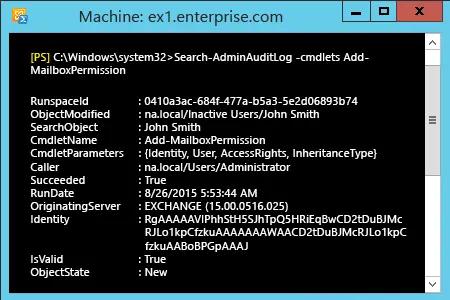
- También a través de power shell - Abra el Exchange Management Shell y ejecute el siguiente cmdlet:
- Search-AdminAuditLog –cmdlets Add(Remove)-MailboxPermission.
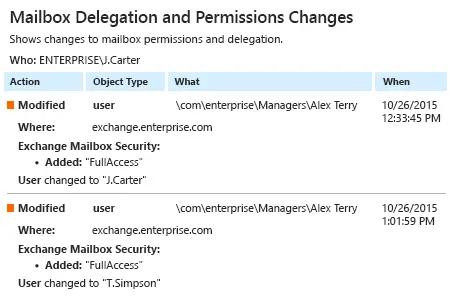
Netwrix Auditor para Exchange
- Ejecute Netwrix Auditor → Haga clic en "Informes" → elija Exchange → Elija "Cambios de Delegación y Permisos de Buzón" → haga clic en "Ver".
Compartir en