
How to Get a List of All Users from a Specific OU
Netwrix Auditor for Active Directory
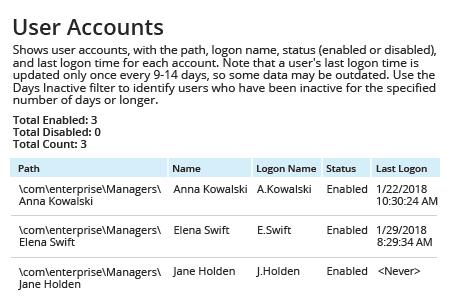
- Run Netwrix Auditor → Navigate to "Reports" → Expand the "Active Directory" section → Go to "Active Directory - State-in-Time" → Select "User Accounts" → Click "View".
- Specify the "Path" filter (e.g., "%Managers%" for the "Managers" organizational unit → Click "View Report".
- To save the report, click the "Export" button → Choose a format from the dropdown menu → Click "Save".
Learn more about Netwrix Auditor for Active Directory
Native Auditing
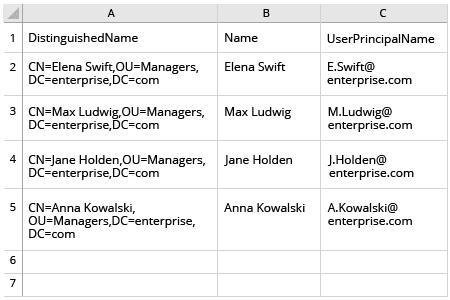
- Open the Powershell ISE → Run the following script, adjusting the OU and export paths:
      $OUpath = 'ou=Managers,dc=enterprise,dc=com'
$ExportPath = 'c:\data\users_in_ou1.csv'
Get-ADUser -Filter * -SearchBase $OUpath | Select-object
DistinguishedName,Name,UserPrincipalName | Export-Csv -NoType $ExportPath
- Open the file produced by the script in MS Excel.
Easily List All Active Directory OU Members without PowerShell Scripting
The rules and settings configured for an organizational unit (OU) in Microsoft Active Directory (AD) apply to all members of that OU, controlling things like user permissions and access to applications. Therefore, it’s critical to keep a close eye on the membership of every OU on your domain DC, especially powerful ones like your Managers OU. Fortunately, you don’t have to manually run PowerShell cmdlets every time you want to get a list of all AD users in a particular OU. With Netwrix Auditor, you can get OU membership in just a few clicks. Simply open the “User Accounts” report, specify the path to the OU you’re interested in and run the report. You’ll get a list of the members of that OU with the following user account properties: name, logon name and status.
Share on