How to Export Users from Active Directory to a Readable Format
Easily export AD users for auditing and compliance with Netwrix Auditor.




Why it is important
Exporting AD data to CSV makes analysis and reporting easier.
IT professionals are often tasked with exporting configuration or user account data from Active Directory into a readable format. A common request is to export AD users to a CSV file, which makes it easier to transform and analyze the data. Fortunately, there’s a straightforward way to export AD user information from Active Directory into a clear, usable format.
Get your report in 2 simple steps
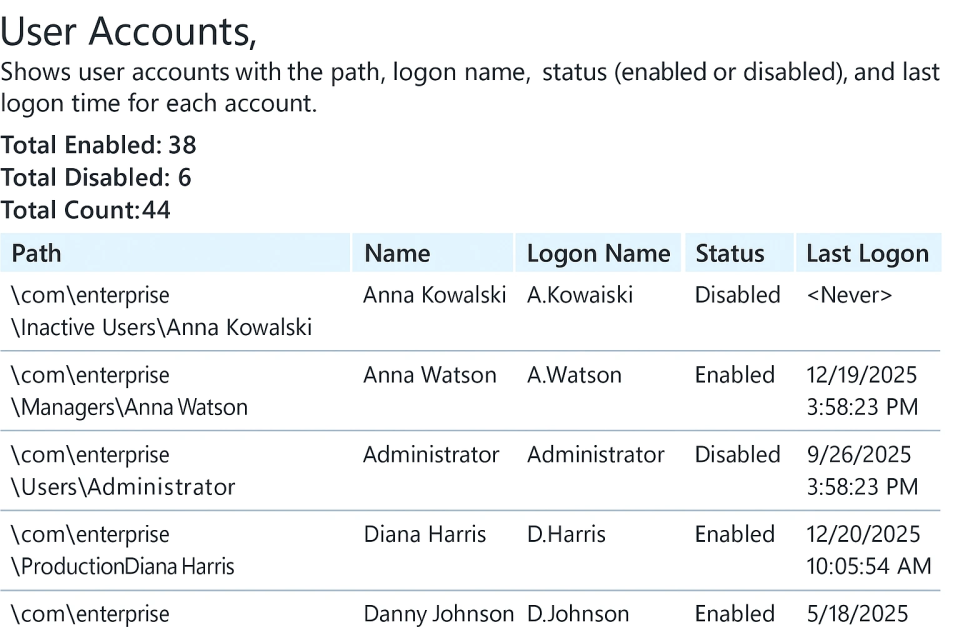
Here’s an example of a report you will receive:
Step 1
Run Netwrix Auditor → Click "Reports" → Navigate to Active Directory → "Active Directory State-in-Time" → Select "User accounts" → Click "View".
Step 2
To save the file, click the "Export" button → Select Excel format → Save as → Choose a location.
"Netwrix Auditor is not just a product for internal IT audits, but a powerful platform for reporting to the higher management who checks our J-SOX compliance. I doubt that we would meet all the requirements without it. Such a high level of visibility assures us that all critical systems are secure and that we are in continuous compliance. Without Netwrix Auditor, we would need to hire at least two people to monitor the systems nonstop."
Balazs Szegfu, Information Systems Expert
DENSO Manufacturing Hungary