
Netwrix Change Tracker
CIS Benchmark auditing across every system you run
CIS-certified compliance reports for 80+ platforms. Continuous scoring, prescriptive remediation per failed check, and file integrity monitoring on every CIS-mandated setting. Agent or agentless.
Read their Stories
Trusted by




































































Every CIS Benchmark you're actually being audited against
Operating systems
Windows Server 2016, 2019, 2022, 2025. Windows 10, 11. RHEL 7-10. Ubuntu 16.04-24.04. Debian 10-14. SUSE 12-16. Oracle Linux 7-10. Rocky 8-10. Amazon Linux 1, 2, 2023. CentOS 7-10. Fedora 39. AIX 7. Solaris 10, 11. macOS 12+.
Databases
SQL Server 2008R2 through 2019. Oracle 12c, 19c (traditional and unified auditing). RDBMS-level, OS-level, and AWS RDS templates.
Network and virtualization
Cisco IOS 15, 16, 17. Juniper. F5. Palo Alto 11. Fortigate 7.0, 7.4. Check Point. SonicWall. Dell. HP. VMware ESXi 7, 8.
Cloud and SaaS
Azure. AWS. GCP. Microsoft 365.
Every report maps line-by-line to the published CIS Benchmark. New benchmark releases are available in the Customer Portal before they're bundled into the next product release.
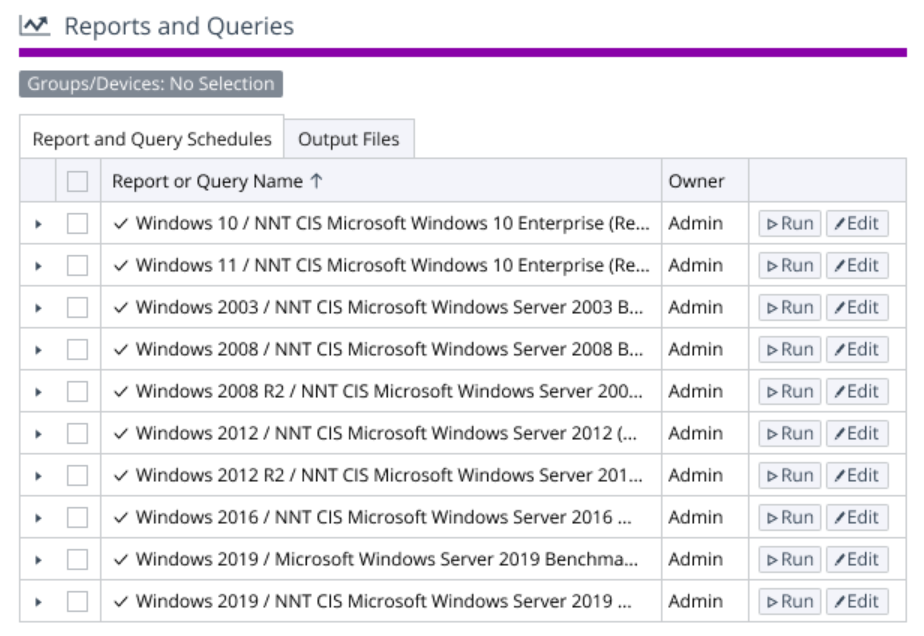
Change Tracker turns every CIS Benchmark into a ready-to-run report
Continuous monitoring and file integrity validation
Netwrix Change Tracker continuously validates changes against approved baselines using file integrity monitoring (FIM). This keeps your configurations hardened, compliant, and aligned with industry standards. A CIS scan tells you the state of a system at scan time. Change Tracker tells you what happened between scans. Watch every file, registry key, service, port, and account a CIS Benchmark cares about, in real time. Reconcile every change against approved work in your ITSM. Flag everything else as Unplanned, the way it shows in the events feed above.
Capture Windows changes in real time via a signed minifilter driver registered with the Microsoft Filter Manager at altitude 388790. Logs I/O without locking files or modifying requests. No reboot required to enable.
Capture Linux changes in real time via Sysdig for who-made-the-change attribution. AIX uses the native AIX Event Infrastructure (ahafs).
Hash files with SHA-256 by default. MD5, SHA-1, SHA-384, and SHA-512 also available.
Reconcile approved changes from ServiceNow, BMC Remedy, Cherwell, ManageEngine, OpenText SMAX, SunView, and Samanage automatically so they don't generate noise. Surface everything else as Unplanned, with the device, the file or setting that changed, the timestamp, and the user account that made the change.
What it takes to stand it up
Hub server
- Windows Server 2019, 2022, or 2025
- Small install (~100 devices): 4 cores, 8 GB RAM, 500 GB disk
- Large install (~1,000 devices): 16 cores, 32 GB RAM, 5 TB disk
- MongoDB 5.x-8.x (bundle the Community Edition or bring your own, including Enterprise or a clustered deployment)
- IIS 10, .NET 8 hosting bundle
- Add Redis above 1,500 devices or for clustered Hub installs
Agent footprint
- Gen 7 Agent on Windows: no dependencies
- Gen 7 Agent on Linux: needs libicu, Sysdig optional for who-made-the-change attribution
- Express Agent: single binary under 10 MB, zero dependencies. Runs on AIX, Solaris, HP-UX, legacy Unix, plus 32-bit and s390x architectures on request
- Steady-state Windows agent overhead: 0-4% CPU, well under 1 KB/sec network
- Agents talk to the Hub one-way over HTTPS (port 443 by default, configurable)
Or skip the agents entirely. Run agentless via the proxy agent for Windows compliance scans, Linux and network devices over SSH, ESXi via vCenter API, and cloud platforms via AWS, Azure, and GCP APIs.
Fits the stack you already have
"The most beneficial feature of Change Tracker is the CIS hardening and the monitoring part of that. That is something we have started to adopt recently, and we are taking it a lot more seriously. Tracking the CIS templates is something we really like about the product. We want to improve our system hardening and our security posture."
Behzaad Ghouse, Security Administrator
JD Wetherspoon
See it run a live CIS benchmark scan
Walk through a real scan, real failures, and the remediation guidance for each one. Five minutes, no install.