Netwrix Change Tracker
File integrity monitoring across every system you run
Detect unauthorized changes to files, registry keys, and configurations in real time. Separate planned work from real threats. Walk into every audit with a complete record of what changed, when, and by whom.
Read their Stories
Trusted by




































































Native logs tell you a file changed. They don't tell you if it mattered.
Every server, workstation, database, and network device generates thousands of file and configuration changes a day. Most are routine — patches, updates, scheduled jobs. A handful aren't. The difference between an audit finding and a breach is whether you can spot the unauthorized change in time, attribute it to a user, and prove the rest of the system is still in a known-good state.
From baseline to alert to audit evidence
Netwrix Change Tracker turns file integrity monitoring into a full audit trail.
Continuous monitoring and file integrity validation
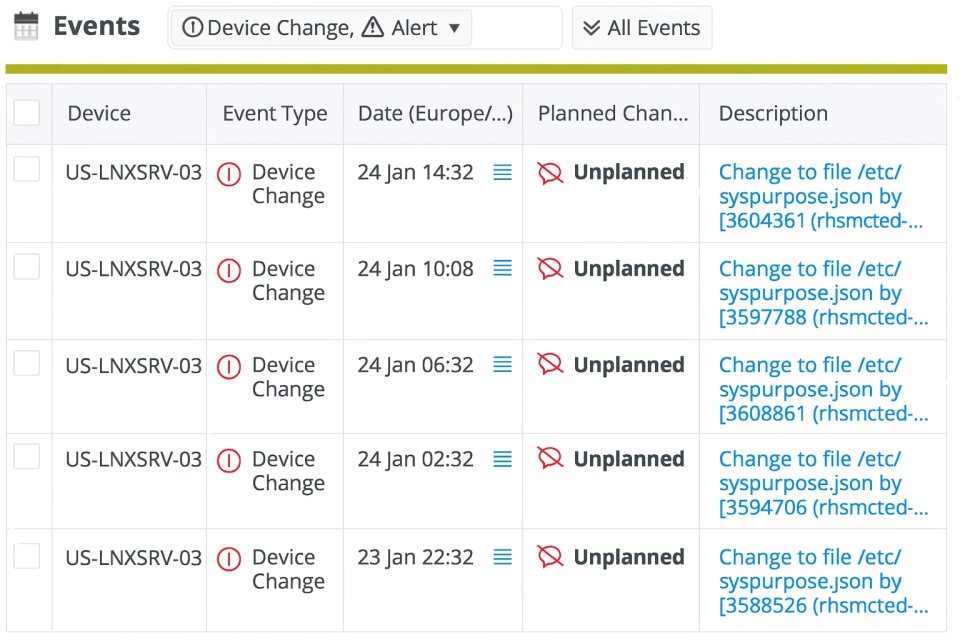
Netwrix Change Tracker continuously validates changes against approved baselines using file integrity monitoring (FIM). This keeps your configurations hardened, compliant, and aligned with industry standards. A scheduled scan tells you the state of a system at scan time. Change Tracker tells you what happened between scans. Watch every file, registry key, service, port, and account a CIS Benchmark cares about, in real time. Reconcile every change against approved work in your ITSM. Flag everything else as Unplanned, the way it shows in the events feed above.
Capture Windows changes in real time via a signed minifilter driver registered with the Microsoft Filter Manager at altitude 388790. Logs I/O without locking files or modifying requests. No reboot required to enable.
Capture Linux changes in real time via Sysdig for who-made-the-change attribution. AIX uses the native AIX Event Infrastructure (ahafs).
Hash files with SHA-256 by default. MD5, SHA-1, SHA-384, and SHA-512 also available.
Reconcile approved changes from ServiceNow, BMC Remedy, Cherwell, ManageEngine, OpenText SMAX, SunView, and Samanage automatically so they don't generate noise. Surface everything else as Unplanned, with the device, the file or setting that changed, the timestamp, and the user account that made the change.
What it takes to stand it up
Hub server
- Windows Server 2019, 2022, or 2025
- Small install (~100 devices): 4 cores, 8 GB RAM, 500 GB disk
- Large install (~1,000 devices): 16 cores, 32 GB RAM, 5 TB disk
- MongoDB 5.x-8.x (bundle the Community Edition or bring your own, including Enterprise or a clustered deployment)
- IIS 10, .NET 8 hosting bundle
- Add Redis above 1,500 devices or for clustered Hub installs
Agent footprint
- Gen 7 Agent on Windows: no dependencies
- Gen 7 Agent on Linux: needs libicu, Sysdig optional for who-made-the-change attribution
- Express Agent: single binary under 10 MB, zero dependencies. Runs on AIX, Solaris, HP-UX, legacy Unix, plus 32-bit and s390x architectures on request
- Steady-state Windows agent overhead: 0-4% CPU, well under 1 KB/sec network
- Agents talk to the Hub one-way over HTTPS (port 443 by default, configurable)
Fits the stack you already have
"The most beneficial feature of Change Tracker is the CIS hardening and the monitoring part of that. That is something we have started to adopt recently, and we are taking it a lot more seriously. Tracking the CIS templates is something we really like about the product. We want to improve our system hardening and our security posture."
Behzaad Ghouse, Security Administrator
JD Wetherspoon
See it catch a real change
Walk through a live FIM scan, watch an unauthorized change get flagged, and see the audit-ready output. Five minutes, no install.