
Netwrix Auditor for Active Directory
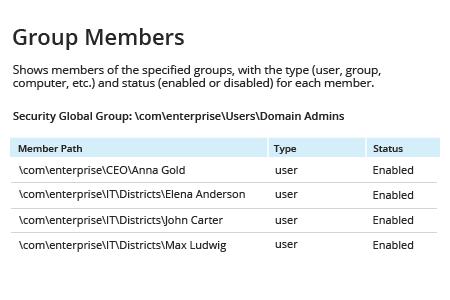
- Netwrix Auditor 실행 → “Reports”로 이동 → “Active Directory” 섹션을 확장 → “Active Directory – State-in-Time”로 이동 → “Group Members”를 선택 → “View”를 클릭합니다.
특정 AD 그룹에 대한 보고서를 생성하려면 Group Path 매개변수를 변경하세요.
자세히 알아보기: Netwrix Auditor for Active Directory
네이티브 감사
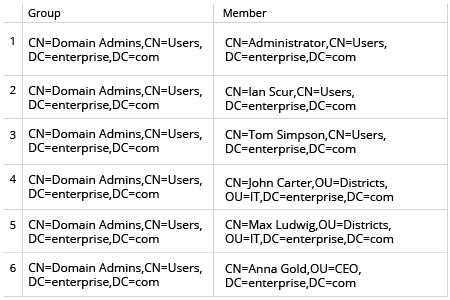
- 도메인 컨트롤러에서 Powershell ISE를 여세요. → 아래 Powershell 스크립트를 실행합니다(특정 AD 그룹에 대한 보고서를 생성해야 하는 경우 $nameofgroup 파라미터를 변경하세요):
      $nameofgroup= 'Domain Admins'
$groupsusers=Get-ADGroup -Identity $nameofgroup |
  ForEach-Object{
                $settings=@{Group=$_.DistinguishedName;Member=$null}
        $_ | Get-ADGroupMember |
              ForEach-Object{
                                       $settings.Member=$_.DistinguishedName
                    New-Object PsObject -Property $settings
                }
    }
    $groupsusers | Export-Csv C:\scripts\GroupsUsers.csv –NoTypeInformation
멤버십 보고서를 검토하여 Active Directory 그룹을 통제 상태로 유지
관리자나 컴플라이언스 감사자는 검토를 위해 IT 관리자에게 AD 그룹 멤버를 보고서로 내보내 달라고 요청할 수 있습니다. 어떤 그룹 멤버든 읽기 쉬운 형식으로 빠르게 내보낼 수 있는 Active Directory 도구가 있으면 IT 관리자는 네이티브 도구를 사용하는 것보다 훨씬 더 빠르게 이러한 요청을 처리할 수 있습니다.
Netwrix Auditor for Active Directory를 사용하면 IT 관리자가 Active Directory 그룹 구성원을 쉽고 읽기 편한 형식으로 빠르게 보고서를 생성할 수 있습니다. Active Directory 그룹 구성원을 CSV 또는 PDF 형식으로 내보낼 수 있어, 어떤 요청에도 유연하게 손쉽게 대응할 수 있습니다.
공유하기