
Database activity monitoring: What to watch and how to do it
Oct 20, 2026
Database activity monitoring exists because native audit tools in SQL Server, Oracle, MySQL, and PostgreSQL miss sensitive reads, before-and-after values, and tampering by privileged accounts that should be closely watched. It independently records who connected, what changed, and whether anyone altered the trail itself. Scope collection to regulated tables, route records to a SIEM, and tune alerts against a baseline of normal activity.
Databases hold the customer, payment, and health records that regulators, attackers, and auditors care about most. Native audit facilities in SQL Server, Oracle, MySQL, and PostgreSQL capture object and permission changes but provide little visibility into who read sensitive rows.
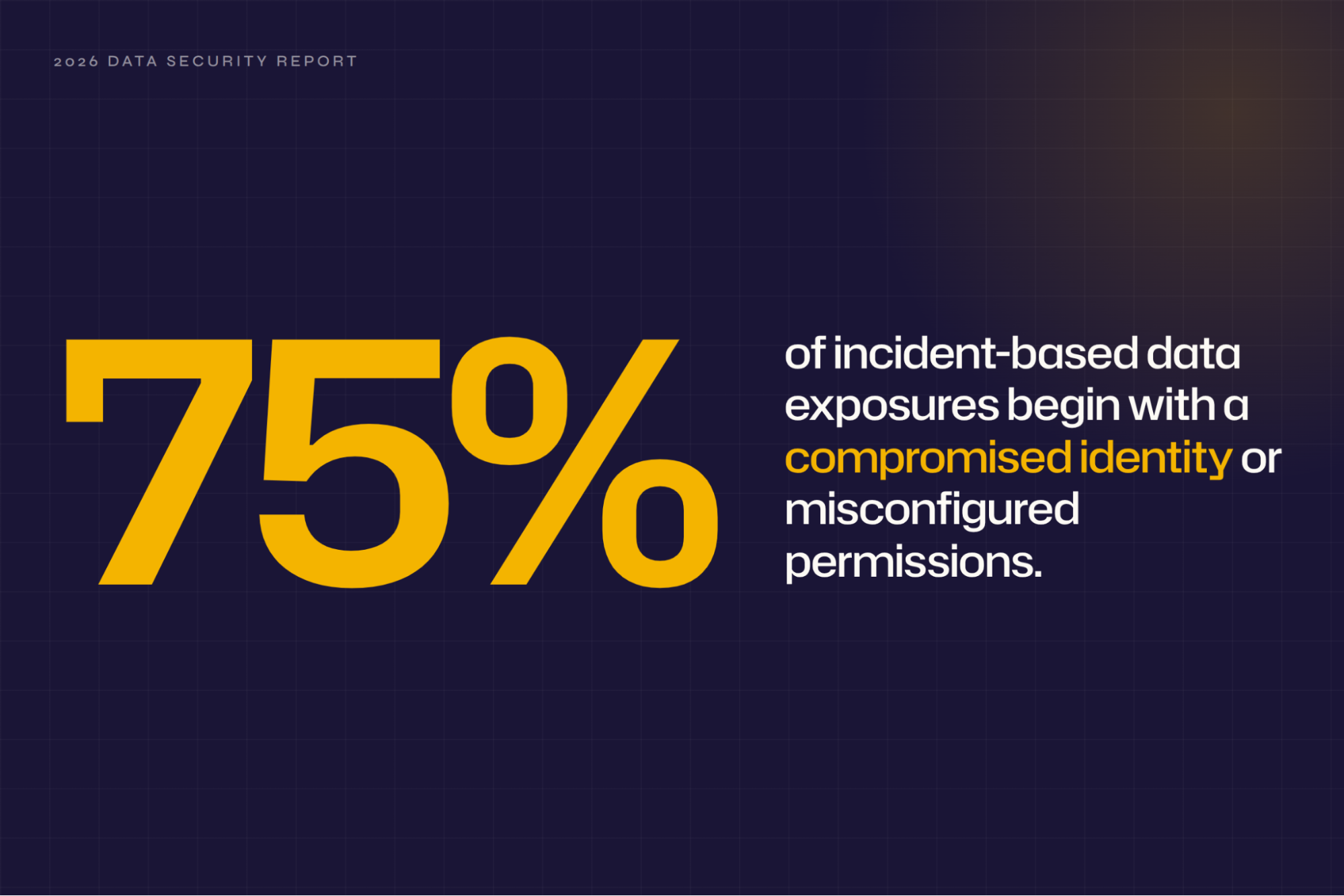
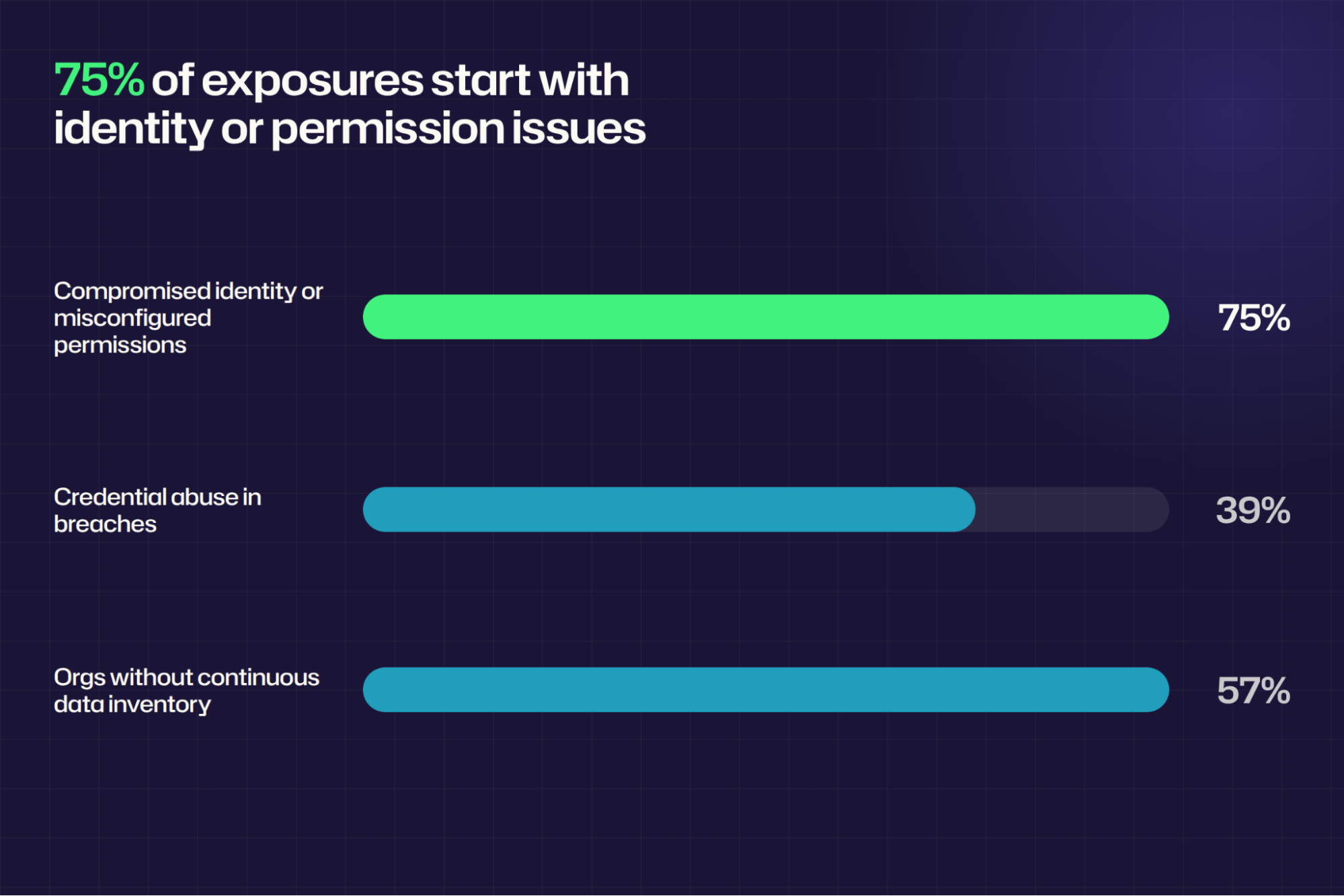
The Netwrix 2026 Data and Identity Security Report found that 75% of sensitive data exposures begin with compromised identities or misconfigured permissions. Native audit leaves the least visibility where those identities have the most power: privileged accounts that can edit the audit trail themselves.
Database activity monitoring produces an independent record of access, changes, and administrative actions, so security teams can investigate incidents, prove compliance, and detect misuse before a compromised account or a quiet configuration change becomes a reportable breach.
What is database activity monitoring?
Database activity monitoring (DAM) is a security discipline that captures, stores, and analyzes user and administrator activity inside a database independently of the database engine itself. On demand, it answers who connected, what they read or changed, and whether anyone modified the audit configuration.
DAM sits alongside performance monitoring but serves a different purpose. Performance tooling tracks CPU, I/O, and query latency to keep the engine healthy. DAM instead captures the SQL statement, user identity, client IP address, and timestamp, so you can tie activity back to a named person or service.
A DAM tool collects that information through a network tap, a host agent, or the database's own audit facility, then forwards it to a repository outside the database so the record survives a compromised administrator account.
Why database activity monitoring matters
For a database administrator (DBA) or security analyst, the hard part of any incident or audit is proving who touched what. Without an independent database trail, teams reconstruct that proof by hand from partial logs, usually under a deadline.
Sensitive data concentrates in the database layer
Customer records, cardholder data, and protected health information (PHI) live in database tables. Any regulated data passes through a database at some point. When database access goes unmonitored, the environment's most sensitive assets lose their nearest layer of accountability, and every downstream control depends on a trail that was never captured.
Native database logs can't support an investigation
SQL Server's default trace captures object and permission changes but no SELECT activity, and keeps only 100 MB of history. Worse, Microsoft warns that sysadmins can tamper with the audit trail itself, which is why NIST SP 800-53 AU-9(2) requires storing audit records on a separate system from the one being audited.
Compliance frameworks require a database audit trail
Every major framework treats database activity as evidence. PCI DSS v4.0.1 Requirement 10 mandates 12 months of logged cardholder-data access and audit-log integrity. HIPAA's 45 CFR 164.312(b) requires mechanisms that record and examine activity in ePHI systems.
In its 2023 inspection report on Ernst & Young Incorporated (PCAOB Release No. 104-2024-113), the PCAOB cited the firm for not evaluating how a client's control owners reviewed direct changes to the database behind its accounting system, in an audit of internal control over financial reporting under SOX.
GDPR Article 5(2) requires controllers to demonstrate compliance with the regulation's principles, which includes showing who accessed personal data.
Compromised accounts and insider misuse surface first at the database
A valid login looks legitimate to every system except the one recording what it did, which is why credential theft and insider misuse rarely trip perimeter controls. The 2026 Data Breach Investigations Report from Verizon found that credential abuse featured in 39% of breaches at some point in the attack chain, and continuous database monitoring is often the earliest place to catch the lateral movement that follows.
Netwrix Auditor records before-and-after values for access and change events across hybrid Microsoft environments. Request a demo.
Database activities you need to monitor
The categories below carry enough security or compliance weight to justify their own detection rules. Together, they cover who got in, what they read or changed, and whether anyone tampered with the record: the questions every investigation starts with.
Authentication and connection events
Logon records are the first place a stolen credential becomes visible. Failed logins reveal password guessing or credential stuffing, while successful logins from unusual sources reveal credentials being used somewhere they shouldn't be.
Privileged and service-account logons deserve particular attention, since a service account that suddenly connects from a new workstation instead of its usual application tier is almost always worth investigating. Oracle enables a predefined failed-logon policy by default in new databases, though upgraded ones often need it turned on manually.
Sensitive-data reads and bulk exports
Direct visibility into who queried regulated tables separates knowing an exposure happened from proving what was taken. First-time access to a table a user has never touched, and bulk extraction through tools such as bcp or expdp, are the read patterns most worth watching, the same behavior data loss prevention controls watch for at the endpoint.
Schema and configuration changes
Schema and configuration changes can destroy data or blind the monitoring meant to catch everything else. CREATE, ALTER, and DROP statements against tables and stored procedures need their own alerts, and changes to the audit configuration itself deserve the fastest response. Microsoft ships xp_cmdshell disabled by default in SQL Server because enabling it gives an attacker a command shell.
New or escalated privileges
A single privilege grant can turn a limited account into one that reads everything, or disables the audit trail entirely. Role membership changes, new logins, and any addition to the sysadmin role in SQL Server, or an equivalent DBA role in Oracle, are non-negotiable alerts, the same privilege escalation pattern watched at the identity layer. Least privilege is the baseline control. Oracle's ORA_ACCOUNT_MGMT policy covers this, but it ships disabled by default.
Data changes to sensitive tables
When a salary or account balance changes without authorization, the first question is what the value was before the change. Native audit records only the statement text, not the row values, so a separate mechanism has to preserve before-and-after content, such as SQL Server's Change Data Capture, MySQL's row-image binary logging, or PostgreSQL triggers. Alerts on bulk or off-hours changes to regulated tables map to MITRE T1565, Data Manipulation.
Activity that breaks the normal pattern
Baseline rules catch activity that looks ordinary in isolation but unusual for the account performing it, such as a user suddenly querying 10 tables in five minutes, or a known application account connecting from a new IP address.
This is the one category that depends on SIEM analytics rather than native audit configuration, the same behavioral-baseline approach that identity threat detection uses at the account layer.
How to implement database activity monitoring
Work through the five steps in order, since each one depends on the last. What you scope in step 1 determines which collection method fits in step 2, and so on.
They also assume a small team that can't manually review every event, so several steps below rely on staged rollouts and automated baselines instead of manual triage.
1. Define the scope of what will be monitored
Start by inventorying which databases hold regulated or business-sensitive data, such as payroll, cardholder, health, or intellectual property, and rank them by regulatory driver. That inventory only matters once you know which tables hold sensitive fields, so run data classification first; skip it, and a payroll audit specification has nothing to point at.
The stakes are real: the survey behind the Netwrix 2026 Data and Identity Security Report found that 57% of organizations don't continuously maintain a sensitive data inventory, so most teams start this step blind.
Once you map sensitive databases, extend the same inventory to the privileged, shared, and service accounts that touch them, and commit to monitoring every privileged session in full, even where regular-user logging stays selective.
CIS Safeguard 8.5 sets the floor for that commitment. At minimum, capture username, timestamp, and source and destination addresses for every asset holding sensitive data.
2. Choose a collection method that matches your environment
Passive network capture via a SPAN port is the place to start if you need zero load on the server. However, that zero-load trade-off costs you visibility into forward-secret Transport Layer Security (TLS), local connections, and cloud-managed databases.
When blocking a statement matters more than seeing it, an inline proxy is a better fit, since it terminates TLS itself, though that same control adds latency and makes the proxy an availability dependency.
If local connections still need coverage after that, and the team can tolerate the CPU cost plus the revalidation work every kernel or database upgrade brings, a host agent closes that gap. Teams running database as a service (DBaaS), or needing visibility into stored procedures and encryption, get there instead by pairing native audit with agentless collection.
Oracle reports mid-single-digit CPU overhead for native auditing at up to 360,000 audit records per hour. Agentless collection adds load on top of that, so test the combination before committing.
In practice, most teams combine methods anyway, since Oracle's AVDF documentation recommends pairing network monitoring with database auditing so each covers the other's blind spots.
3. Set policies and alert thresholds that a small team can act on
Turn rules on in stages, not all at once, since enabling everything on day one buries a small team in false positives. Start that staged rollout with audit tampering and sysadmin grants, mapped from the six activity categories above, since those two carry the least tolerance for a missed alert.
NIST SP 800-94 warns that a freshly deployed system typically throws off excessive false positives before its rules are fully tuned to the environment, which is exactly why the staged approach matters here.
Volume and access-pattern rules call for a different treatment. Run them as anomalies, tuned against at least a week of baseline data, the same order of magnitude Microsoft Sentinel uses for its own affected-rows anomaly rule, which trains over 14 days.
Expect those thresholds to stay local to your environment rather than follow a universal number, since one team's anomaly is 100 rows, another's is 500,000, and only your own baseline reveals which is which.
4. Centralize database events and correlate them with identity context
Centralize log collection first, as CIS Safeguard 8.9 requires, and use a tool that filters large event datasets down to a set a human can review, the way NIST SP 800-61 Rev. 3 recommends. Once that pipeline exists, correlate each event with the account behind it, since a centralized log without identity context still leaves you reading raw SQL statements instead of names.
In Microsoft Sentinel, that correlation runs through specific tables. Route Azure SQL audit events to the SQLSecurityAuditEvents table (or AzureDiagnostics in older setups), SQL Server Windows events to SecurityEvent, and Defender alerts to SecurityAlert; then use the IdentityInfo table to attach the person behind each account.
Splunk and IBM QRadar users can follow the same pattern with their own identity lookups; the payoff is turning "someone ran a large SELECT" into "a contractor account added to sysadmin two hours ago ran a large SELECT."
5. Test, tune, and maintain the monitoring pipeline
Test the full pipeline with representative activity before trusting it in production. Add a test login to a server role, alter an audit specification, and run a 600-row export, then confirm each alert arrives with the right identity attached. A pipeline that logs the event but loses the identity context is only half built.
Rebuild baselines whenever applications change, and periodically re-check the audit policies themselves, since Oracle's AVDF documentation warns that a DBA can modify or delete them. Retrieve and review the settings on a schedule; CIS Safeguard 8.1 calls for that review at least annually.
Retention deserves the same discipline. Set it to the strictest mandate that applies, with PCI DSS's 12-month floor as the baseline, and keep the diagnostic setting that feeds an Azure SQL pipeline on your monitored list too, since deleting it can silently stop collection.
How Netwrix helps you monitor database activity
Most of the work above, from defining scope to correlating identity context, applies regardless of the tools you use. Netwrix Auditor covers the collection, alerting, and before-and-after detail for SQL Server and Oracle, and Netwrix Access Analyzer adds the permission and sensitive-data layer on top.
Tracking logons and privileged access
Netwrix Auditor's SQL Server monitoring records successful and failed logons and tracks DBA activity, including privileged actions and server role changes. Its Oracle Database monitoring software tracks successful and failed logons and monitors SQL statements and privileges. For either source, you can configure alerts to email an analyst or run a script you define as a response action.
Auditor reports also serve as compliance evidence. First National Bank and Trust of Beloit uses Netwrix Auditor as its main solution for OCC compliance and now spends one hour, instead of one week, preparing for audits. Bank of the South uses it to protect business-critical data and comply with PCI DSS and GLBA, saving at least 40 hours per year on audit preparation.
Capturing before-and-after values for data changes
Netwrix Auditor for SQL Server runs in triggerless mode by default, reading the trace log every five minutes with no added load and reporting who changed what and when. Trigger-based mode adds before-and-after values for INSERT, UPDATE, and DELETE, which native audit can't provide, at the cost of additional load on high-transaction servers.
Connecting activity to sensitive data
Netwrix Auditor applies sensitive-data context at the table level in triggerless mode, using the tables and policies you've configured, so reports can flag activity against regulated tables. For deeper discovery and permission analysis across SQL Server and Oracle, Netwrix Access Analyzer maps effective permissions and surfaces overexposed data, beyond what Auditor covers alone.
Deploying with minimal production impact
Netwrix Auditor collects remotely, so only trigger-based mode touches the monitored tables themselves. Oracle collection runs through the Oracle Instant Client on the Auditor server every ten minutes, and SQL Server trace reading runs every five minutes. Add-ons forward activity records to Splunk, IBM QRadar, and ArcSight for teams already centralizing on a SIEM.
Put database activity monitoring into practice
Start with the instance that holds your most regulated data, establish a baseline, and expand only after the first alert set produces actionable results.
For cloud-managed workloads, coverage depends on the data source and deployment model. Netwrix Access Analyzer discovers sensitive data and analyzes permissions across SQL Server, Azure SQL, Amazon RDS for SQL Server, and Oracle.
Request a demo to see how Netwrix can help you monitor database activity, centralize the audit trail, and catch misuse before it becomes a breach.
Frequently asked questions about database activity monitoring
Share on
Learn More
About the author
