
How Netwrix DSPM complements Microsoft 365
Feb 23, 2026
Netwrix DSPM enhances Microsoft 365 security with unified data discovery, context-aware risk prioritization, automated remediation, and continuous compliance monitoring. While M365 provides foundational security through Purview and Entra ID, it lacks visibility into shadow data and automated risk response. Netwrix closes these gaps, helping organizations discover sensitive data, enforce least privilege, and respond faster to threats.
Microsoft 365 is a productivity platform for businesses around the world. It brings together email (Exchange), collaboration (Teams), document storage and sharing (OneDrive, SharePoint), and identity (Entra ID). But with its ubiquity comes risk. Sensitive data, like financial records and personal information, lives and flows within Microsoft 365, which makes it a high-risk environment for data security and an attractive target for both external attackers and internal misuse. Some risk factors include:
- Not all data is properly inventoried or classified, especially as users create, share, and collaborate in Teams and SharePoint.
- When permissions are too broad or not regularly reviewed, users or compromised accounts may have excessive rights, increasing exposure.
- Unauthorized or unusual access patterns can precede data leaks. Continuous monitoring is required to detect these patterns early.
Regulatory pressure adds another layer. With data protection laws (GDPR, HIPAA, PCI DSS, and others), organizations must demonstrate control, traceability, and remediation.
Find and protect sensitive data, prioritize and root out compliance risks, and shut down risky behavior before it becomes a breach.
The importance of comprehensive DSPM in cloud productivity suites
Traditional security tools—like basic DLP, IAM, and perimeter firewalls—can fall short of providing full visibility into where sensitive data is stored, who has access, and how it's being used, especially in distributed, SaaS-first environments. This is where Data Security Posture Management (DSPM) can help.
DSPM is a data-first security strategy. Rather than just protecting infrastructure, it focuses on the data itself. By integrating DSPM into Microsoft 365, organizations gain the intelligence and control to protect sensitive data in their cloud productivity environments. Key benefits include:
- Real-time risk assessment: DSPM identifies overexposed data, risky sharing settings, and privilege escalations.
- Automated remediation: It can trigger corrective actions, such as fixing permissions and applying sensitivity labels to mitigate risk.
- Compliance support: With proper discovery, classification, and monitoring, DSPM supports data governance, audit trails, DSARs, and other compliance workflows.
- Faster threat response: By correlating identity, activity, and data, DSPM can spot and respond to abnormal behavior faster, including insider threats.
Netwrix DSPM and Microsoft's native capabilities
Netwrix DSPM is a data-centric security offering. It provides continuous discovery, classification, risk assessment, and remediation support for sensitive data in both cloud (including Microsoft 365) and on-premises environments.
Netwrix DSPM includes these core products:
- Netwrix Data Classification: Discovers and classifies sensitive data across structured and unstructured sources
- Netwrix Auditor: Provides visibility into user activity, changes, and access patterns with audit-ready reporting
- Netwrix Access Analyzer: Manages permissions and enforces least privilege access
- Netwrix 1Secure: Cloud-native platform for unified data and identity security
Microsoft 365 offers some native security and governance tools, including sensitivity labels in Microsoft Purview, audit logs, and access controls. However, they lack the depth, automation, and continuous risk assessment that a dedicated DSPM solution like Netwrix provides. Netwrix complements Microsoft's built-in capabilities with advanced discovery, continuous exposure analysis, and remediation workflows.
What Microsoft 365 provides natively for data protection
Microsoft 365 comes with a range of built-in tools that form a strong foundation for data protection. But they have their limits. Here's what Microsoft offers out of the box and where the gaps remain.
Overview of M365 tools: Purview, Defender, Intune, Entra ID
Microsoft's native security stack covers identity, endpoint, compliance, and data protection.
Sensitivity labeling and DLP
One of Microsoft 365's strongest native capabilities is the ability to protect data and prevent unauthorized access and leaks. Microsoft Purview can scan Microsoft 365 environments to identify and classify information such as PII, financial data, and intellectual property. You can apply sensitivity labels such as Confidential, Internal-Use, or Public that stay with the data wherever it moves. Based on assigned labels, Purview can enforce encryption, rights management, watermarks, and other protections. In addition, Purview's Data Loss Prevention (DLP) lets administrators create policies to warn or block when sensitive data is being shared externally, copied, printed, or saved in risky locations.
Because these controls are built into Microsoft 365 workloads (Exchange Online, SharePoint Online, OneDrive, Teams), they provide broad protection.
Activity logging and alerting capabilities
Microsoft 365 provides audit logs and alerting for visibility into user and system activity:
- Entra ID logs sign-in and audit events, so you can see who signed in, from where, and with what device.
- Intune and Defender generate logs for device compliance, app usage, policy violations, and endpoint threats like malware or suspicious activity.
- Purview and Defender together provide alerting when DLP policies are triggered, risky data-sharing occurs, configuration changes happen, or suspicious behavior is detected.
These logging and alerting features support compliance, investigation, and the ability to respond when something goes wrong.
Limitations in visibility, automation, and granularity
Despite being effective, native Microsoft 365 tools have limitations:
- Visibility gaps: Although you get logs and alerts, you still lack the full picture of where all sensitive data resides (especially in shadow locations), who has access to it, and how that access is being used over time.
- Granularity and prioritization: Built-in tools treat all policy violations the same and don't provide detailed risk scoring or context.
- Automation and remediation: Many actions require manual investigation or custom scripts. Native tools do not provide built-in automatic remediation workflows unless you build them yourself.
- Complex configurations at scale: Managing policies, permissions, and exceptions becomes difficult as organizations expand across workloads, regions, and third-party apps.
- Coverage across environments: Native tools don't cover scenarios where data leaves Microsoft 365, is accessed from unmanaged devices, or is shared into non-M365 apps and cloud services.
Netwrix DSPM: Built for proactive data security
For improved visibility, better prioritization, and automated remediation across cloud and on-premises systems, organizations need to complement Microsoft 365 with Netwrix DSPM. Instead of reacting to incidents after the damage is done, Netwrix focuses on preventing exposure in the first place.
Unified data discovery
A major challenge for organizations is knowing where sensitive data resides. Employees, partners, and third parties create new files, duplicate information, share documents, and move data across systems. Netwrix Data Classification automatically scans and discovers data across multiple platforms, including:
- Microsoft 365 (Teams, SharePoint, OneDrive, Exchange)
- File servers and network shares
- Databases such as SQL Server
Instead of relying on guesswork, security teams know precisely what exists, where it sits, and how risky it is.
Context-aware risk prioritization
Different risks carry different weight and implications. Netwrix DSPM tackles this by evaluating context, including sensitivity of the data, who has access (users, groups, external guests), how frequently the data is accessed, and whether access patterns appear abnormal or risky. Teams can focus on what actually matters rather than sorting through endless low-risk alerts, resulting in more accurate risk assessment, faster decision-making, and far less noise.
Automation of remediation workflows
Identifying risk is one thing but being able to address it through automated workflows is transformative. Netwrix DSPM can automate corrective actions, including moving assets to secure environments, updating access permissions, removing overly broad access, revoking access for inactive accounts, applying sensitivity labels, and archiving or deleting stale data based on policy. The platform's incident response capabilities also enable fast root-cause analysis.
Built-in sensitivity label insights and overprovisioned access detection
Netwrix DSPM doesn't replace Microsoft sensitivity labels; it enhances them. It strengthens classification coverage by identifying where labels are missing, misapplied, or inconsistent. Netwrix also detects overprovisioned access, such as files shared externally without justification, sensitive data accessible by too many users, and orphaned access tied to disabled accounts.
Compliance support
Netwrix DSPM simplifies compliance activities. It enables teams to manage sensitive information according to compliance standards. Using Netwrix, you can identify and classify regulated data, implement processes for data privacy and governance, manage data throughout its lifecycle, enforce endpoint protection, and get out-of-the-box reports aligned with PCI DSS, HIPAA, SOX, GDPR, GLBA, FISMA/NIST, and CJIS.
Comparison of Microsoft 365 capabilities with Netwrix DSPM
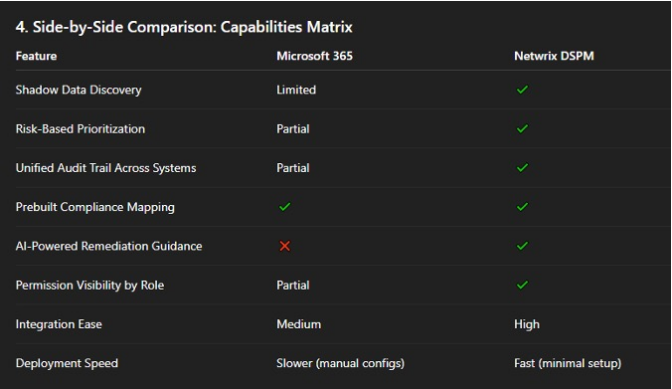
While Microsoft 365 provides a strong foundation, particularly in compliance mapping and basic access governance, it does not natively support shadow data discovery, remediation workflows, or unified visibility across systems. Netwrix DSPM closes these gaps with sharper insight, risk-based prioritization, and AI-powered remediation.
Real-world scenarios: Where Netwrix goes further
There are real-world cases where security teams need more visibility, context, and automation than what Microsoft 365 built-in tools can offer.
Catching over-permissioned users with no activity history
In many organizations, users accumulate permissions over time. Microsoft 365 can show access information but doesn't evaluate whether those permissions are justified. Netwrix DSPM correlates access rights with actual activity history. If a user hasn't accessed sensitive data they're permitted to view, the system flags it as unnecessary risk and can remove the permission or mark it for review.
Automated responses to brute-force attempts in Microsoft 365
Microsoft 365 can detect suspicious sign-in attempts, but response actions require manual follow-up. Netwrix DSPM takes this further on detecting repeated failed login attempts, the platform can trigger automated remediation: temporarily disabling accounts, revoking excessive privileges, revoking risky access tokens, modifying group memberships, and alerting security teams with context.
Uncovering forgotten or unlabeled sensitive data in SharePoint and Teams
As Teams channels and SharePoint libraries grow, sensitive information can be misplaced, duplicated, or stored without proper labeling. Netwrix DSPM continuously scans the environment to detect sensitive data stored without labels, files shared more broadly than intended, and content living in unmanaged sites. Once discovered, it can automatically apply appropriate labels, restrict access, and notify data owners.
Integration synergy: Enhancing Microsoft 365, not replacing it
Netwrix DSPM isn't an alternative to Microsoft 365's built-in security tools. Instead, it strengthens them. Many organizations have already invested in Microsoft Entra ID, Purview, and Defender, and Netwrix builds on that foundation by adding insight, automation, and context.
How Netwrix works seamlessly with Microsoft Entra ID, Purview, and Defender
Netwrix DSPM integrates with Microsoft 365 security services to extend their capabilities:
- With Microsoft Entra ID, Netwrix adds richer identity context so teams understand who has access and whether that access is appropriate.
- With Purview, it enhances sensitivity labeling coverage by identifying unlabeled data and correcting inconsistencies.
- With Defender, it provides in-depth context for events, such as whether suspicious activity involved highly sensitive files or over-permissive sharing settings.
Bringing DSPM into existing security workflows
Netwrix DSPM fits into the workflows that IT and security teams already use. Alerts, insights, and remediation recommendations can feed into existing SIEM, SOAR, ticketing, or governance systems—providing a seamless experience without switching between multiple dashboards.
Supporting IT, security, and compliance teams with unified visibility
Netwrix DSPM provides a single, unified view across data, identities, permissions, and activity. IT teams get clarity on access and permissions; security teams get context-rich insights for faster threat detection; compliance teams can map data to regulatory frameworks and prove controls are working. With Netwrix Auditor's Interactive Search, you can retrieve historical activity data instantly to prove compliance decisions in seconds.
Use case spotlight: Rapid risk reduction in M365
A mid-sized public sector organization was struggling to keep up with data exposure risks in Microsoft 365. Even with native capabilities like Purview labels and Entra ID access controls, IT teams lacked visibility into where sensitive files were stored, who had access, and which permissions were no longer necessary.
Following evaluation and proof-of-concept, the organization adopted Netwrix DSPM. Within the first week, the software automatically identified over-permissioned accounts, unlabeled records, and external sharing links that were still active long after their intended use.
The impact was measurable:
- Audit preparation time dropped by nearly 50%
- Security teams resolved high-risk exposures within hours instead of weeks
- Dormant access and unused permissions were greatly reduced
- Incident response became proactive rather than reactive
Netwrix DSPM didn't replace the security layer that Microsoft 365 provides. It complemented it, strengthened it, and made the environment safer.
Choosing the right tool for Microsoft 365 data security
Microsoft 365's built-in security tools are sufficient for smaller environments with defined data flows, limited external sharing, and simple compliance requirements. But as organizations grow, risks move below the surface. Collaboration becomes dynamic, permissions expand, external access increases, and sensitive data becomes harder to trace.
To determine whether Netwrix DSPM aligns with your Microsoft 365 security needs, use this quick checklist:
- Do you struggle to locate all sensitive data across Microsoft 365?
- Are permissions difficult to track or frequently become excessive?
- Do audits require manual effort across multiple portals?
- Is remediation slow or reliant on custom scripts?
- Do you need visibility beyond Microsoft 365 (on-prem, hybrid)?
If you checked several of these, Netwrix DSPM is likely a strong fit. Request a personalized demo to see it in action.
Final thoughts: From baseline to advanced security
For advanced security in hybrid environments, organizations need a layered DSPM approach. Netwrix provides continuous visibility, risk assessment, and automated protection that empowers organizations to move from a simple Microsoft 365 security baseline to proactive data security.
Leading analysts, including Gartner and KuppingerCole, have recognized Netwrix for its capabilities in securing sensitive data and managing risk across complex IT environments. Netwrix has been recognized in the Gartner Magic Quadrant for Privileged Access Management for four consecutive years (2022-2025), and in 2025 was named an Overall Leader in the KuppingerCole Data Security Platforms Leadership Compass.
FAQs
Share on
Learn More
About the author

Jennifer Taufan
Solutions Engineer
Jennifer is a Solutions Engineer at Netwrix, where she partners with organizations to address their data security needs. Prior to joining Netwrix, she worked in healthcare IT alongside major healthcare organizations to optimize their reporting solutions. At Netwrix, she continues to ensure organizations can secure their data and meet regulatory requirements.