
Come ottenere un report dei permessi NTFS
Auditing nativo
- Apri il Powershell ISE.
- Esegui lo script seguente, modificando i campi “OutFile” e “RootPath”:
      $OutFile = "C:\Temp\Permissions.csv" # Insert folder path where you want to save your file and its name
$RootPath = "\\Pdc\Shared" # Insert your share directory path
$Header = "Folder Path,IdentityReference,AccessControlType,IsInherited,InheritanceFlags,PropagationFlags"
# $Header = "Folder Path,IdentityReference,AccessControlType,IsInherited,InheritanceFlags,PropagationFlags,FilesystemRights"
$FileExist = Test-Path $OutFile
If ($FileExist -eq $True) {Del $OutFile}
Add-Content -Value $Header -Path $OutFile
$Folders = dir $RootPath -recurse | where {$_.psiscontainer -eq $True}
foreach ($Folder in $Folders){
$ACLs = get-acl $Folder.fullname | ForEach-Object { $_.Access }
Foreach ($ACL in $ACLs){
$OutInfo = $Folder.Fullname + "," + $ACL.IdentityReference + "," + $ACL.AccessControlType + "," + $ACL.IsInherited + "," + $ACL.InheritanceFlags + "," + $ACL.PropagationFlags
# If you need detailed file system rights in your report, add the following at the end of previous line:
# + "," + ($ACL.FileSystemRights -replace ',','/' )
Add-Content -Value $OutInfo -Path $OutFile
}}
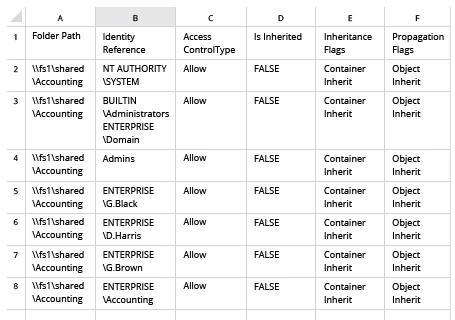
- Apri il file prodotto dallo script in Microsoft Excel:
Netwrix Auditor per Windows File Servers
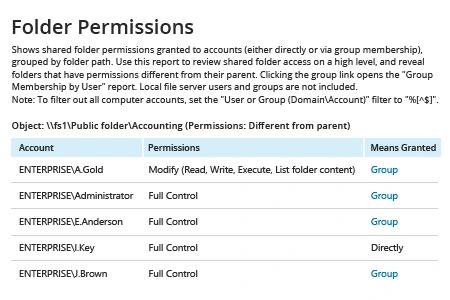
- Esegui Netwrix Auditor → Vai alla sezione “Reports” → Apri “File Servers” → Vai a “File Servers – State-in-Time” → Seleziona il rapporto “Folder Permissions”.
- Nel filtro "Object UNC Path", specificare il percorso della condivisione file (ad esempio, "\\Myserver\Myshare").
- Clicca su “Visualizza Rapporto”.
Per ricevere il rapporto via email regolarmente, clicca semplicemente sull'opzione "Iscriviti" e specifica il programma e i destinatari.
Condividi su