
Kerberos 위임의 목적
Kerberos 위임은 오래전부터 사용되어 왔습니다(정확히는 Windows Server 2000부터). 하지만 대체로 Active Directory를 다루는 엔지니어들은 Active Directory Kerberos 위임의 다양한 구현 방식, 그 용도, 그리고 악용될 수 있는 방법을 모두 잘 알고 있지 않습니다. 심지어 일부는 Kerberos 위임을 위임된 권한과 혼동하기도 합니다.
Kerberos 위임의 실질적인 용도는 애플리케이션이 다른 서버에 호스팅된 리소스에 액세스할 수 있도록 하는 것입니다. 예를 들어 웹 서버와 같은 애플리케이션이, 다른 곳에 호스팅된 웹사이트의 리소스(예: SQL 데이터베이스)에 액세스해야 하는 경우가 있습니다. 웹 서버를 실행하는 서비스 계정에 데이터베이스에 대한 액세스를 직접 부여하는 대신, 해당 서비스 계정을 SQL 서버 서비스에 위임되도록 허용할 수 있습니다. 사용자가 웹사이트에 로그인하면, 서비스 계정은 해당 사용자를 대신해 SQL 서버 서비스에 대한 액세스를 요청합니다. 이를 통해 사용자는 웹 서버의 서비스 계정 자체에 대한 별도의 액세스를 프로비저닝할 필요 없이, 자신에게 프로비저닝된 데이터베이스의 콘텐츠에 액세스할 수 있게 됩니다.
Kerberos 위임의 유형
수년간 Kerberos 위임은 여러 형태로 발전해 왔습니다. Windows Server 2000의 원래 구현은 무제한 위임(unconstrained delegation)입니다. 그 이후로 보안을 강화한 더 엄격한 버전의 위임이 등장했는데, 그가 바로 제한 위임(constrained delegation)과 리소스 기반 제한 위임(resource-based constrained delegation)입니다. 아래에서 각 위임 유형을 더 자세히 살펴보겠습니다.
컴퓨터 또는 사용자 계정에서 위임을 구성하려면 아래와 같이 Active Directory Users and Computers 의 Delegation 탭을 사용합니다. 사용자 계정에는 servicePrincipalName (SPN)이 설정되어 있어야 합니다.
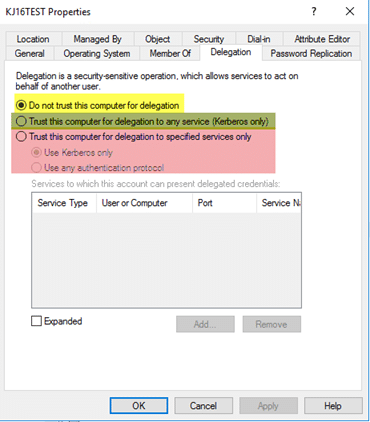
그림 1. Active Directory Users and Computers의 위임(Delegation) 탭
첫 번째 옵션(노란색)은 계정을 구성하여 위임(delegation)용으로 신뢰될 수 없도록 합니다. 이는 위임에 절대 사용되어서는 안 되는 민감하거나 관리용 계정에 가장 흔히 사용됩니다. 두 번째 옵션(초록색)은 계정을 무제한 위임(unconstrained delegation)용으로 구성할 수 있게 합니다. 세 번째 옵션(빨간색)은 계정을 제한 위임(constrained delegation)용으로 구성할 수 있게 합니다.
무제한 위임(Unconstrained Delegation)
이것은 위임(Delegation)의 원래 구현 방식이며, 또한 가장 보안이 취약합니다. 그럼 무제한 위임(unconstrained delegation)이 실제로 무엇을 하는 걸까요? 내부적으로는 무제한 위임이 구성되면 해당 개체의 userAccountControl 속성이 업데이트되어 “TRUSTED_FOR_DELEGATION” 플래그가 포함됩니다. 무제한 위임이 구성된 호스트에 개체가 인증되면, 해당 계정의 티켓-그랜팅 티켓(ticket-granting ticket, TGT)이 메모리에 저장됩니다. 이렇게 하면 필요할 때 무제한 위임이 구성된 호스트가 나중에 해당 사용자를 가장(impersonate)할 수 있습니다.
예를 들어, 특권 계정이 무제한 위임이 구성된 호스트에 인증하는 상황을 생각해 봅시다. 그 계정은 해당 특권 사용자로서 도메인 내에서 구성된 어떤 서비스든지에 접근할 수 있습니다. 한 단계 더 나아가서, 특권 계정이 자동으로 사용자의 호스트에 인증하도록 강제하는 방법이 있다면 어떻게 될까요? “프린터 버그(printer bug)”를 사용하면 도메인 컨트롤러가 사용자의 호스트에 인증하게 만들 수 있고, 그 계정의 TGT가 메모리에 남게 됩니다.
“프린터 버그(printer bug)” 같은 메커니즘이 존재하기 때문에, 무제한 위임(unconstrained delegation)은 보안상 매우 취약하며 가능하다면 사용하지 않아야 합니다. 한 가지 주의할 점은 도메인 컨트롤러가 기본적으로 무제한 위임으로 구성된다는 것입니다. 다만 도메인 컨트롤러는 서비스만 호스팅하는 임의의 애플리케이션 서버보다 훨씬 더 안전해야 하므로, 일반적으로 문제가 되지 않을 것입니다.
제한된 위임
Windows Server 2003에서 도입된 제한된 위임(constrained delegation)을 사용하면 계정이 위임될 수 있는 서비스가 무엇인지 구성할 수 있습니다. 이론적으로, 계정이 손상(침해)되더라도 잠재적 노출을 제한할 수 있습니다.
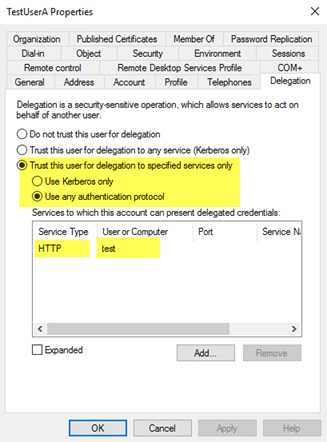
그림 2. TestUserA는 HTTP/test 서비스에 위임될 수 있습니다.
제한된 위임(constrained delegation)에서 한 가지 주의할 제한 사항은 포리스트 간(cross-forest)에는 작동하지 않는다는 점입니다.
계정에 제한 위임(Constrained Delegation)이 설정되면 내부적으로 두 가지가 발생합니다:
- 해당 개체의 userAccountControl 속성이 “TRUSTED_TO_AUTHENTICATE_FOR_DELEGATION” 플래그와 함께 업데이트됩니다.
- msDS-AllowedToDelegateTo 속성은 위임 탭에서 구성한 SPN으로 채워집니다.
제한 위임(constrained delegation)을 악용하는 것은 무제한 위임(unconstrained delegation)을 악용하는 것과 다릅니다. 악용되는 일반적인 방법 중 하나는 공격자가 제한 위임이 설정된 사용자 계정의 평문 비밀번호 또는 NTLM 해시를 손상(탈취)할 수 있는 경우입니다. Kekeo 같은 도구를 사용하면, 해당 비밀번호를 알고 있는 계정에 대해 TGT를 요청하고, (사용자가 ‘Sensitive’로 표시되어 있지 않은 한) 어떤 사용자에 대해서도 TGS 요청을 실행한 뒤 티켓을 주입하고 그 사용자로 요청한 서비스에 액세스할 수 있습니다.
리소스 기반 제한 위임(Resource-Based Constrained Delegation)
Windows Server 2012에 도입된 리소스 기반 제약 위임(resource-based constrained delegation)은 제약 위임을 구성하는 방식을 바꾸며, 신뢰 관계 전반에서도 작동합니다. 어떤 개체가 어떤 서비스에 위임할 수 있는지 지정하는 대신, 서비스를 호스팅하는 리소스가 자신에게 위임할 수 있는 개체를 지정합니다. 관리 관점에서는 이를 통해 리소스 소유자가 해당 리소스에 접근할 수 있는 대상을 제어할 수 있습니다. 예를 들어, 제약 위임을 사용해 WebServer 서비스 계정이 데이터베이스에 액세스하기 위해 SQL Service에 위임할 수 있다고 지정하는 대신, SQL 서버 서비스 계정에서 WebServer 서비스 계정이 자신에 대한 위임 액세스 권한을 갖고 있다는 것을 지정할 수 있습니다.
리소스 기반 제약 위임은 대상 리소스에서 msDS-AllowedToActOnBehalfOfOtherIdentity 속성을, 이를 위임할 수 있도록 허용된 개체의 SID로 채워 구성합니다. 리소스 기반 제약 위임을 구성하려면 PowerShell을 사용해야 합니다. Active Directory Users and Computers에는 GUI 구성 요소가 없으며, Attribute Editor 페이지에서는 이 속성을 수동으로 수정할 수 없습니다.
리소스 기반 제약 위임(Resource-Based Constrained Delegation)과 이를 악용하는 방법에 대해 더 알아볼 수 있습니다 여기.
기존 Kerberos 위임 식별
이제 다양한 유형의 위임에 대한 기본 사항과 그것이 악용될 수 있는 몇 가지 방법을 이해하셨으니, 여러분의 환경에 이미 구성되어 있는 위임 유형이 무엇인지 머릿속에 정리할 수 있는 방법을 공유하고자 합니다. 특히 도메인 컨트롤러가 아닌 다른 개체에 무제한 위임(unconstrained delegation)이 구성되어 있는 경우처럼, 안전하지 않은 시나리오를 강조해 살펴보겠습니다.
다음은 Microsoft Technet 갤러리에 원래 게시되었던 스크립트로, 무제한 위임(unconstrained), 제한 위임(constrained), 그리고 리소스 기반 제한 위임(resource-based constrained)으로 구성된 계정을 식별합니다. 이 스크립트가 나열하는 구성에 대한 정보와 잠재적인 경고 사항을 강조 표시합니다:
<#.Synopsis Search the domain for accounts with Kerberos Delegation..DESCRIPTION Kerberos Delegation is a security sensitive configuration. Especially full (unconstrained) delegation has significant impact: any service that is configured with full delegation can take any account that authenticates to it, and impersonate that account for any other network service that it likes. So, if a Domain Admin were to use that service, the service in turn could read the hash of KRBRTG and immediately effectuate a golden ticket. Etc :) This script searches AD for regular forms of delegation: full, constrained, and resource based. It dumps the account names with relevant information (flags) and adds a comment field for special cases. The output is a PSObject that you can use for further analysis. Note regarding resource based delegation: the script dumps the target services, not the actual service doing the delegation. I did not bother to parse that out. Main takeaway: chase all services with unconstrained delegation. If these are _not_ DC accounts, reconfigure them with constrained delegation, OR claim them als DCs from a security perspective. Meaning, that the AD team manages the service and the servers it runs on..EXAMPLE .Search-KerbDelegatedAccounts.ps1 | out-gridview.EXAMPLE .Search-KerbDelegatedAccounts.ps1 -DN "ou=myOU,dc=sol,dc=local".NOTES Version: 0.1 : first version. 0.2 : expanded LDAP filter and comment field. Author: Willem Kasdorp, Microsoft. Creation Date: 1/10/2016 Last modified: 4/11/2017#>[CmdletBinding()]Param( # start the search at this DN. Default is to search all of the domain. [string]$DN = (Get-ADDomain).DistinguishedName)$SERVER_TRUST_ACCOUNT = 0x2000$TRUSTED_FOR_DELEGATION = 0x80000$TRUSTED_TO_AUTH_FOR_DELEGATION= 0x1000000$PARTIAL_SECRETS_ACCOUNT = 0x4000000 $bitmask = $TRUSTED_FOR_DELEGATION -bor $TRUSTED_TO_AUTH_FOR_DELEGATION -bor $PARTIAL_SECRETS_ACCOUNT# LDAP filter to find all accounts having some form of delegation.# 1.2.840.113556.1.4.804 is an OR query.$filter = @"(& (servicePrincipalname=*) (| (msDS-AllowedToActOnBehalfOfOtherIdentity=*) (msDS-AllowedToDelegateTo=*) (UserAccountControl:1.2.840.113556.1.4.804:=$bitmask) ) (| (objectcategory=computer) (objectcategory=person) (objectcategory=msDS-GroupManagedServiceAccount) (objectcategory=msDS-ManagedServiceAccount) ))"@ -replace "[sn]", ''$propertylist = @( "servicePrincipalname", "useraccountcontrol", "samaccountname", "msDS-AllowedToDelegateTo", "msDS-AllowedToActOnBehalfOfOtherIdentity")Get-ADObject -LDAPFilter $filter -SearchBase $DN -SearchScope Subtree -Properties $propertylist -PipelineVariable account | ForEach-Object { $isDC = ($account.useraccountcontrol -band $SERVER_TRUST_ACCOUNT) -ne 0 $fullDelegation = ($account.useraccountcontrol -band $TRUSTED_FOR_DELEGATION) -ne 0 $constrainedDelegation = ($account.'msDS-AllowedToDelegateTo').count -gt 0 $isRODC = ($account.useraccountcontrol -band $PARTIAL_SECRETS_ACCOUNT) -ne 0 $resourceDelegation = $account.'msDS-AllowedToActOnBehalfOfOtherIdentity' -ne $null $comment = "" if ((-not $isDC) -and $fullDelegation) { $comment += "WARNING: full delegation to non-DC is not recommended!; " } if ($isRODC) { $comment += "WARNING: investigation needed if this is not a real RODC; " } if ($resourceDelegation) { # to count it using PS, we need the object type to select the correct function... broken, but there we are. $comment += "INFO: Account allows delegation FROM other server(s); " } if ($constrainedDelegation) { $comment += "INFO: constrained delegation service count: $(($account.'msDS-AllowedToDelegateTo').count); " } [PSCustomobject] @{ samaccountname = $account.samaccountname objectClass = $account.objectclass uac = ('{0:x}' -f $account.useraccountcontrol) isDC = $isDC isRODC = $isRODC fullDelegation = $fullDelegation constrainedDelegation = $constrainedDelegation resourceDelegation = $resourceDelegation comment = $comment }}
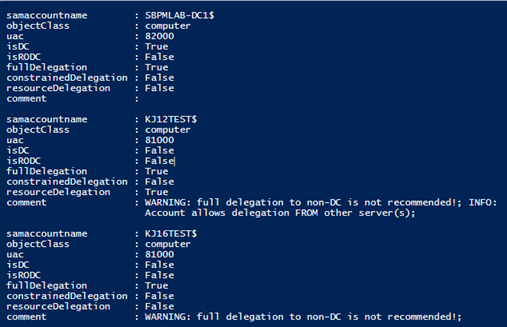
그림 3. 문제 있는 위임을 식별하기 위한 샘플 스크립트
Netwrix가 도와드릴 수 있는 방법
Netwrix Active Directory security solution 를 통해 Active Directory를 처음부터 끝까지 안전하게 보호할 수 있습니다. 다음을 수행할 수 있습니다:
- Active Directory에서 취약점을 식별하고 완화하세요. 과도한 권한, “shadow” 관리자, 오래된 계정, 약한 비밀번호 등.
- AD 구성과 권한을 제어하고 강력한 비밀번호 정책을 적용하여 자격 증명 탈취를 방지합니다.
- 고급 위협까지도 탐지하여, 공격자가 임무를 완수하기 전에 행동을 멈추게 하세요.
- 자동화된 대응 조치로 보안 침해를 즉시 차단하여 비즈니스에 미치는 피해를 최소화하세요.
- 악의적이거나 부적절한 변경 사항을 최소한의 중단 시간으로 되돌리거나 복구하세요.
공유하기
더 알아보기
저자 소개

Kevin Joyce
제품 관리 책임자
Netwrix의 제품 관리( Product Management ) 책임자입니다. Kevin은 사이버 보안에 대한 열정이 있으며, 특히 공격자들이 조직 환경을 악용하기 위해 사용하는 전술과 기술을 이해하는 데 집중합니다. Active Directory 및 Windows 보안에 초점을 맞춰 제품 관리 분야에서 8년의 경험을 쌓아, 조직이 Identity, 인프라 및 데이터를 보호할 수 있도록 솔루션을 구축하는 데 그 열정을 더했습니다.