
기본(네이티브) 감사
- "사이트 설정(Site Settings)"으로 이동 → "사이트 컬렉션 관리(Site Collection Administration)"를 클릭 → "사이트 컬렉션 기능(Site collection features)"으로 이동 → "보고(Reporting)"를 선택 → "활성화(Activate)"를 클릭하세요.
- "Site Settings"로 이동 → "Site Collection Administration"을 클릭 → "Site collection audit settings"로 이동 → "List Libraries and Sites" 설정에서 감사할 수 있도록 "Editing Users and Permissions" 이벤트를 선택하세요.
- "Site Settings"로 이동 → "Site Collection Administration"을 클릭 → "Site collection audit settings"로 이동 → "Automatically trim the audit log for this site?"를 "Yes"로 설정 → 절단(보관) 범위 시간 설정(기본값은 30일) → 절단하기 전에 로그를 저장할 위치를 설정 → "OK"를 클릭합니다.
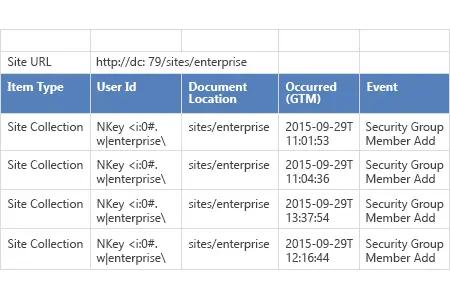
- "Site Settings"로 이동 → "Site Collection Administration"을 클릭 → "Audit log reports"로 이동 → "Security Settings" 보고서를 선택하여 SharePoint 환경에서 발생한 모든 권한 변경 사항을 확인하세요.
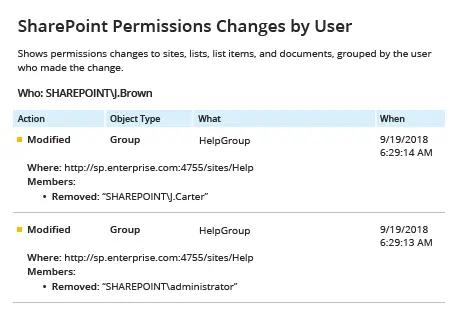
Netwrix Auditor for SharePoint
- Netwrix Auditor 실행 → "Reports"로 이동 → "SharePoint" 섹션을 확장 → "SharePoint Permissions Changes by User"를 선택 → "View"를 클릭합니다.
- 보고서를 저장하려면 "Export" 버튼을 클릭한 다음 → 드롭다운 메뉴에서 형식을 선택하고 → "Save"를 클릭하세요.
공유하기