
Netwrix Auditor for Exchange
Netwrix Auditor 실행 → "Reports" 클릭 → Exchange Online 선택 → State-in-Time Reports → " Mailbox Non-Owner Permission Details" 선택 → "View" 클릭.
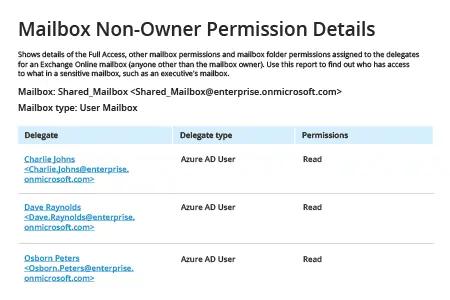
기본 솔루션
1. 관리자 권한으로 PowerShell ISE를 실행한 다음 다음 명령을 실행하여 Office 365 PowerShell에 연결하세요:
Set-ExecutionPolicy RemoteSigned
2. 다음 명령을 실행하여 Windows PowerShell 자격 증명을 요청합니다:
$Cred = Get-Credential
계정과 비밀번호를 입력한 다음 확인(OK)을 클릭합니다.
3. 다음 명령을 사용해 세션을 만들되, Exchange Online 위치에 따라 –ConnectionUri 매개변수를 수정합니다:
$Session = New-PSSession -ConfigurationName Microsoft.Exchange -ConnectionUri https://outlook.office365.com/PowerShell-liveid/ -Credential$Cred -Authentication Basic –AllowRedirection
4. Exchange Online에 연결:
Import-PSSession$Session -DisableNameChecking
5. 사용자 권한 보고서를 생성하려면 다음 중 하나를 수행합니다:
- 사용자 권한에 대한 전체 요약을 보려면 다음 Get-Mailbox 명령을 사용하세요:
Get-Mailbox -resultsize unlimited | Get-MailboxPermission | Select Identity, User, Deny, AccessRights, IsInherited| Export-Csv -Path "c:\temp\mailboxpermissions.csv" –NoTypeInformation
- 특정 사용자의 보고서가 필요하면 -identity 매개 변수를 대신 사용하세요: -resultsize unlimited.
- 전체 액세스 권한이 있는 사용자를 필터링하려면 다음 매개 변수를 사용하세요: where {($_.accessrights -contains "FullAccess")}:
Get-Mailbox -resultsize unlimited | Get-MailboxPermission| where {($_.accessrights -contains "Fullaccess")} | Select AccessRights,Deny,InheritanceType,User,Identity,IsInherited | Export-Csv -Path "c:\temp\fullaccess.csv" -NoTypeInformation
- 기본적으로 비(非)소유자 액세스를 포함해 사용자 전체 목록을 가져옵니다. 직접 사용자 권한에 대한 정보만 얻으려면 다음 중 하나를 사용하세요: {($_.user -ne "NT AUTHORITY\SELF")} 또는 {($_.user -like '*@*')}:
Get-Mailbox -resultsize unlimited | Get-MailboxPermission | Select Identity, User, Deny, AccessRights, IsInherited| Where {($_.user -ne "NT AUTHORITY\SELF")}| Export-Csv -Path "c:\temp\NonOwnerPermissions.csv" -NoTypeInformation
- “Send As” 권한에 대한 정보를 보려면 Get-RecipientPermission cmdlet을 사용하세요:
Get-Mailbox -resultsize unlimited | Get-RecipientPermission| where {($_.trustee -ne "NT AUTHORITY\SELF")}|select Identity,Trustee,AccessControlType,AccessRights,IsInherited | Export-Csv -Path "c:\temp\sendaspermissions.csv" –NoTypeInformation
- “Send on Behalf” 권한이 있는 사서함을 보고하려면 다음 스크립트를 사용하십시오:
      $GrantSendOn= Get-Mailbox-resultsize unlimited| where {($_.GrantSendOnBehalfTo -ne "")}

$Out=foreach ($user in $GrantSendOn.GrantSendOnBehalfTo) {

$obj= New-Object System.Object

$obj|Add-MemberNoteProperty eMail$GrantSendOn.WindowsEmailAddress

$obj|Add-Member NoteProperty DisplayName $GrantSendOn.DisplayName

$obj|Add-Member NoteProperty User $user

$obj }

$Out| Export-Csv -Path "c:\temp\sendonbehalfpermissions.csv" –NoTypeInformation
6. 보고서를 검토:
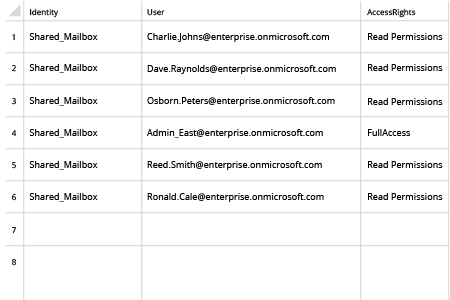
7. 다음 명령을 사용하여 세션을 종료하십시오:
Remove-PSSession$Session
공유하기