
Netwrix Auditor for Active Directory
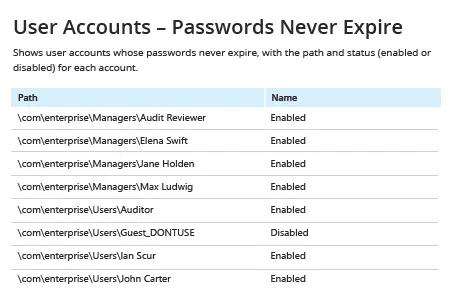
- Netwrix Auditor를 실행하세요 → “Reports”로 이동합니다 → “Active Directory”를 엽니다 → “Active Directory - State-in-Time”로 이동합니다 → “User Accounts – Passwords Never Expire”를 선택합니다 → “View”를 클릭하세요.
- 이메일로 보고서를 정기적으로 받으려면 “Subscribe” 버튼을 클릭하고 원하는 일정을 선택하세요.
네이티브 감사
- PowerShell ISE를 열고 → 다음 코드를 사용해 새 스크립트를 만든 다음 실행하되, 내보낼 경로를 지정합니다:
      # Import the AD module to the session

Import-Module ActiveDirectory

#Search for the users and export report

get-aduser -filter * -properties Name, PasswordNeverExpires | where {
$_.passwordNeverExpires -eq "true" } | Select-Object DistinguishedName,Name,Enabled |
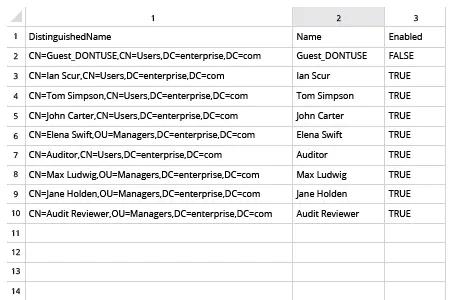
Export-csv c:\data\pw_never_expires.csv -NoTypeInformation
- 스크립트가 생성한 파일을 MS Excel에서 엽니다.
공유하기