
네이티브 감사
- 컴퓨터 목록을 포함한 파일을 만드세요.
- Powershell ISE를 열고 → 다음 스크립트를 실행한 다음, 내보내기에 사용할 파일 이름과 경로를 조정하세요:
      $computers = Get-Content -Path C:\data\computers.txt Get-WmiObject -ComputerName $computers -Class Win32_UserAccount -Filter "LocalAccount='True'" |
Select PSComputername, Name, Status, Disabled, AccountType, Lockout, PasswordRequired, PasswordChangeable, SID | Export-csv C:\data\local_users.csv -NoTypeInformation
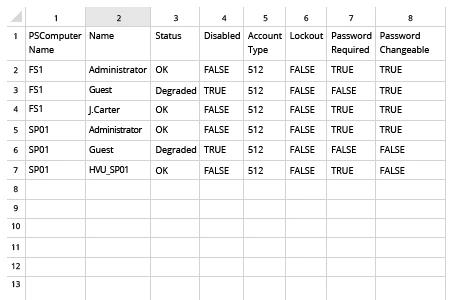
- 스크립트로 생성된 파일을 MS Excel에서 엽니다.
Netwrix Auditor for Windows Server
- Netwrix Auditor를 실행한 다음 → "Reports"로 이동 → "Windows Server" 섹션을 확장 → "Windows Server – State-in-Time"로 이동 → "Local Users and Groups"를 선택 → "View"를 클릭합니다.
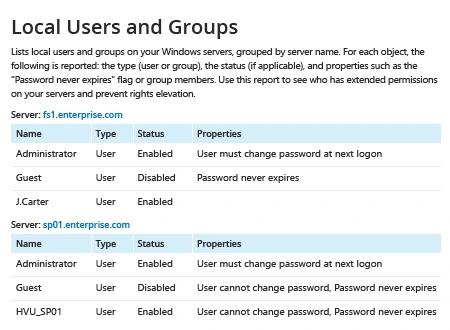
- 보고서를 저장하려면 "Export" 버튼을 클릭 → 드롭다운 메뉴에서 형식을 선택 → "Save"를 클릭하세요.
공유하기