
네이티브 감사
- PowerShell ISE를 열고 → 다음 cmdlet을 실행하여 Microsoft SharePoint용 PowerShell 스냅인을 가져옵니다:
Add-PSSnapin Microsoft.SharePoint.PowerShell
- SharePoint 서버에서 다음 스크립트를 실행하되, SharePoint 사이트 URL($SPSiteURL)과 CSV로 내보낼 파일 경로($ExportFile)를 지정하십시오:
      [void][System.Reflection.Assembly]::LoadWithPartialName
("Microsoft.SharePoint")
$SPSiteUrl = "http://sharepoint/sites/ent"
$SPSite = New-Object Microsoft.SharePoint.SPSite($SPSiteUrl);
$ExportFile = "C:\root\Permissions.csv"
"Web Title,Web URL,List Title,User or Group,Role,Inherited" | out-file $ExportFile
foreach ($WebPath in $SPSite.AllWebs)
{
if ($WebPath.HasUniqueRoleAssignments)
{
$SPRoles = $WebPath.RoleAssignments;
foreach ($SPRole in $SPRoles)
{
foreach ($SPRoleDefinition in $SPRole.RoleDefinitionBindings)
{
$WebPath.Title + "," + $WebPath.Url + "," + "N/A" + "," +
$SPRole.Member.Name + "," + $SPRoleDefinition.Name + "," +
$WebPath.HasUniqueRoleAssignments | out-file $ExportFile -append
}
}
}
foreach ($List in $WebPath.Lists)
{
if ($List.HasUniqueRoleAssignments)
{
$SPRoles = $List.RoleAssignments;
foreach ($SPRole in $SPRoles)
{
foreach ($SPRoleDefinition in $SPRole.RoleDefinitionBindings)
{
$WebPath.Title + "," + $WebPath.Url + "," + $List.Title + "," +
$SPRole.Member.Name + "," + $SPRoleDefinition.Name | out-file $ExportFile -append
}
}
}
}
}
$SPSite.Dispose();
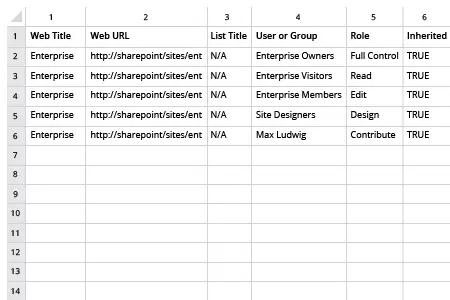
- 스크립트에서 생성된 파일을 MS Excel에서 여십시오.
샘플 보고서:
Netwrix Auditor for SharePoint
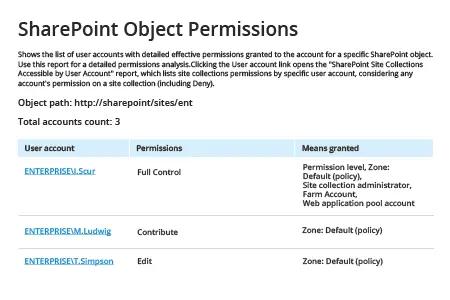
- Netwrix Auditor를 실행합니다 → “Reports”로 이동합니다 → “SharePoint” 섹션을 확장합니다 → “SharePoint – State-in-Time”로 이동합니다 → “SharePoint Object Permissions”를 선택합니다 → “View”를 클릭합니다.
- “Object Path”를 지정하고 “Permissions”를 “(Select All)”로 설정합니다.
- 보고서를 CSV 또는 다른 형식으로 내보내려면 → “Export” 버튼을 클릭합니다 → 드롭다운 메뉴에서 형식을 선택합니다 → “Save”를 클릭합니다.
예시 보고서:
공유하기