
만료되기 전에 사용자에게 비밀번호를 변경하라고 알리는 방법
기본(네이티브) 솔루션 vs. Netwrix Auditor for Active Directory
Netwrix Auditor for Active Directory
- Netwrix Password Expiration Notifier를 실행합니다 → 도메인을 선택합니다 → “Edit”를 클릭합니다 → “Enable password expiration alerting”를 클릭합니다 → “Save”를 클릭합니다.
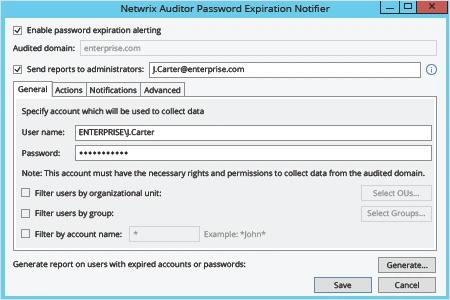
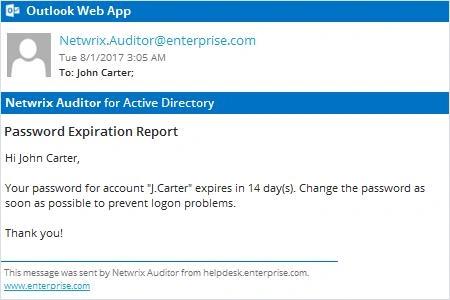
Netwrix Auditor는 비밀번호가 곧 만료될 각 계정 소유자에게 Active Directory 비밀번호 만료 알림 이메일을 자동으로 전송합니다.
네이티브 감사
- PowerShell ISE를 사용하여 다음 스크립트를 복사, 수정한 후 저장하세요:
      #requires -module ActiveDirectory

<#
.SYNOPSIS
Script will scan Active Directory for accounts with expiring passwords

.DESCRIPTION
Script will scan Active Directory for accounts with expiring passwords and will send customized email to users

.PARAMETER Domain
.PARAMETER specifies which domain search will be performed against

.PARAMETER Cred
The PS credential to use to query AD (if not using the logged in credential)

.PARAMETER SearchBase
The OU path to search for user accounts in

.PARAMETER PasswordExpirationThreshold
Specifies accounts where this value exceeded will be emailed

.PARAMETER Subject
Which subject shall be put into email

.PARAMETER From
Which address shall be used as a FROM field in Email

.PARAMETER EmailServerAddress
SMTP relay address

.PARAMETER FailoverEmail
Emails address where all errors will be sent to

.PARAMETER LogFilePath
The path to where the informational log file is generated by this script.
#>

[CmdletBinding()]
Param(
[string]$Domain = $env:USERDNSDOMAIN,
[PSCredential]$cred,
[string]$SearchBase,
[string]$UserSearchString = '*',
[int]$PasswordExpirationThreshold = 14,
[string]$Subject = "Password Expiration Notification",
[string]$From = "J.Carter@enterprise.com",
[string]$EmailServerAddress = "mail.enterprise.com",
[string]$FailoverEmail = "J.Carter@enterprise.com",
[string]$LogFilePath = 'D:\Temp\ServiceAccountExpirations.log'
)

begin {
function Write-Log($Message) {
$MyDateTime = Get-Date -Format 'MM-dd-yyyy H:mm:ss'
Add-Content -Path $LogFilePath -Value "$MyDateTime - $Message"
}
try {
$MaxPasswordAge = (Get-ADDefaultDomainPasswordPolicy -Server $Domain).MaxPasswordAge.Days
Write-Log -Message "The max password age for the $Domain domain is $MaxPasswordAge"
if ($PasswordExpirationThreshold -gt $MaxPasswordAge) {
throw "The value '$PasswordExpirationThreshold' specified as the password expiration threshold is greater than the max password age for the domain" }

[string]$EmailTemplate = @'
<html> <body> <font SIZE="6" COLOR="#ff0000"> <p ALIGN="CENTER" style='font-size:20.0pt;font-family:"Times New Roman";color:#CC0000;mso-bidi-font-weight: bold'>Password Expiration Notice</p> </font><font style='font-size:14.0pt;font-family:"Times New Roman";color:#1C1C1C;mso-bidi-font-weight:bold'> <p>Dear $FirstName $LastName,</p> <p>Your password in <U> $domain </U> domain will expire in $DaysBeforeExpiration days. Please change it as soon as possible to make sure your account does not get locked out. To change your password press CTRL+ALT+DEL and select "Change Password". </p> <p>Please review the guidelines below as they are necessary for successfully updating your password.</p> <p>PASSWORD MUST:</p> <dir> <p>Be at least 8 total characters</p> <p>Contain at least one uppercase character</p> <p>Contain at least one numeral</p> <p>Not be the same or similar to the last 5 used passwords</p> <p>Be used for at least 24 hours before changing again</p> </dir> <p></p> <p>If you enter an incorrect password 5 or more times, your account will be locked and you will need to contact the Help Desk for assistance. </p> </font><font SIZE="4" style='font-size:13.0pt;font-family:"Times New Roman";color:#CC0000'> <p ALIGN="CENTER">*** Please do not respond to this e-mail. <BR>Direct any questions or concerns regarding this issue to the IT Help Desk. <BR> For information on how to contact the Help Desk, please visit </font> <a HREF="http://helpdesk.enterprise.com"> <font SIZE="4" COLOR="#0000ff"><u> http://helpdesk.enterprise.com/ </u></font> </dir> </font></b> </body> </html>
'@
} catch {
Write-Log -Message $_.Exception.Message
exit
}
}
process {
try {
$GetAdUserParams = @{
'Filter' = { (Enabled -eq $True) -and (PasswordNeverExpires -eq $false) -and (samAccountName -like $UserSearchString)}
'Properties' = 'PasswordLastSet', 'PasswordExpired', 'PasswordNeverExpires','EmailAddress'
}
if ($SearchBase) {
$GetAdUserParams.SearchBase = $SearchBase
}
if ($Cred) {
$GetAdUserParams.Credential = $cred
}
$Today = Get-Date
$Users = Get-ADUser @GetAdUserParams | Where-Object { $_.PasswordLastSet -and !$_.PasswordExpired }
Write-Log -Message "Found '$($Users.Count)' total expirable AD user accounts"
$ExpiringUsers = [System.Collections.ArrayList]@()
foreach ($User in $Users) {
$UserPwdExpireDate = $User.PasswordLastSet.AddDays($MaxPasswordAge)
$DaysUntilExpire = ($UserPwdExpireDate - $Today).Days
$FirstName = $User.GivenName
$LastName = $User.Surname
if ($DaysUntilExpire -le $PasswordExpirationThreshold) {
Write-Log -Message "The user $($User.samAccountName)'s password will expire in $DaysUntilExpire days"
$EmailBody = $EmailTemplate.Replace('$FirstName', $FirstName).Replace('$LastName', $LastName).Replace('$DaysBeforeExpiration', $DaysUntilExpire).Replace('$domain', $Domain)
Send-MailMessage -To $User.EmailAddress -From $From -Subject $Subject -BodyAsHtml $EmailBody -SmtpServer $EmailServerAddress -Priority High -UseSsl
$ExpiringUsers.Add($User) | Out-Null
}
}
Write-Log -Message "'$($ExpiringUsers.Count)' accounts found with expiring passwords within $PasswordExpirationThreshold days"
} catch {
Write-Log -Message "$($_.Exception.Message) - $($_.InvocationInfo.ScriptLineNumber)"
}
}
- 작업 스케줄러를 사용해 스크립트 실행을 자동화합니다.
자세히 알아보기: Netwrix Auditor for Active Directory
사용자에게 비밀번호 변경을 상기시켜 사용자 생산성을 극대화하고 헬프데스크 업무 부담을 줄이세요
많은 모범 사례에서는 내부자 및 외부자 위협으로부터 기업 데이터와 중요 시스템의 보안을 강화하기 위해 정기적인 비밀번호 변경을 요구합니다. 하지만 사용자가 비밀번호 변경 알림을 무시하거나(또는 알림을 전혀 받지 못하는 경우—예: 원격 근무 중인 경우) 만료된 비밀번호를 재설정하기 위해 헬프데스크 관리자만 기다려야 하므로 전반적인 생산성이 저하됩니다. 강력한 비밀번호 보안 정책을 유지하면서도 헬프데스크 업무 부담을 최소화하려면, IT 담당자는 사용자에게 비밀번호 만료를 더 효율적으로 알릴 수 있는 방법이 필요합니다.
Netwrix Auditor for Active Directory를 사용하면 IT 담당자가 Active Directory와 그룹 정책에서 실제로 어떤 일이 일어나고 있는지에 대해 완전한 가시성을 확보할 수 있습니다. 또한 만료되기 전에 사용자가 비밀번호를 변경하도록 상기시키는 알림 이메일을 보낼 수 있으며, IT 관리자는 알림을 비밀번호 만료까지 남은 정확한 일 수를 지정하도록 설정할 수도 있습니다. 더불어 IT 관리자는 비밀번호가 곧 만료되는 사용자 계정이 무엇인지 보여주는 요약 보고서를 받습니다. 이러한 알림과 보고서를 통해 IT 담당자는 사용자 또는 헬프데스크의 생산성을 희생하지 않으면서 보안을 강화할 수 있습니다.
공유하기