
DSPM vs DLP: differences and how to use both
Oct 24, 2026
DSPM vs DLP is a sequencing decision between knowing where sensitive data sits and controlling where it goes. Data security posture management (DSPM) discovers and classifies sensitive data and maps access to it, while data loss prevention (DLP) enforces policy as data moves, and each DLP rule is only as accurate as its classification. Teams without an inventory should start with DSPM, and teams with known leaking channels should start with DLP.
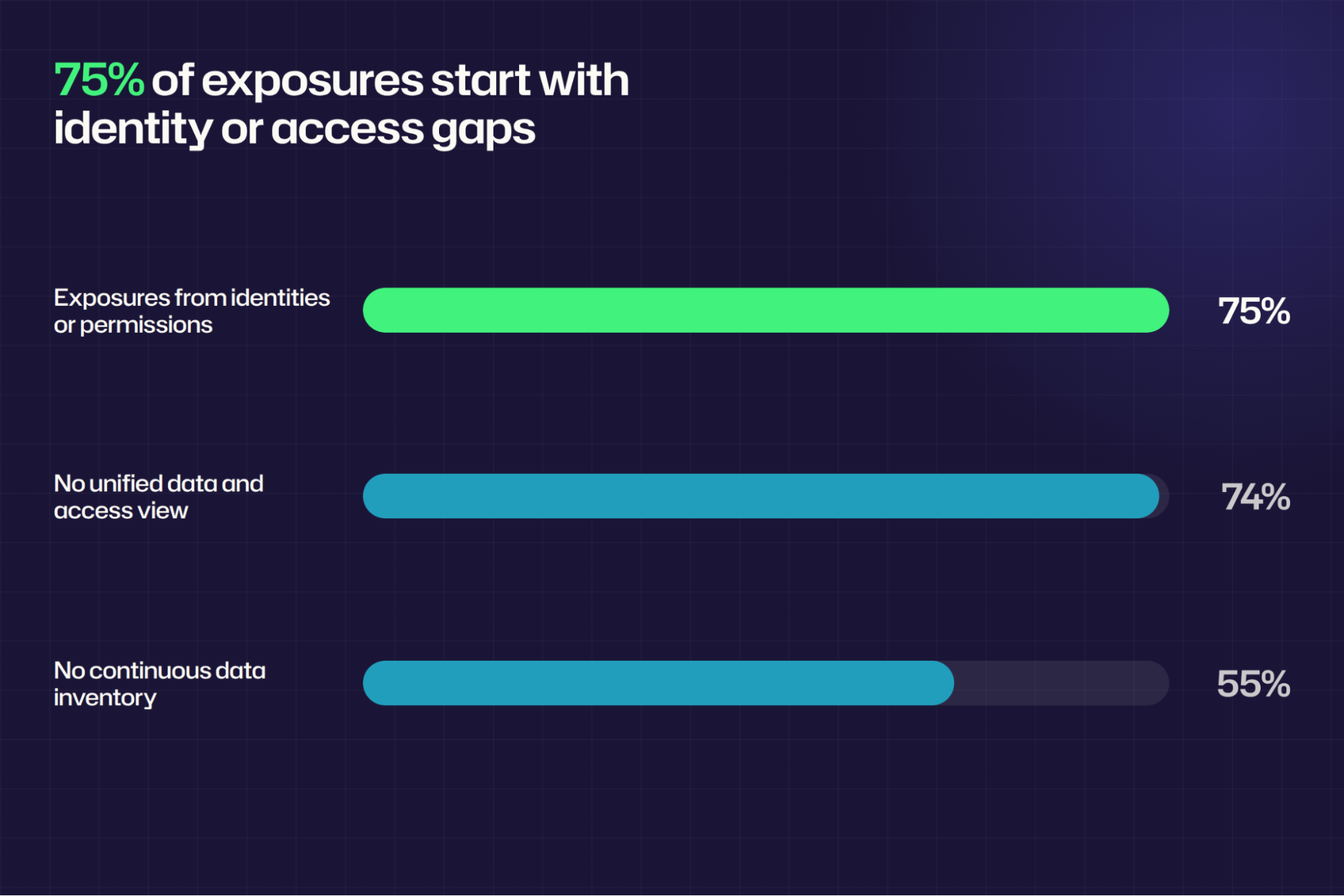
Most organizations can't answer the two questions a DLP policy depends on: where sensitive data sits and who can reach it. Of 2,317 IT and security professionals surveyed for the Netwrix 2026 Data and Identity Security Report, 74% don't have a single, unified view of sensitive data and which identities have access to it.
That visibility problem shapes the DSPM vs DLP decision. DLP enforces policy on content as it moves through monitored channels, and each rule assumes the team already knows what the data is.
DSPM produces the inventory and the access map behind those rules, and DLP stops the transfers. The two categories answer different questions, and the right order depends on which one a team can't answer today.
The table lines up DSPM and DLP on discovery, access, enforcement, and prioritization, the four questions where they diverge.
Question | DSPM | DLP |
|---|---|---|
|
Where does sensitive data sit? |
Discovers and classifies it across repositories |
Reports matches in the locations and channels it monitors |
|
Who can reach it? |
Maps permissions and identifies excessive or open access |
Evaluates the user and action at the moment of use |
|
What happens when someone moves it? |
Reports the exposure for cleanup at the source |
Warns, blocks, encrypts, quarantines, or logs |
|
Which risks need action first? |
Ranks exposure by sensitivity and access |
Ranks by policy-match alerts |
Following one file through the table shows how the two fit together. DSPM finds a spreadsheet of employee tax IDs saved to a team site, classifies it, shows that the whole department can open it, and ranks the site for cleanup.
DLP takes over when someone tries to email that spreadsheet outside the company, and it warns, blocks, or logs the attempt.
Why teams compare DSPM and DLP
DSPM and DLP both protect sensitive data, so they land on the same shortlist even though they act at different points in its life.
One budget line forces a choice
A team with room for one new control has to decide whether not knowing where sensitive data sits or not controlling where it goes costs more. DSPM answers the first question, and DLP answers the second, so the missing answer should decide the purchase.
Both categories depend on classification
DLP rules match content against sensitive information types, sensitivity labels, and other classifiers, so a rule's accuracy depends on the accuracy of the classification behind it. DSPM supplies that classification across repositories, which lets DLP rules target labeled content as well as patterns.
The Netwrix 2026 Data and Identity Security Report found that 55% of organizations don't continuously maintain a sensitive data inventory, so many DLP rules start without the inventory they assume.
AI tools raise both questions at once
Microsoft 365 Copilot draws on content the user can access, so oversharing becomes a data-access question that DSPM for Copilot readiness addresses before it becomes a transfer question.
Sensitive text typed or pasted into a chat tool becomes a transfer question that only an enforcement control can see. DSPM covers the first question, and DLP covers the second, making AI tool adoption the clearest case for needing both.
Netwrix DSPM discovers and classifies sensitive data across on-premises, hybrid, and cloud environments. Request a demo.
What is DSPM?
Data security posture management continuously discovers and classifies sensitive data, maps who and what can access it, and prioritizes exposure for remediation. It finds previously unknown data across on-premises data centers and cloud providers, classifies structured and unstructured data, and assesses access to show how exposed each repository is to privacy, security, and AI risks.
Key features of DSPM
- Continuous discovery: Finds sensitive data across on-premises data centers and cloud providers, including repositories with no policy, so the inventory reflects what exists.
- Automated classification: Labels structured and unstructured data by sensitivity, privacy, and compliance requirements at scale, which gives every later control the same definition of sensitive.
- Access mapping: Establishes who and what can reach each location, including through nested group membership, so standing access is visible before anything moves.
- Exposure prioritization: Ranks locations by sensitivity and standing access, so remediation targets the highest risk first.
- Remediation at the source: Points to overexposed shares and stale sensitive data that can be cleaned up before any rule fires.
What is DLP?
Data loss prevention is a set of controls that detect and block sensitive data from leaving through monitored channels such as endpoints, email, web uploads, and cloud apps. When content matches a policy, the control warns the user, blocks the action, encrypts the item, quarantines it, or logs the event.
Key features of DLP
- Multi-channel monitoring: Watches endpoints, email, web uploads, and cloud apps for sensitive content.
- Policy-based enforcement: Warns, blocks, encrypts, quarantines, or logs when content matches a rule, which stops data at the moment of transfer.
- Coverage across data states: Protects data in use, in motion, and at rest with endpoint, network, and storage actions, as NIST defines DLP.
- Granular scoping: Applies rules to specific channels, destinations, and data types, such as USB transfers, outbound email, browser uploads, and pastes into AI tools.
- Evidence of enforcement: Records each match and the action taken, which supports audit and reporting.
The difference between DSPM and DLP in four questions
DSPM starts from the data, and DLP starts from the policy.
Where does sensitive data sit?
DSPM crawls repositories whether or not anyone has written a policy for them and builds the inventory from what it finds. DLP reports what it finds in the locations and channels it monitors, so a repository outside every policy stays unseen.
Who can reach it?
DLP transfer rules evaluate a user's action on an item, while DSPM assesses standing access to the repository. An Everyone entry on a payroll share creates exposure before any transfer rule fires, and DSPM reads permissions, resolves group nesting, and reports that access for cleanup as part of data access governance.
The Netwrix 2026 Data and Identity Security Report found that 75% of sensitive data exposures begin with compromised identities or misconfigured permissions, so an identity with existing share access can present risk before any transfer occurs.
What happens when someone moves it?
DLP enforces transfer policies on the channels it monitors, while DSPM works upstream by reducing risky access before anything moves.
Purview endpoint DLP, for example, restricts uploads to restricted cloud service domains and access from unallowed browsers on Windows and macOS, and it restricts pasting into supported browsers on Windows, with macOS in preview.
Purview's Edge for Business and network controls cover AI destinations such as ChatGPT, Google Gemini, DeepSeek, and Microsoft Copilot. USB transfers, personal email, browser uploads, and AI prompt pastes each need a control on that specific channel.
Which risks need action first?
DSPM ranks a location by what sits there and who can reach it, so a share full of customer records open to Domain Users outranks a locked-down folder with one sensitive file in it.
DLP ranks by how many events match a rule, measuring both the rule's breadth and the risk. For example, a regular expression (regex) for 16-digit numbers matches order IDs, part numbers, and test data alongside card data, and each match inflates the alert queue without raising true risk.
Where Microsoft Purview DLP fits
Many Microsoft 365 organizations start with Purview DLP. It natively covers Exchange, SharePoint, OneDrive, and Teams; Office apps; Windows 10 and 11 devices; the three latest macOS versions; and Fabric and Power BI workspaces, plus non-Microsoft connected apps and Microsoft 365 Copilot in preview.
Coverage beyond those locations depends on setup, item age, and operating system, and is subject to Purview's documented limitations.
- On-premises file shares and SharePoint Server need the Microsoft Purview Information Protection scanner, which crawls files on a configured cycle and doesn't discover or label in real time.
- Exchange DLP scans new messages and doesn't scan or match email already stored in a mailbox or archive.
- Endpoint DLP supports Windows 10 and 11, Windows Server 2019 and later, and the three latest macOS versions; it excludes Domain Controllers and Server Core installs, and lists no Linux, iOS, or Android support.
Which should you choose first, DSPM or DLP?
Start with the control that answers the missing question, and sequence the second control behind it.
When to choose DSPM
Choose DSPM first when the team can't say where sensitive data sits or who holds access to it, because every DLP rule written before then rests on guesses.
A DSPM pass delivers inventory and access findings, and remediating overexposure shrinks the estate before you write a single enforcement rule. These situations point to DSPM.
- The team can't produce a current sensitive data inventory on request.
- Nobody has reviewed standing access to shares, sites, and databases recently.
- Known overexposure, such as Everyone or Authenticated Users entries, remains unremediated.
- An AI or Copilot rollout needs a map of what the model could reach.
When to choose DLP
Choose DLP first when sensitive data is already leaving through known channels such as USB drives, personal email, and uploads to AI tools, because those transfers need controls on the endpoint or email channel now.
Scope the first policies narrowly to the channels known to leak and the data types the team already identifies, then widen them as discovery catches up. These situations point to DLP.
- Incidents or audit findings, including insider threat cases, show sensitive data leaving through specific channels.
- Regulatory obligations require demonstrable transfer controls on email, endpoints, or cloud apps.
- The team already knows which data types to protect and where they live.
- AI tool usage is active and needs immediate paste and upload controls.
When to add DSPM to an existing DLP program
Review the data types and repositories behind current DLP policy matches, and check whether label-based rules follow the organization's data classification policy. Add DSPM when policy tuning needs better classification or standing-access findings that a DLP policy match doesn't carry.
How to make DSPM and DLP work together
Sequence the work so DLP scope follows classified data and known access, then let incidents direct the next discovery run.
1. Classify sensitive data in the repositories DLP will monitor
Run data classification across every repository DLP will cover, then write policy conditions against labels and classifiers as well as patterns.
In Purview, for example, DLP conditions can match sensitive information types, sensitivity labels, and retention labels. Complete this step after every in-scope repository has been scanned and label-based rules have labeled content to evaluate.
2. Map who can reach each classified location and remove open access
Attach access findings to every classified location before deciding what a policy protects. A location with sensitive data and tight permissions needs a narrow rule, while the same data open to Authenticated Users needs cleanup first, guided by the effective permissions on each location.
Remove obsolete HR exports and other stale sensitive data before setting enforcement scope. Purview's on-premises DLP action can also remove the Everyone, Authenticated Users, and Domain Users security identifiers (SIDs) from a file's access control list. Do this step when each classified location has a current list of who has effective access.
3. Scope DLP policies to classified data and high-risk destinations
Start with the highest-sensitivity locations and prioritize external email, removable media, and uploads to AI tools. Run each new DLP policy in simulation mode to evaluate its impact before moving to enforcement. Complete this step when each in-scope data type has a policy that names its locations, destinations, and enforcement mode.
4. Review incidents and rerun discovery on a schedule
Use repeated DLP incidents from one site or one data type to choose which locations to rescan or remediate next, and rerun discovery as new repositories and data types appear.
For example, Purview's on-demand classification can sweep historical files in SharePoint, OneDrive, and endpoints, defaulting to files created or modified in the past year. Schedule reviews monthly, quarterly, or at each repository onboarding, depending on the team's requirements.
How Netwrix helps with DSPM and DLP
Netwrix DSPM, powered by Netwrix Access Analyzer, covers posture for stored data, and Netwrix Endpoint Protector covers enforcement for data in transit.
Discover and classify sensitive data
Netwrix DSPM discovers and classifies sensitive data across on-premises, hybrid, and cloud environments. Netwrix Access Analyzer provides discovery and classification across 40+ supported data sources, giving DLP rules accurate tags to match against.
Identify excessive and open access
Netwrix DSPM identifies excessive or open access and prioritizes the risks that need remediation. Netwrix Access Analyzer maps effective permissions across file servers, SharePoint sites, databases, and cloud storage, giving the team a standing-access view outside DLP policy matches.
Block sensitive data from leaving endpoints
Netwrix Endpoint Protector applies content-aware DLP policies on Windows, macOS, and Linux endpoints to control USB devices and removable media and to block sensitive uploads.
With Netwrix Endpoint Protector, Alloy blocks unauthorized file transfers and enforces USB encryption across mixed operating systems.
For AI tools, Netwrix Endpoint Protector inspects typed prompts and attached file content for destinations including ChatGPT, Microsoft Copilot, Google Gemini, DeepSeek, X AI Grok, and Claude.
Match the control to the missing answer
The strongest programs run the two categories as one loop, in which DSPM sets what a DLP rule protects, and DLP incidents show DSPM which repositories to inspect next.
Pick the first control by the question the team can't answer today, and bring the second in as soon as the first produces findings to act on.
Request a demo to see how Netwrix DSPM discovers sensitive data and identifies open access, and how Netwrix Endpoint Protector enforces policy where data leaves the endpoint.
Frequently asked questions about DSPM vs DLP
Share on
Learn More
About the author
