
Best file share permission auditing tools in 2026
Jul 22, 2026
Most teams conflate two questions that require separate tools: who can access a sensitive share right now, and who changed access or opened files. Native Windows utilities resolve neither at scale, so audits stall and incidents lose their trail. The tool you need calculates effective access across nested groups and captures every permission change with attribution across Windows, network-attached storage, and SharePoint.
Knowing exactly who can open a sensitive file share sounds basic, yet most teams can't answer it on demand. 71% of organizations can't immediately determine which identities have access to a given piece of sensitive data, according to The Netwrix 2026 Data and Identity Security Report. That blind spot is what file share permission auditing exists to close.
The exposure that follows is permission-driven. The same report found that 75% of security incidents originate from a compromised identity or a misconfigured permission, the exact condition that file share auditing is designed to catch. AI is widening the gap, adding identities that need access to shares faster than manual reviews can keep up.
Permission auditing answers two distinct questions: who currently has access, and who changed or used it. The seven tools below handle those jobs to different degrees, and few handle both equally well.
What to look for in file share permission auditing tools
Strip away the feature lists, and you're really judging every tool here on the same handful of things, which include:
- Effective-access calculation: Ensure the tool resolves nested Active Directory groups and combines share-level and NTFS permissions to show the access a user actually has, not the raw access control entries written on a folder. That means walking every nested group a user belongs to, then applying Windows' most-restrictive-wins rule between the share and NTFS permissions on the same folder, since a tool that only reads the top-level ACL won't catch it.
- Change and activity auditing: Look for before-and-after capture of DACL (discretionary access control list) and SACL (system access control list) changes with user attribution, mapped to the file share Event IDs that matter: 5142 (share added), 5143 (share modified), 5144 (share deleted), 4670 (permissions changed), and 5140 (share accessed).
- Platform coverage: Confirm support for Windows file servers; network-attached storage (NAS) appliances from NetApp, Dell EMC, and Nutanix; SharePoint on-premises and Online; and OneDrive, because access risk doesn't stop at the Windows file server.
- Compliance reporting: Pre-built templates map access data directly to specific control language, such as PCI DSS Requirement 7's "restrict access by business need to know" or HIPAA's access control safeguard, so an access review doesn't require manually reformatting a permission export into whatever structure the auditor requested.
Netwrix Access Analyzer resolves nested AD groups and SharePoint inheritance to surface overexposed sensitive data. Request a free trial.
File share permission auditing tools at a glance
The table below maps each tool to its primary job and to the coverage that matters most for file-share auditing: effective permissions, change auditing, NAS support, and SharePoint or OneDrive reach.
Tool | Primary job | Effective permissions | Change auditing | NAS coverage | SharePoint / OneDrive |
|---|---|---|---|---|---|
|
Both entitlement reporting and change auditing |
Yes (nested groups, effective access) |
Yes (added/updated/removed trustees; DACL/SACL attributes) |
Dell Celerra/VNX, Isilon/PowerScale, Unity, Hitachi, Nasuni, NetApp, Nutanix, Qumulo |
On-premises and Online |
|
|
Varonis Data Security Platform |
Both with classification and UEBA |
Yes (bi-directional, nested groups) |
Yes (every access event) |
Windows file shares, NetApp, Nutanix, Pure Storage, HPE, others |
Yes |
|
ManageEngine ADAudit Plus |
Change auditing |
Not explicitly described |
Yes (old/new permission values) |
NetApp, EMC Isilon, Synology, QNAP, Amazon FSx, Azure File Share, Nutanix Files, Qumulo |
Via separate SharePoint Manager Plus |
|
SolarWinds Access Rights Manager |
Access governance |
Yes (broken inheritance, stale accounts) |
Audit-ready reporting |
Windows, EMC, NetApp via file servers |
SharePoint and SharePoint Online |
|
Lepide Data Security Platform |
Both |
Yes (all 13 permissions; NTFS + share) |
Yes (real-time alerts) |
NetApp, Dell EMC, Nutanix, Nasuni |
SharePoint Online |
|
IS Decisions FileAudit |
Change and access auditing |
NTFS permission visibility (basic and advanced) |
Yes (with user attribution, snapshots) |
Not supported |
OneDrive, Teams, SharePoint Online, others |
|
Quest Change Auditor |
Forensic change auditing |
Not the primary focus |
Yes (who/what/when/where, before/after) |
NetApp and EMC via separate add-on modules |
Not in the retrieved scope |
1. Netwrix Access Analyzer and Netwrix Auditor
Netwrix Access Analyzer is a data access governance tool that reports who can access file shares, SharePoint, and NAS by resolving nested Active Directory groups to determine effective permissions and flagging overexposed data.
Netwrix Auditor is a change auditing tool that records who changed permissions or accessed files, with before-and-after details across Windows file servers and NetApp. Together, they cover both jobs this guide evaluates: who has access and who changed or used it.
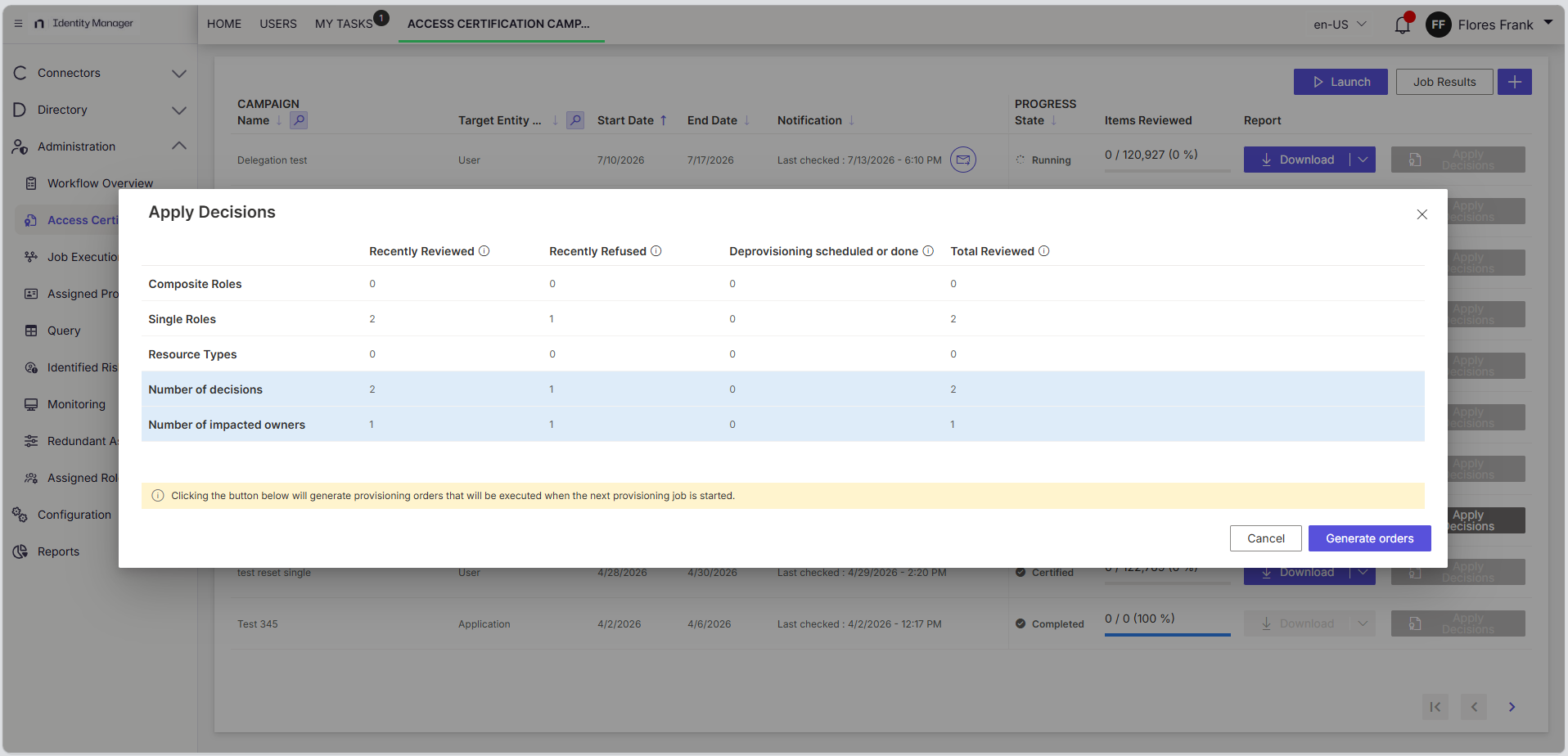
What stands out:
- Effective-access calculation: Covers both the resource path (who can reach this folder) and the user path (what this user can reach), resolving nested AD groups against share and NTFS permissions.
- Permission change tracking (Auditor): Full trustee-level record of every permission added, updated, or removed since the last review cycle.
- File access activity (Auditor): Object-level file events, including successful and failed read and modification attempts, on Windows file servers.
- Forensic change auditing (Auditor): File activity trail of DACL and SACL attribute changes, before-and-after values, on NetApp filers.
- SharePoint coverage (Access Analyzer): On-premises and Online audit jobs, reporting configuration, permissions, and effective rights.
- Broad NAS support (Access Analyzer): Spans Dell Celerra/VNX, Isilon/PowerScale, Unity, Hitachi, Nasuni, NetApp Data ONTAP, Nutanix, and Qumulo.
- Free starting point: Netwrix Effective Permissions Reporting Tool, covering Active Directory and file shares ahead of a full deployment.
What to consider:
- Effective-access scans run on a schedule, not continuously; mid-cycle changes can slip through.
- Entitlement reporting and forensic auditing are two separate, separately licensed products.
- NAS change capture is NetApp-only, plus Dell Unity.
- Auditor runs on-premises SQL Server, with real infrastructure overhead next to SaaS-only tools.
First National Bank and Trust of Beloit, a 130-year-old bank running compliance across 300 users at 17 locations, had been relying on manual processes to demonstrate OCC compliance, a workload that used to take a full week before every audit.
With Netwrix Auditor's before-and-after change tracking in place, that dropped to an hour, and reviewing daily activity now takes 15 minutes instead of a manual trawl through logs.
Best for: Microsoft-centric environments that need both who-has-access reporting and who-changed-what auditing across Windows, NAS, and SharePoint.
2. Varonis Data Security Platform
The Varonis Data Security Platform combines entitlement reporting, classification, and behavioral detection in a single platform, with coverage spanning SharePoint, OneDrive, Windows file shares and NAS, Microsoft 365, AWS, Azure, etc.
What stands out:
- Bidirectional effective permissions with nested group resolution and a data classification overlay for sensitive data access analysis.
- UEBA detects mass deletion, mass modification and abnormal access patterns associated with file and identity activity.
- Automated least-privilege remediation for reducing Everyone permissions and open shares.
- Compliance reporting aligned to ISO 27001, 27017, 27018, and 27701, AICPA standards, and NIST 800-53, rather than just the usual GDPR and HIPAA checkboxes.
- A managed detection and response service carries a stated 30-minute ransomware response target with 24x7x365 coverage.
What to consider:
- File-server monitoring runs on Varonis's own agent, not native logs; AD monitoring still does.
- UEBA needs a real baseline: Varonis recommends three-plus months of data before it's reliable.
- Self-hosted support ends December 31, 2026; new deployments need a SaaS plan.
Best for: Large organizations that want entitlement reporting, classification, and behavioral detection in one platform and are ready to operate on SaaS.
3. ManageEngine ADAudit Plus
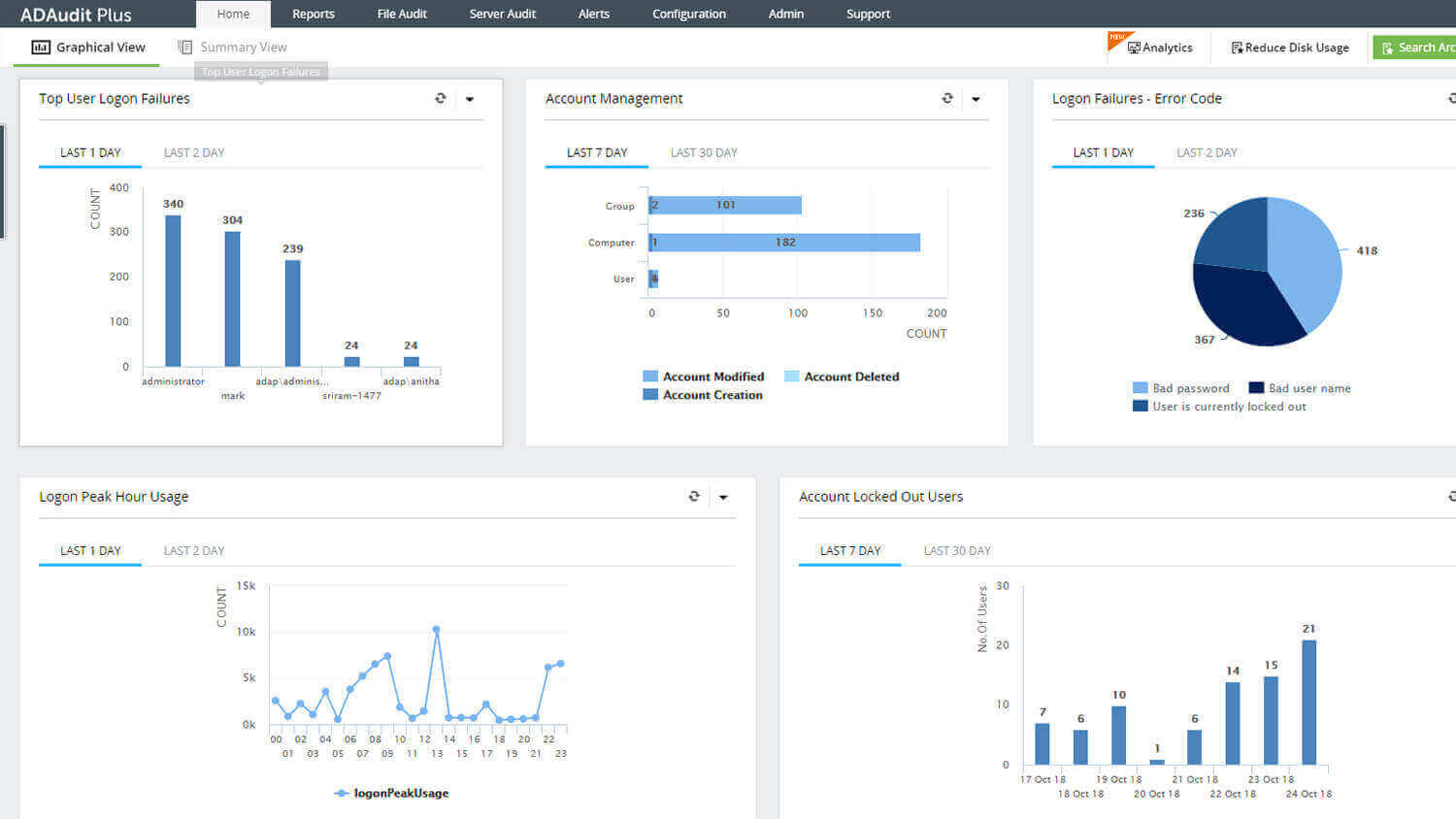
ManageEngine ADAudit Plus tracks file-server changes across Windows and a broad set of NAS and file-store types, with a focus on change auditing rather than entitlement reporting.
source: manageengine.com
What stands out:
- Effective NTFS and share permission reporting with before-and-after DACL values and real-time change alerts.
- NAS event coverage across NetApp, Dell EMC/Isilon, Synology, Qumulo, and Hitachi storage environments.
- File access activity monitoring alongside AD change auditing in investigation and reporting dashboards.
- Compliance report templates for HIPAA, PCI DSS, SOX, GDPR, and ISO 27001.
What to consider:
- "Agentless" only holds for domain controllers; real-time file-server auditing needs a client agent.
- Depending on the native Security Event Log, on busy servers, events roll off before anyone looks.
- Large or distributed deployments push toward the agent path, with a 16-core, 32GB server recommended.
Best for: Windows and NAS environments that need broad device coverage for change auditing and can add a separate tool for SharePoint.
4. SolarWinds Access Rights Manager
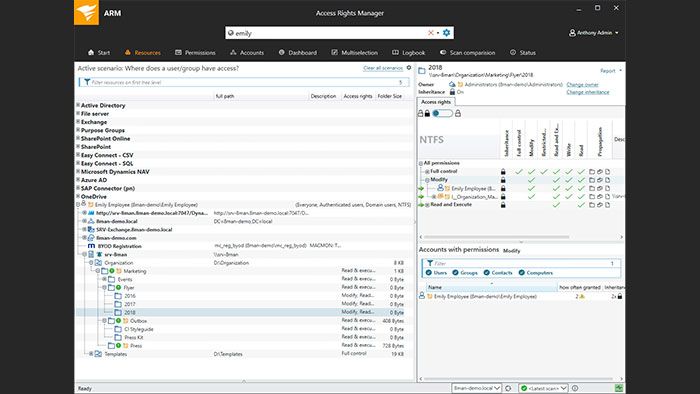
SolarWinds Access Rights Manager (ARM) is an access governance and management platform with permissions reporting and delegation workflows, covering Active Directory, Microsoft Entra ID, file servers (Windows, EMC, NetApp), SharePoint, SharePoint Online, Exchange, Teams, OneDrive, and SAP/R3.
source: golicense.net
What stands out:
- Permission snapshot reports for broken inheritance, Everyone permissions, stale access, and related governance issues.
- Role-based access modeling for request and approval workflows in recurring access governance reviews.
- Permission change history with user attribution for teams investigating access modifications.
- HIPAA, PCI DSS, and GDPR templates for governance workflows in regulated access reviews.
What to consider:
- Permission reporting is scan-and-compare, not continuous; changes made and reverted between scans may not surface.
- Scans run on a single collector; doubling parallel requests doesn't double throughput, and scans can stall for a day or more.
- CIFS/SMB only. No NFS support, a hard gap for Unix or Linux-integrated NAS.
Best for: Teams that want access governance, provisioning, and self-service delegation alongside compliance reporting.
5. Lepide Data Security Platform
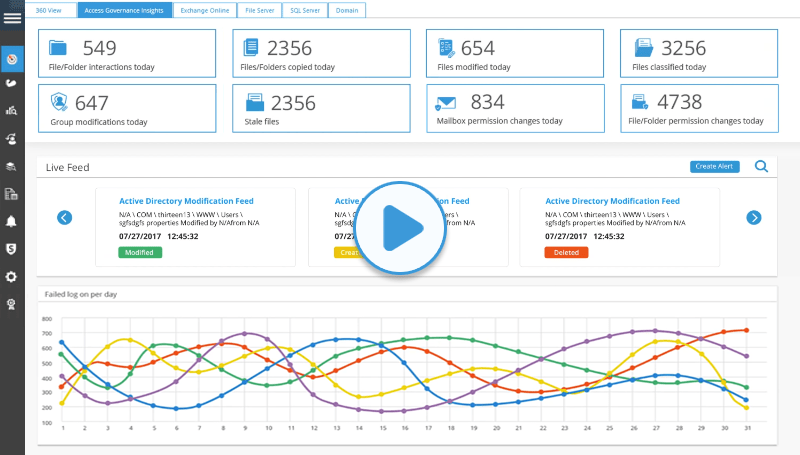
The Lepide Data Security Platform pairs effective permissions reporting with real-time alerting, SharePoint Online analysis, and NAS coverage, deployable on-premises or as SaaS.
source: lepide.com
What stands out:
- Effective permissions reporting for all 13 NTFS permission types, broken inheritance, and stale object detection.
- Real-time alerts for permission changes and file access events via email and Syslog.
- SharePoint Online coverage, alongside Windows file servers and selected NAS devices.
- Pre-built compliance report templates for SOX, HIPAA, PCI DSS, GDPR, and ISO 27001.
What to consider:
- Real-time auditing requires an agent per file server, which is manually updated whenever a rule changes.
- UEBA needs a 90 to 180-day baseline, but alerts start immediately, before that baseline exists.
- NAS coverage is inconsistent: NetApp via FPolicy only, Isilon via UDP-only syslog, no Synology.
Best for: Organizations that want both effective permissions reporting and change auditing with CMMC among the listed compliance areas.
6. IS Decisions FileAudit
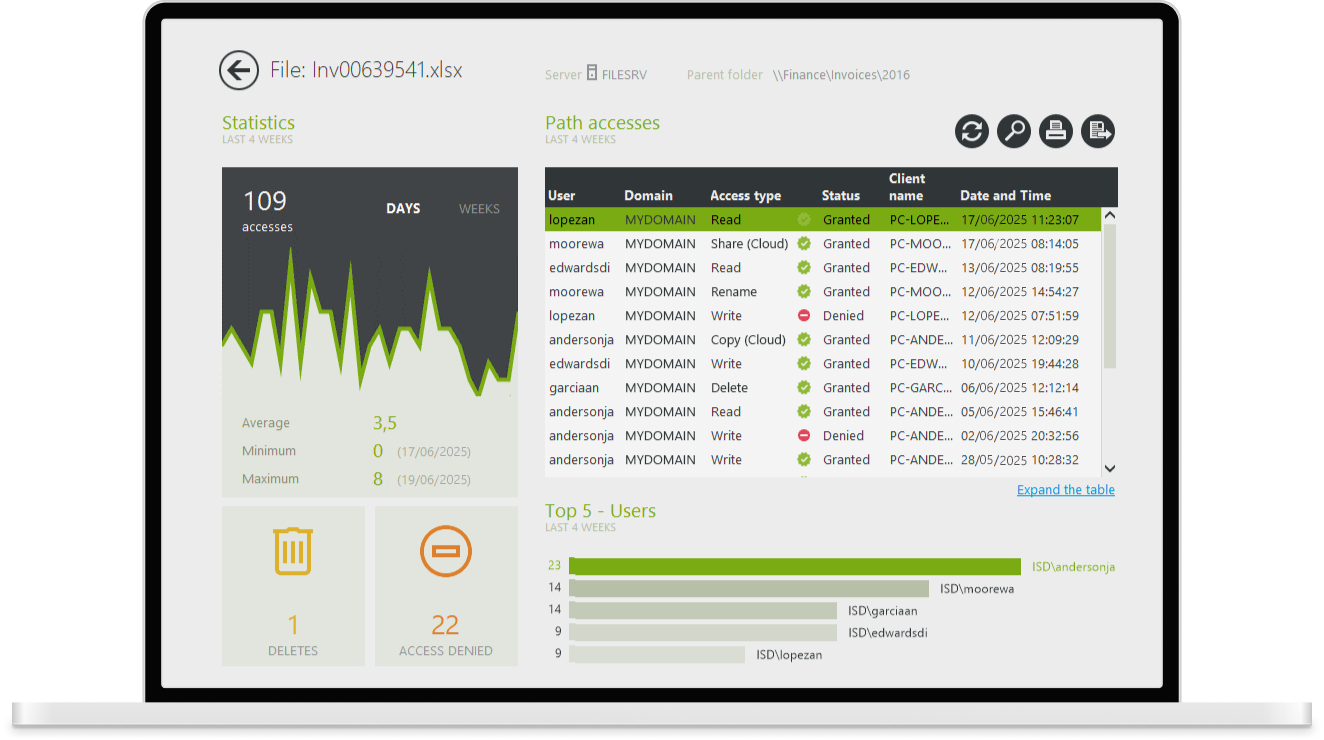
IS Decisions FileAudit is an agentless file access and change-auditing product for Windows servers and supported cloud storage.
source: isdecisions.com
What stands out:
- Real-time monitoring for file access, modification, deletion, and permission changes on Windows file servers.
- Alert routing through email, Syslog, and SNMP workflows for operations and security teams.
- Historical access event queries with exports for investigations, audit requests, and recurring compliance reviews.
- Agentless deployment for teams with straightforward Windows file server estates.
What to consider:
- Agentless, reading native event logs, not the file system. Cross-server moves can register as delete-plus-create.
- Shell-extension previews can trigger false-positive reads; IS Decisions calls it a "strong probability," not proof.
- Depends on the Security Log's own retention; misconfigured, it silently stops logging new events.
Best for: Windows file servers and Microsoft 365 cloud environments that need fast, agentless access and change auditing without NAS requirements.
7. Quest Change Auditor for Windows File Servers
Quest Change Auditor for Windows File Servers handles forensic change auditing with before-and-after values and audit data stored outside the Windows Security Event Log.
source: quest.com
What stands out:
- Before-and-after DACL and SACL change records with account, timestamp, path, and workstation attribution.
- Tamper-resistant audit trail storage outside the Windows Security Event Log.
- Quest Active Roles and One Identity integrations for broader IAM programs in existing Quest environments.
- SOX, PCI DSS, and HIPAA compliance report templates for recurring change-control evidence needs.
What to consider:
- Agent-based on every DC, server, and file server; thorough, but an agent per server to maintain.
- Doesn't report inherited ACL changes, and copying into an unmonitored folder generates no event.
- NAS needs separate products, Change Auditor for NetApp and for EMC, not add-on modules.
Best for: Teams that need a tamper-resistant forensic change trail outside the Security Event Log, especially within the Quest and One Identity ecosystem.
Choose the right file share permission auditing tool
Start by naming the job you most need to fill. If an audit or access review is driving the search, you need an effective-access calculation that resolves nested groups and combines share and NTFS permissions into the access a user actually holds.
If a security incident is driving it, you need a forensic before-and-after trail with user attribution that survives Security log rollover. Many teams need both, plus coverage that reaches past Windows shares to NAS, SharePoint, and cloud data stores.
Netwrix covers both jobs without forcing that trade-off. Netwrix Access Analyzer and Netwrix Auditor read the same environment, so an entitlement Access Analyzer flags as overexposed traces straight back through Auditor's change history to the account and timestamp that granted it, closing the loop between who can reach a share and who let them in.
For estates with sensitive data in the cloud, Netwrix's data security posture management capabilities extend that same who-can-access visibility to cloud stores, feeding the same data access governance program that keeps access rights accurate long after the audit closes.
Since 71% of organizations can't name who has access to a given file on demand, and 75% of incidents trace back to exactly that kind of compromised identity or misconfigured permission. Access Analyzer and Auditor together close that gap, so the answer is already there before an audit or an incident forces the question.
Request a demo to see effective access and change auditing on your own shares.
Disclaimer: The information in this article was verified as of July 2026. Please verify current capabilities directly with each provider.
Frequently asked questions about file share permission auditing
Share on
Learn More
About the author

Netwrix Team
Learn more on this subject
What early NIS2 enforcement tells us about audit trails
Continuous posture management vs. point-in-time assessments
What an AD/Entra Hybrid Audit Actually Looks For & Why Most Teams Fail the First One
System logs: how to differentiate between an AI agent and a human hacker
Netwrix Auditor named to two 2026 Capterra Shortlists