
Netwrix Auditor for Windows Server
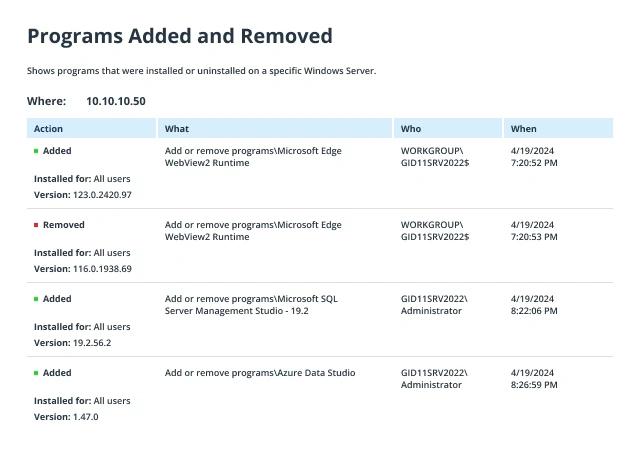
运行 Netwrix Auditor → 进入 "Reports" → "Windows Server" → "Windows Server Changes" → 选择 "Programs Added and Removed" 报告 → 单击 "View"。
若要通过电子邮件定期接收报告,请单击 "Subscribe" 按钮并选择首选的计划。
建议按照以下步骤为新软件安装设置警报:
- 在 Netwrix Auditor 的主页中,进入 "Alerts" → 单击 "Add" → 指定警报的名称。
- 切换到 "Recipients" 选项卡 → 单击 "Add Recipient" → 指定希望接收该警报的电子邮件地址。
- 转到“Filters(过滤器)”选项卡 → 调整以下过滤器:
- 点击“Add(添加)”以保存警报。
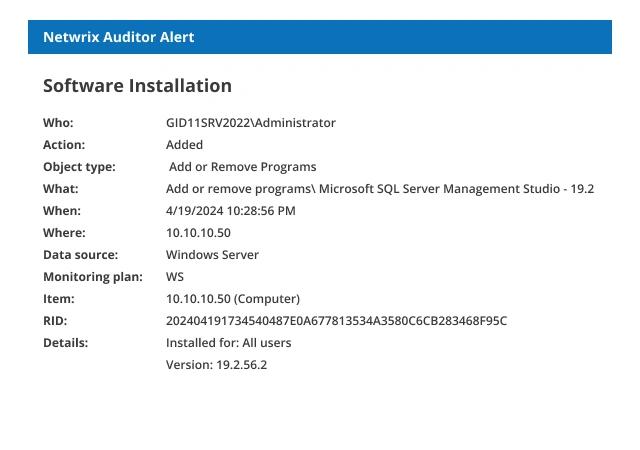
每当有人安装新软件时,你将收到类似的警报:
原生审计
- 运行 eventvwr.msc → Windows Logs → 右键单击“Application(应用程序)”日志 → 属性:
- 确保选中“Enable logging”复选框
- 将日志大小至少增加到 1 GB
- 将保留策略设置为“Overwrite events as needed”或“Archive the log when full”。
- 打开“事件查看器”(Event Viewer),在应用程序日志中搜索事件源为 MsiInstaller 的 11707 事件 ID,以查找最新安装的软件。
- 要创建在任何软件安装时触发的即时告警,你需要通过设置参数来编辑以下 PowerShell 脚本,并将其保存为 .ps1 文件(例如 detect_software.ps1),保存到任意位置:
      #Mail SMTP Setup Section
$Subject = "New Software Has Been Installed on $env:COMPUTERNAME" # Message Subject
$Server = "smtp.server" # SMTP Server
$From = "From@domain.com" # From whom we are sending an e-mail(add anonymous logon permission if needed)

$To = "to@uncc.edu" # To whom we are sending
$Pwd = ConvertTo-SecureString "enterpassword" -AsPlainText –Force #Sender account password
#(Warning! Use a very restricted account for the sender, because the password stored in the script will be not encrypted)
$Cred = New-Object System.Management.Automation.PSCredential("From@domain.com" , $Pwd) #Sender account credentials

$encoding = [System.Text.Encoding]::UTF8 #Setting encoding to UTF8 for message correct display

#Generates human readable userID from UserSID in log.

$UserSID = (Get-WinEvent -FilterHashtable @{LogName="Application";ID=11707;ProviderName="MsiInstaller"}).UserID.Value | select -First 1
$objSID = New-Object System.Security.Principal.SecurityIdentifier("$UserSID")
$UserID = $objSID.Translate([System.Security.Principal.NTAccount])

#Generates email body containing time created and message of application install.

$Body=Get-WinEvent -FilterHashtable @{LogName="Application";ID=11707;ProviderName='MsiInstaller'} | Select TimeCreated,Message | select-object -First 1

#Sending an e-mail.
Send-MailMessage -From $From -To $To -SmtpServer $Server -Body "$Body . Installed by: $UserID" -Subject $Subject -Credential $Cred -Encoding $encoding
- 运行任务计划程序 → 创建新的计划任务 → 输入名称 → 触发器选项卡 → 新建触发器 → 设置以下选项:
- 在事件时开始任务
- 日志 - 应用程序
- 源 - 空白
- 事件 ID – 11707。
- 转到“操作”选项卡 → 使用以下参数创建新操作:
- 操作 - 启动程序
- 程序脚本:PowerShell
- 添加参数(可选):-File "指定我们脚本的文件路径"
- 单击“确定”
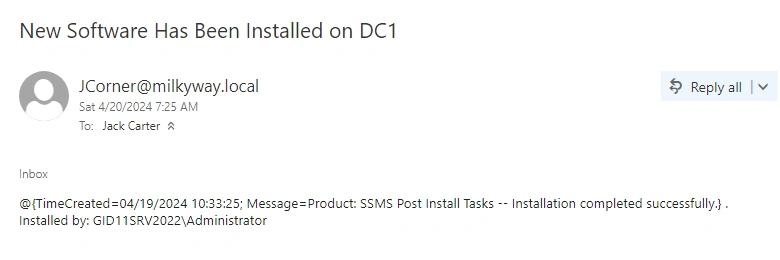
- 现在,您将通过电子邮件收到有关 Windows 服务器上每一次软件安装的通知。邮件内容包含软件安装时间、软件名称以及安装程序的 userID(SID)等详细信息。
检测企业软件安装策略违规行为
在 Windows Server 上意外或蓄意的未授权软件安装可能会让恶意软件进入您的网络,从而导致性能问题以及敏感数据的丢失或泄露。威胁既来自组织内部,也来自外部的黑客:员工可能在不知情的情况下下载并安装恶意程序,从而违反您的软件安装策略。这就是为什么必须明确了解已安装了哪些软件、是谁在 Windows 上安装了软件以及事件发生的时间。您可以使用 PowerShell 脚本在事件查看器中查找 Windows 安装程序日志,但这需要 PowerShell 脚本方面的专业知识,而且可能会让人疲于应对。
为降低数据泄露和停机的风险,IT 专业人员需要能够检测何时安装了新软件,并快速确定所有“谁-做了什么-在哪里-何时-以何种方式”的关键信息。Netwrix Auditor for Windows Server 可通过查看已安装应用程序的事件日志,提供对您的 Windows Server 基础设施中正在发生的情况的完整可视化,包括未授权的软件安装。IT 专业人员只需创建一个警报,就会在每次安装新软件时立即收到详细的电子邮件通知,并查看是谁在 Windows 上安装了程序,从而充分保护组织的资产。
分享到