
Netwrix Auditor for Active Directory
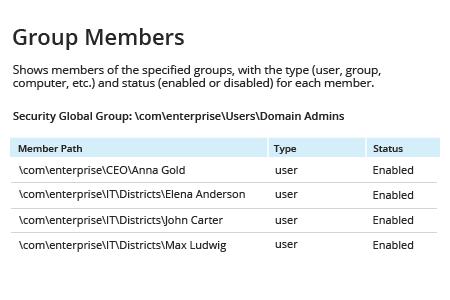
- 运行 Netwrix Auditor → 转到“Reports”→ 展开“Active Directory”部分 → 进入“Active Directory – State-in-Time”→ 选择“Group Members”→ 点击“View”。
如果要为特定 AD 组生成报表,请更改 Group Path 参数。
了解更多: Netwrix Auditor for Active Directory
原生审计
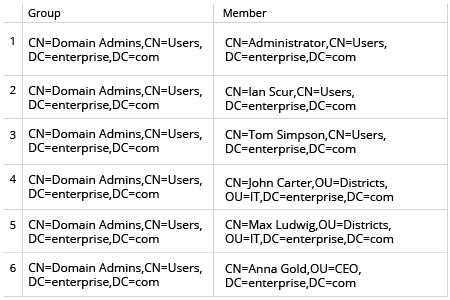
- 在域控制器上打开 Powershell ISE → 运行以下 Powershell 脚本(如果需要为特定 AD 组生成报告,请更改 $nameofgroup 参数):
      $nameofgroup= 'Domain Admins'
$groupsusers=Get-ADGroup -Identity $nameofgroup |
  ForEach-Object{
                $settings=@{Group=$_.DistinguishedName;Member=$null}
        $_ | Get-ADGroupMember |
              ForEach-Object{
                                       $settings.Member=$_.DistinguishedName
                    New-Object PsObject -Property $settings
                }
    }
    $groupsusers | Export-Csv C:\scripts\GroupsUsers.csv –NoTypeInformation
通过审查成员报告,让 Active Directory 组保持受控
主管或合规审计人员可能会要求 IT 管理员将 AD 组成员导出到报告中以便审查。拥有能够将任意组成员快速导出为可读格式的 Active Directory 工具,将使 IT 管理员能够比使用原生工具更快地满足此类请求。
Netwrix Auditor for Active Directory 使 IT 管理员能够以易于阅读的格式快速生成有关 Active Directory 组成员的报告。他们可以将 Active Directory 组成员导出为 CSV 或 PDF 格式,从而具备灵活性,能够轻松应对任何请求。
分享到