
Netwrix Auditor for Active Directory
- 运行 Netwrix Auditor → 进入 “Reports” → 展开 “Active Directory” 部分 → 转到 “Active Directory – State-in-Time” → 选择 “Computer Accounts – Last Logon Time” → 点击 “View”。
- 如果你想按一段不活跃时间来限制列表(例如,只显示最近一次登录在 30 天前或更久之前的计算机),请调整 “Inactive Days” 参数,并将 “Status” 切换为 “Enabled” → 单击 “View Report”。
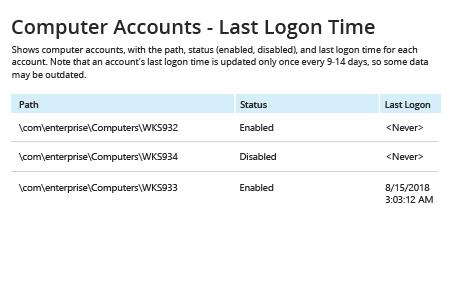
- 要保存报告,请点击 “Export” 按钮 → 在下拉菜单中选择一种格式 → 点击 “Save”。
了解 Netwrix Auditor for Active Directory
本机审计
如果你想在域工作站上运行 Get-ADComputer PowerShell cmdlet,则必须在该计算机上下载并安装 Active Directory Administrative Center (ADAC) 或 ActiveDirectory PowerShell 模块。
- 打开 PowerShell ISE → 运行以下 PowerShell 命令,并根据需要调整 $DaysInactive 变量的值(下面的示例脚本将搜索并收集过去 90 天内未登录的所有计算机):
      # Specify inactivity range value below
$DaysInactive = 90
# $time variable converts $DaysInactive to LastLogonTimeStamp property format for the -Filter switch to work

$time = (Get-Date).Adddays(-($DaysInactive))

# Identify inactive computer accounts

Get-ADComputer -Filter {LastLogonTimeStamp -lt $time} -ResultPageSize 2000 -resultSetSize $null -Properties Name, OperatingSystem, SamAccountName, DistinguishedName, LastLogonDate
- 要将“陈旧”的计算机账户列表导出到 CSV 文件,请在此更新后的 PowerShell 脚本中添加 Export-CSV PowerShell cmdlet,如下所示:
      # Specify inactivity range value below

$DaysInactive = 90

# $time variable converts $DaysInactive to LastLogonTimeStamp property format for the -Filter switch to work

$time = (Get-Date).Adddays(-($DaysInactive))

# Identify and collect inactive computer accounts:

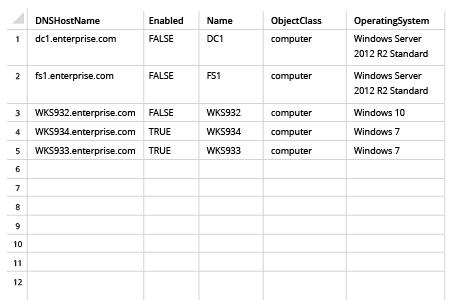
Get-ADComputer -Filter {LastLogonTimeStamp -lt $time} -ResultPageSize 2000 -resultSetSize $null -Properties Name, OperatingSystem, SamAccountName, DistinguishedName, LastLogonDate| Export-CSV “C:\Temp\StaleComps.CSV” –NoTypeInformation
- 在 Microsoft Excel 中打开脚本生成的文件:
每当你需要查找不活跃的计算机时,不要把时间浪费在 PowerShell 脚本编写上
不活跃的 Active Directory 用户和计算机会带来严重的安全与合规风险。Microsoft AD 域中的不活跃计算机往往存储敏感数据,而这些数据可能被黑客窃取;此外,任何不活跃的账户都可能成为进入你 IT 环境的切入点,使攻击者能够悄无声息地访问 Microsoft Active Directory、Windows Server 或 Exchange 等关键 IT 系统。
因此,安全最佳实践建议禁用处于非活动状态的 Active Directory 帐户。但现实情况是,IT 管理员往往被其他管理任务压得喘不过气,难以将识别并禁用过期的计算机帐户提到优先级上。因而,拥有一种简单的方法来列出所有非活动的计算机并将其禁用至关重要——这有助于减少攻击面,并加强 IT 环境的安全性。
PowerShell 是众多工具之一,可帮助你在 Active Directory 中查找非活动的计算机。使用 PowerShell,你可以获取非活动计算机并将其导出为 CSV 文件;甚至还可以计划定期运行脚本,以便生成关于过期计算机对象的报告。然而,创建和维护这些脚本既需要时间,也需要具备使用 PowerShell 命令的专业能力。此外,尽管脚本可以收集非活动的计算机帐户,但它们并不能帮助你完成将其禁用这一关键步骤。
Netwrix Auditor for Active Directory 能够大幅简化整个工作。它包含一个即用型报告,可列出所有非活动计算机,并附上每台计算机的最后登录时间。此外,它还内置了 Inactive User Tracking 工具,可以自动禁用所有在指定天数以上处于非活动状态的计算机和用户帐户——帮助你以更少的精力保持 IT 环境的安全。
分享到