
AI Governance Auditing for Security and IT Teams
Sep 2, 2026
AI governance auditing distinguishes between a documented policy and a working control. The audit traces one AI output back through the identity that invoked it, the data it reached, the guardrail that applied, and the record retained afterward. Most programs fail because access is ineffective: nobody can say which identities access sensitive data through an AI assistant, let alone prove the limit is held.
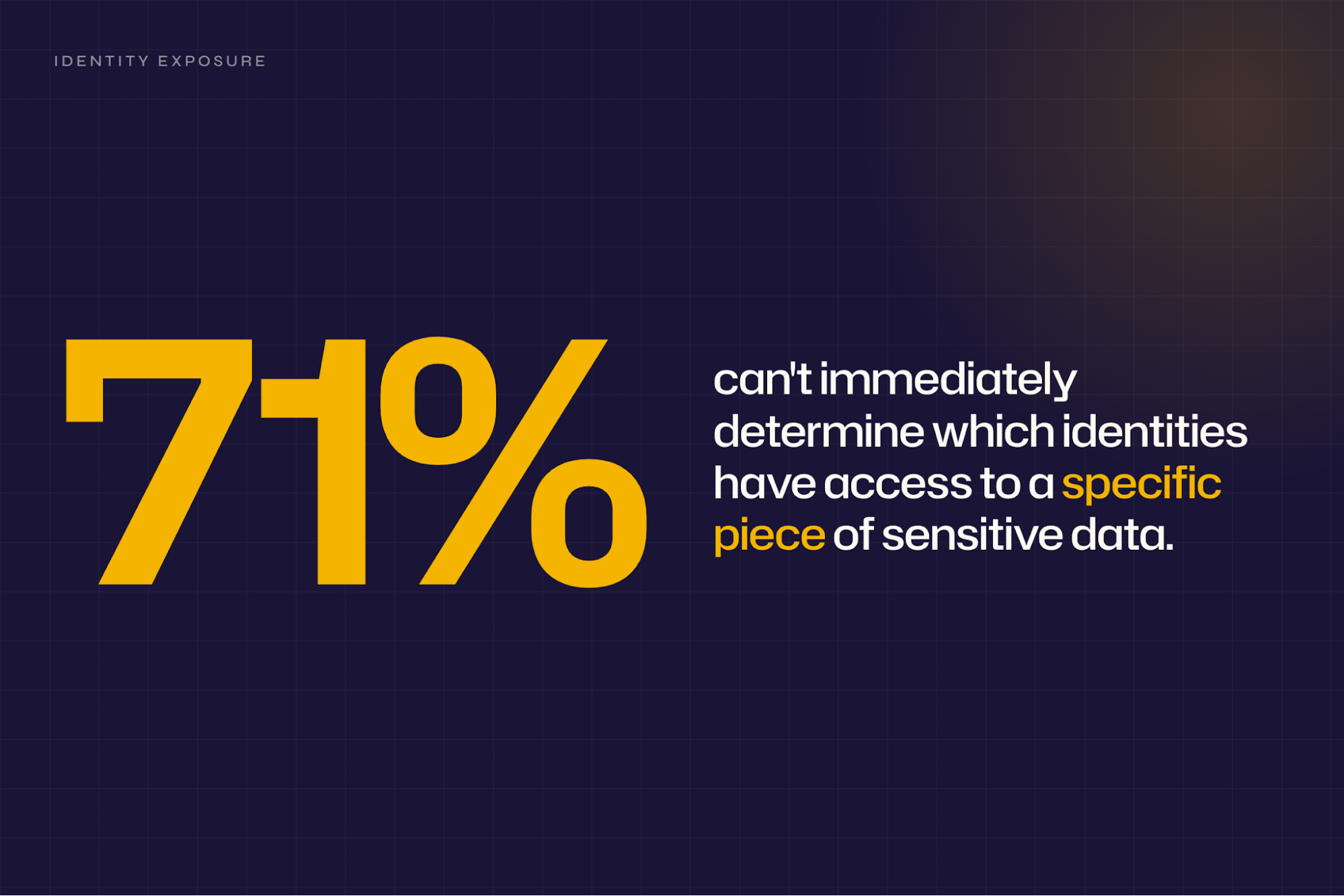
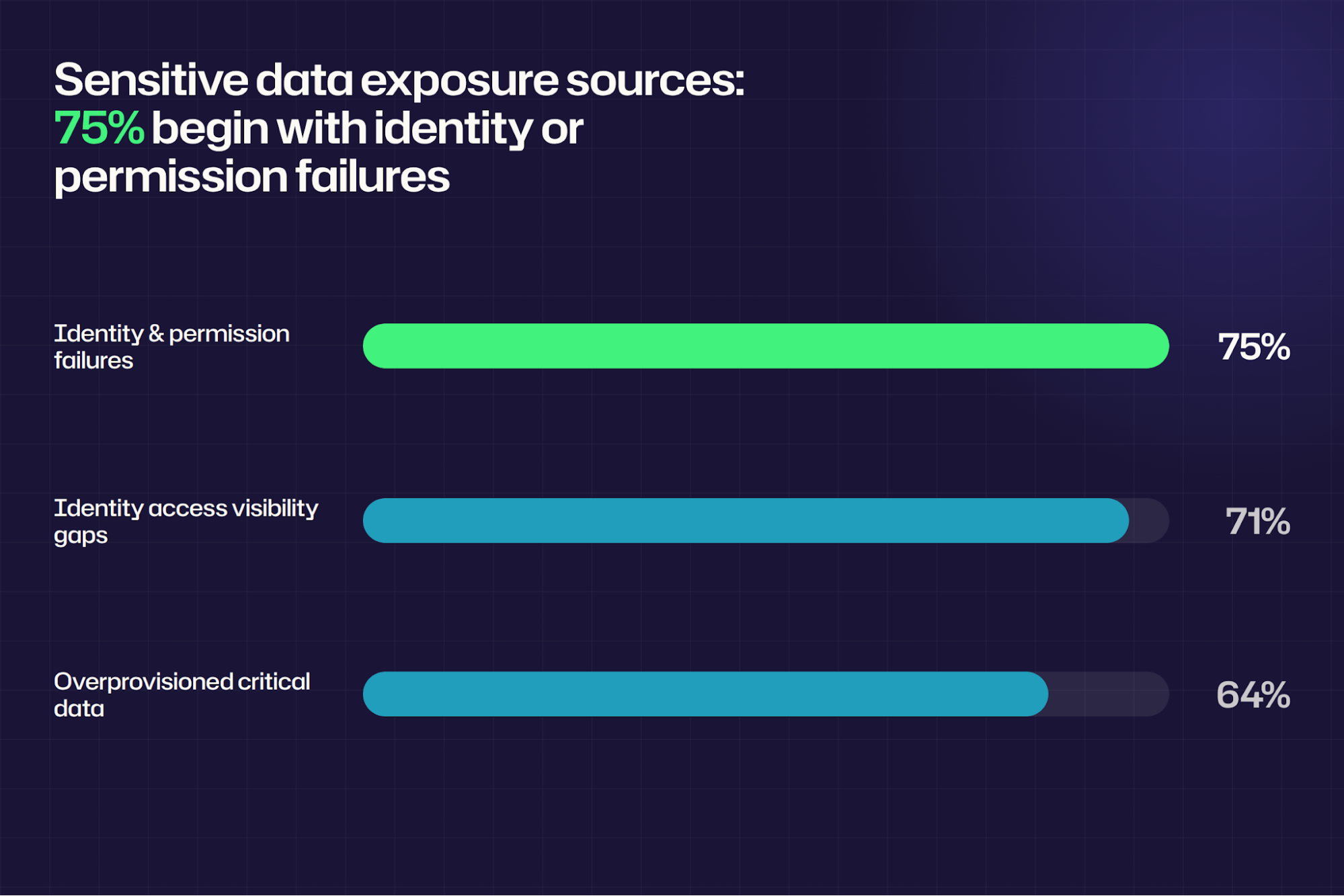
Leadership approves Microsoft 365 Copilot, and two days later legal wants to know which sensitive files it can read. In the survey behind the Netwrix 2026 Data and Identity Security Report, 71% of security and IT leaders said they can't immediately determine which identities have access to a specific piece of sensitive data.
The assistant itself is rarely the problem. Microsoft's documentation states that Copilot surfaces organizational data to which individual users have at least view permissions, so every stale group membership and overshared site becomes a possible prompt result. The control gap lies in the underlying permission layer, where years of ad hoc sharing accumulate without review.
Testing that layer one identity and one file at a time is what produces an answer nobody has to take on trust.
What is AI governance auditing?
AI governance auditing examines whether the controls governing AI access to data, identities, and workflows operate as designed. Evidence includes logs, test results, permission reports, and dated reviews. PwC's audit guidance frames the task as testing the design and effectiveness of AI-related controls. That means documenting how each control is designed, how it operates, and how management tests it.
A governance audit ends with control effectiveness. Model performance testing is a separate discipline that covers bias, drift, accuracy, and explainability.
Scope spans governance and policy, technical and model risk, and data-access and identity controls. The IIA's AI Auditing Framework assigns that work by accountability, mapping it to the Three Lines Model so governance bodies, management, and internal audit each own a defined share. Identity is explicitly within scope, and the ISACA AAIA outline requires auditors to evaluate an organization's AI-specific identity and access management program.
Why AI governance auditing matters more than the policy document
A policy states an intention. An audit produces the artifacts showing that intention survived contact with a live tenant. That gap separates a governance program from a governance slide, and it pays off in four specific ways.
Approving AI adoption on evidence
Security teams get asked to bless AI rollouts on a timeline somebody else set. A completed audit lets them sign off with a named list of which AI tools access which data under which identities. The approval then rests on a boundary someone actually tested, not just described.
Turning policy into a measurement record
The NIST AI RMF expectation for ongoing measurement lands in MEASURE 2.4. It states that the functionality and behavior of the AI system and its components, as identified in the MAP function, are "monitored when in production." An audit converts a written policy into a record that satisfies that expectation, built from logs, permission reports, signed test results, and reviews with dates and names attached.
Finding exposure before it becomes an incident
Overshared sites and stale permissions surface on someone else's schedule, usually during an investigation. The Netwrix 2026 Data and Identity Security Report found that 75% of sensitive data exposures begin with compromised identities or misconfigured permissions. That makes the permission layer the highest-yield place to look.
A scheduled audit turns those conditions into findings with tickets and named owners, months before a breach review.
A scheduled audit converts those conditions into findings with tickets and named owners months ahead of a breach review.
Giving leadership a number that moves
Boards fund the work they can track, and a completed audit yields a count of open gaps, along with owners and target dates. Teams derive that count from failed control tests and unresolved findings, so progress reads as a trend line, much like patch compliance or phishing failure rates.
Netwrix 1Secure™ reports which sensitive files Copilot can access for each licensed identity, and logs every Copilot interaction along with the resources it references. Request a demo.
How to audit AI governance controls
A defensible audit answers five questions, in order. It covers which AI systems are in use, what sensitive data each can access, which identities they operate under, what controls apply, and what evidence shows those controls work. Work through the six steps below in sequence, and finish each one with the artifact named at the end.
1. Build and verify the AI asset and data access inventory
Pull the inventory from three sources, because no single system knows everything. Take licensed AI apps and service principals from Microsoft Entra ID. Add embedded AI features from each SaaS vendor's release notes and admin center, plus unsanctioned tools from egress logs or your CASB. For each entry, record the owner, the business purpose, the environment, and the repositories the tool can read from.
Then reconcile the three lists and treat every difference as a finding. Assign each unregistered tool a named owner and a decision date, decide whether to keep or block it, and log the outcome. Unsanctioned use rarely appears in procurement records, which is why shadow AI security belongs in the first pass alongside sanctioned tools.
Apply the same scrutiny to the tools you already approved, since approval and safety are separate questions. Whether Copilot is safe in a given tenant depends on what its licensed identities can access, and this inventory answers that.
Consider the step complete when every AI tool in the environment appears in a single list, with an owner and a data-source mapping. NIST AI RMF GOVERN 1.6 requires mechanisms to inventory AI systems and resource them according to organizational risk priorities. This list satisfies that requirement. The artifact is a validated inventory with an attached list of findings.
2. Test each AI policy against the role that enforces it
Read every AI usage policy against four questions before you look at any control. Establish what use is acceptable, which data types are prohibited, where a human is required in the loop, and how long output is retained. Write down the answer to each one, and mark any question the policy leaves open.
Then build a two-column map that places each policy statement next to the named role responsible for enforcing it. Name the individual, since a team name gives an auditor nobody to interview about who approves a new AI use case and who reviews output in high-risk workflows. Any statement without a name attached is the finding.
Extend the governance you already run rather than writing a parallel set of AI rules. An IAM risk assessment already documents approval paths, and an established identity governance and administration program already defines role ownership. Confirm those extend to AI use, and record where they stop.
GOVERN 2.1 requires that roles, responsibilities, and lines of communication for mapping, measuring, and managing AI risk are documented and clear to individuals and teams throughout the organization. The artifact is that policy-to-role map, with the unowned statements listed as gaps.
3. Map effective access for every AI-reachable data source
Run this step in four passes, moving from license to file. First, list the users and groups that hold Copilot licenses. Second, resolve each group to its actual membership, including nested groups. Third, list the SharePoint sites, Teams, and mailboxes that contain sensitive data and that the resolved membership can access.
The fourth pass covers the identities people forget, starting with guests. Guest accounts widen the map faster than anything else, so audit Teams guest access against the same sensitive sites. Then repeat the whole exercise for non-human identities, since Active Directory service accounts and app registrations often carry broader access than any person on the payroll.
Start the mapping with the native report, then check what it left out. Microsoft's "Site permissions for users" report lists the SharePoint or OneDrive sites that a specified user can access, directly or through groups, and is the closest native per-identity view.
Before you treat that output as complete, verify three limits against your own environment. The report depends on the organization-wide permissions report, which shows only the top 100 sites by permitted user count and excludes archived sites and sites in a NoAccess lock state. Data can lag generation by up to 48 hours, and each tenant is capped at five reports refreshed every 30 days.
Cover the remainder with tooling that resolves nesting across the entire estate in a single pass. That's the job of a data access governance capability, and the wider category of data access governance tools exists to close exactly this gap. The artifact is a set of per-identity access findings carrying risk ratings.
4. Prove the log trail can reconstruct an AI interaction
Test the trail by picking one recent Copilot interaction and trying to rebuild it from logs alone. Retrieve the sign-in, the prompt event, the files touched, and any admin change to AI settings, then check whether file access monitoring covers the repositories involved. Anything you can't retrieve goes straight onto the findings list as a coverage gap.
Know which record type holds what before you conclude anything is missing. Purview's CopilotInteraction audit records capture interaction metadata and references to the files Copilot used to answer a request. The prompt and response bodies, though, reside in the user's mailbox and require eDiscovery to collect.
Next, measure your retention window against the investigation window you'd actually need. Under Microsoft's audit retention policies, Audit (Standard) retains records for 180 days, and Audit (Premium) extends that period to 1 year for Microsoft Entra ID, Exchange, OneDrive, and SharePoint activity generated by users with E5 or equivalent licensing. Anything longer than a year requires the 10-Year Audit Log Retention add-on in addition to E5.
Close the step by testing whether the records actually join up across systems. Confirm that the team can tie an AI event to an identity and then to a file-access record without manual correlation, and note any tooling gaps where the chain breaks. The artifact is a logging coverage and retention assessment stating the window per workload.
5. Run control tests from a permitted and an unpermitted identity
Define the test before you run it, because an expected outcome written afterward is worthless. Pick one file with a known sensitivity label, one identity that should reach it, and one that should be refused, then write down the result you expect from each.
Issue the identical retrieval prompt from both identities and compare the two responses. The permitted identity should return the content, and the restricted identity should refuse or return an empty result. Check the audit log for both attempts, because a silent failure that leaves no record is its own finding.
Give DLP the same surface-by-surface treatment on the same test file. Run policies in simulation mode before enforcing them, and apply DLP policy best practices that fit the tenant. Repeat each case in chat, in Word, and in email summarization, because a policy that holds in one can behave differently in another.
Record scope, expected outcome, actual outcome, and remediation for every case, then sign the workpapers and attach the screenshots and log exports. The artifact is a signed test log in which each failed case has an owner and a retest date.
6. Write the report so findings convert into remediation
Structure the report like any other IT risk assessment deliverable, covering scope, methodology, findings, risk ratings, and remediation. Order the findings by significance, so the reader meets the worst gap first.
For each observation, include the five elements a reviewer looks for before signing. The IIA's report-writing toolkit recommends a criticality rating and a statement of facts covering condition, criteria, cause, and effect, plus a management action plan naming the agreed action, the responsible personnel, and a due date.
Set the next audit date before you circulate the report, while the scope is still fresh. Schedule it at a planned interval and add change triggers for new AI features, permission changes, policy revisions, and logging changes. The artifact is that report, with a retest date already on the calendar.
How to verify Microsoft 365 Copilot access controls
Microsoft Copilot earns its own pass because its guardrails sit in named admin surfaces a generic method can't point to, and because one of those controls is being retired. Microsoft's deployment guidance sequences a rollout into discover, classify, audit, secure, monitor, and govern, with each verb corresponding to a test with a recorded result.
1. Read the Purview data risk assessment first
Open Microsoft Purview Data Security Posture Management (DSPM), go to Discover and then Data risk assessments, and read the default assessment before running anything custom. It runs weekly against the top 100 SharePoint sites by usage, and the first results take roughly 4 days to appear in a new tenant.
Treat the output as a shortlist that still needs broadening, since usage and sensitivity rankings pull in different directions. Carry everything the assessment flags into the per-identity mapping from step 3, and keep the unranked sites in scope.
2. Pull the SharePoint data access governance reports
Generate the Data Access Governance reports and work through risky sharing links, permission state, and Everyone Except External Users (EEEU) exposure. Every EEEU grant on a site that holds regulated data is a finding, and anonymous sharing links are the fastest to revoke.
Check your licensing tier before you trust the coverage those reports give you. E5 alone provides activity reports, capped at 10,000 sites with 28 days of data. Snapshot reports and remediation actions require SharePoint Advanced Management, which comes with a Copilot license, the Plan 1 add-on, or Microsoft 365 E7.
3. Replace Restricted SharePoint Search with a supported control
Check whether the tenant still relies on Restricted SharePoint Search (RSS) to hold Copilot back, and record a migration finding wherever it does. Microsoft has announced the retirement through the Microsoft 365 message center, blocking new RSS enablement starting July 31, 2026, and fully retiring the feature on January 31, 2027.
Plan the replacement while there's still runway, since existing RSS configurations won't migrate automatically to Restricted Content Discovery. Inventory the sites currently protected by RSS, and map each one to a permission fix or a Restricted Content Discovery entry.
4. Test labels and DLP on every Copilot surface
Verify sensitivity labels on the test files first, then verify Purview DLP configuration in Microsoft 365 Copilot and Copilot Chat. Run the same case in Copilot Chat, in Word, and in email summarization, and log each surface separately.
Read the result against what the policy action actually performs. The DLP action prevents Copilot from processing sensitive content but leaves the user's access to the file untouched, so a user who still opens the document has passed the test. For each case, capture the identity, the file, the expected result, the actual result, the applicable label or DLP rule, and the timestamp.
5. Export the evidence and schedule the recheck
Export Purview audit records of Copilot activity for the test window, and set audit log retention to match the investigation period the team would actually need. Schedule Microsoft Entra access reviews for the group memberships that control Teams and site access, then assign an owner to every failed test and book the retest date.
Judge Copilot verification against a single concrete standard rather than a checklist of reviewed settings. The team clears it when it can name a file, show that Copilot won't summarize it under a restricted identity, explain which permission, label, or DLP rule stopped it, and produce the Purview record proving the test happened.
Evidence and readiness checklist for an AI governance audit
An AI data access audit rests on artifacts an auditor can inspect. Four categories carry most of the weight:
- Inventory evidence: The AI system and tool list with owners and environments, plus documentation of which data sources each system can reach
- Policy and control evidence: Usage policies with change logs, role definitions and a responsible, accountable, consulted and informed (RACI) matrix for AI governance, and a risk assessment per AI use case
- Identity, access, and monitoring evidence: Per-identity access reports, AI activity logs, and records of control events such as DLP triggers, Conditional Access decisions, and access review outcomes
- Review and oversight evidence: Minutes or tickets documenting AI governance decisions, an audit trail of remediation after prior assessments, and metrics tracking governance performance over time
Miss any one of the four, and that's the hole an auditor finds first. The readiness questions below test the same ground from the other direction, and every unanswered one is a gap needing an owner, a remediation plan, and a retest date.
Readiness check | Question to answer |
|---|---|
|
Inventory |
Do you have a documented inventory of all AI tools and use cases, including Copilot and other embedded AI features? |
|
Data access |
Can you list which sensitive data sources each AI system can reach, and under which identities? |
|
Control mapping |
Are AI usage policies mapped to actual controls, including access rules, DLP, Conditional Access, and review processes? |
|
Log retention |
Do you retain AI-related logs long enough, and in a form you can hand to auditors and leadership? |
|
Review evidence |
Can you show a recent AI governance review with findings, remediation actions, and named owners? |
|
Historical reporting |
Can you report identity and data access tied to AI tools over time, rather than at a single point? |
How Netwrix closes the AI governance audit gap
Four of the steps above run on data that native tooling retains briefly or scatters across portals, covering effective permissions, AI activity records, prompt-level enforcement, and change history.
Netwrix groups those under AI governance as a named platform capability for hybrid Microsoft environments, and a different product carries each job.
Reporting what Copilot can reach, before and after rollout
Netwrix 1Secure reports on the sensitive data Copilot can reach before a tenant enables it, which answers the readiness question while the rollout's still reversible. After go-live, it lists users, timestamps, and referenced resources for each interaction, and flags Copilot responses that expose sensitive data.
Coverage spans SharePoint Online, Windows file servers, Active Directory, Microsoft Entra ID, and Exchange Online, so the log trail step 4 asks for comes out of one console.
Calculating effective permissions behind every identity
Netwrix Access Analyzer resolves nested AD group membership and broken SharePoint inheritance to calculate what each identity can actually reach, surfacing open access and stale entitlements that per-site reports flatten. That turns the four-pass mapping from step 3 into a report you can hand to an auditor.
The Microsoft 365 Copilot readiness assessment runs the same analysis ahead of deployment, so over-permissioned content gets remediated before any user receives a prompt.
Blocking sensitive data in AI prompts at the endpoint
Netwrix Endpoint Protector inspects prompt content on the endpoint and blocks sensitive data before it reaches ChatGPT, Microsoft Copilot, Google Gemini, Claude, or DeepSeek. Every blocked event ties back to the identity behind it, which turns a written prohibited-data rule into something step 5 can test.
Retaining change evidence past the native log window
Netwrix Auditor records every AD and Entra ID configuration and directory change with before-and-after values in a searchable trail. It retains those values in a Long-Term Archive that defaults to 120 months, well past Purview's 180-day standard window.
Two regulated customers show what that retained trail is worth during an examination. First National Bank and Trust of Beloit maintains continuous OCC compliance across 300 users at 17 locations on Netwrix Auditor, replacing manual checklist work that once took a full week with an hour of preparation. Flagler Bank identifies and mitigates IT risk across its whole network with a one-person IT department, closing investigations in 10 minutes that manual log searching used to stretch into hours.
Netwrix reports on AI data access and blocks it at the endpoint. Microsoft's own enforcement layer still determines what an identity can do within Microsoft 365 through sensitivity labels, Purview DLP, and Conditional Access. The audit verifies those controls, and model behavior stays with the data science and model risk teams.
Request a demo to map which identities Copilot can reach, monitor what it surfaces after rollout, and keep the change evidence an examiner will ask for.
Frequently asked questions about AI governance auditing for security and IT teams
Share on
Learn More
About the author
