
Understanding FSMO roles in Active Directory
Sep 6, 2026
FSMO roles assign exclusive authority over five critical Active Directory operations to designated domain controllers, preventing replication conflicts in a multi-master environment. The roles split between forest scope (Schema Master, Domain Naming Master) and domain scope (RID Master, PDC Emulator, Infrastructure Master). Knowing where each role lives and how to transfer or seize it determines how quickly your team recovers from a domain controller failure.
Active Directory operates on a multi-master model in which every domain controller maintains a writable copy of its domain partition. That design gives resilience (operations continue even when individual DCs go offline), but it also introduces the possibility of conflicting changes.
Microsoft reduced the risk of conflict by designating specific domain controllers as the sole authority for five sensitive operations. These are the Flexible Single Master Operations (FSMO) roles, and understanding them is fundamental to managing a stable, well-governed Active Directory environment.
This guide explains each of the five FSMO roles, covers how to identify which domain controllers hold them, and provides the commands needed to transfer or seize roles when circumstances require it.
What are FSMO roles in Active Directory?
FSMO stands for Flexible Single Master Operations and refers to five Active Directory operations that only one designated domain controller can process at a time. By restricting these operations to a single authoritative DC per scope, Active Directory prevents data collisions that would occur if multiple controllers attempted to perform them simultaneously.
Each of the five FSMO roles belongs to one of two scopes:
Role | Scope |
|---|---|
|
Schema Master |
Forest |
|
Domain Naming Master |
Forest |
|
RID Master |
Domain |
|
PDC Emulator |
Domain |
|
Infrastructure Master |
Domain |
Forest-scoped roles have exactly one holder across the entire AD forest, regardless of how many domains the forest contains. Domain-scoped roles have exactly one holder per Active Directory domain, so a forest with three domains contains three RID Masters, three PDC Emulators, and three Infrastructure Masters.
By default, when you promote the first domain controller in a forest, all five FSMO roles land on that DC. Administrators can redistribute them as the environment grows and operational needs evolve.
Netwrix Auditor monitors FSMO role assignments across Active Directory and alerts your team when a role transfer or seizure occurs outside a planned maintenance window. Get a demo
Why multi-master replication requires single-master operations
Early network directory services relied on a single-master model: one server held the writable copy of the account database while all others kept read-only replicas. That model prevented conflicts but created a hard dependency on a single server: if it went offline, no new accounts could be created, and no existing accounts could be modified.
Active Directory replaced that model with multi-master replication. Every domain controller can write to its local copy of the directory, and changes propagate to all other controllers through scheduled replication. The design delivers resilience, but it exposes specific operations where two controllers acting simultaneously would corrupt the directory. FSMO roles resolve that by enforcing single-master authority precisely where the multi-master model can't safely operate.
Importance of FSMO roles
FSMO roles keep Active Directory consistent, secure, and recoverable. Their importance only becomes clear when something goes wrong: a domain controller fails, a role transfer is needed under pressure, or an attacker targets a role holder.
Conflict prevention
Without designated single-master authorities, two domain controllers could simultaneously process conflicting operations: one assigning RID 1050 to a new user account while another assigns the same RID to a different account, or two administrators extending the schema with incompatible attribute definitions. Either outcome produces directory corruption with no clean path to resolution. FSMO roles ensure each sensitive operation has exactly one authoritative source at any given time.
Authentication reliability
The PDC Emulator's FSMO designation is why your help desk can unlock an account and have it take effect within seconds across the domain. Without it, Kerberos authentication decisions would rely on whatever password version a given DC happened to hold at that moment, creating race conditions between recent password changes and login attempts. The single-master model for password processing gives every DC a known escalation path for authentication failures, and that path only works because one DC holds the PDC Emulator role.
Security posture
Three of the five FSMO roles sit directly in the path of high-value attack scenarios. The Schema Master controls whether an attacker can extend the directory schema to introduce persistence mechanisms. The RID Master controls SID assignment, and RID manipulation is a known vector for privilege escalation and SID history attacks. The PDC Emulator processes authentication and account lockouts, making it a prime target for anyone trying to maintain domain access or suppress lockout alerts.
Disaster recovery
When a domain controller holding an FSMO role fails, the recovery path depends on whether your team knows which roles it held and whether the failure is temporary or permanent. Organizations that do not track role assignments discover the gap under pressure: new user accounts can't be created, time synchronization drifts, or Group Policy updates stop propagating. Documenting role holders and testing transfer procedures are the operational baseline for AD resilience.
What are the 5 FSMO Roles
Active Directory defines five FSMO roles. The Schema Master and Domain Naming Master operate at the forest level. The RID Master, PDC Emulator, and Infrastructure Master operate at the domain level.
1. Schema Master
Each forest has one Schema Master. The Active Directory database schema defines every object class (users, groups, computers, printers, and more) and every attribute those objects can hold. Only the Schema Master can write schema changes.
Schema updates are infrequent. They occur when you raise the forest functional level, upgrade Active Directory to a newer version, integrate enterprise software that extends the schema (Exchange Server is a common example), or introduce a new Windows Server operating system version into the forest. The Schema Master must be online and reachable for any of these operations to succeed.
Once committed, a schema change replicates to every domain controller in the forest. If the Schema Master is offline when you attempt a schema update, the operation fails until the DC is accessible again.
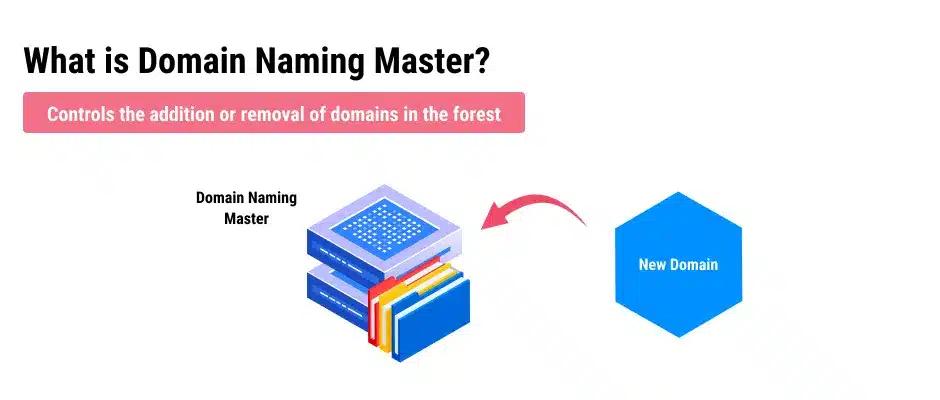
2. Domain Naming Master
Each forest has one Domain Naming Master. It is the only domain controller authorized to add or remove domains and application partitions from the forest.
You interact with the Domain Naming Master when your organization's directory structure changes: adding a child domain, removing an obsolete domain, or absorbing domains from an acquired company. Because these operations are infrequent and rarely time-critical, the Domain Naming Master has lower availability requirements than the domain-level roles. A brief Domain Naming Master outage has no impact on day-to-day operations.
3. RID Master
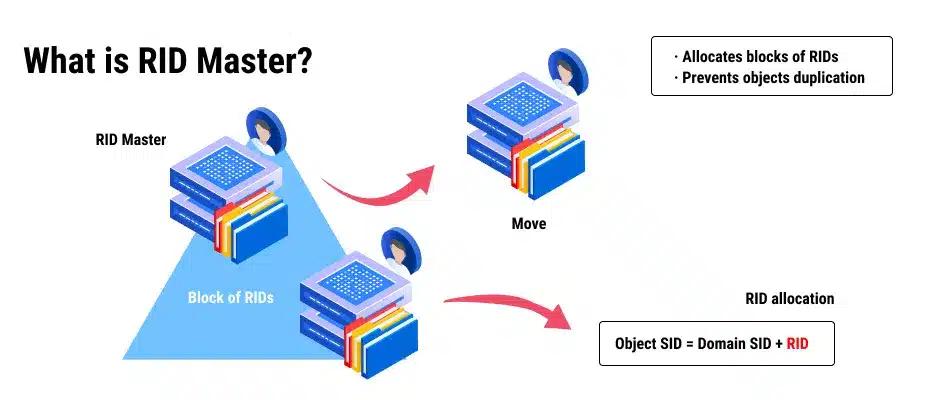
Each domain has one RID Master. Every security principal in Active Directory (users, computers, and groups) requires a unique Security Identifier (SID). A SID consists of a domain-wide prefix followed by a Relative Identifier (RID). The RID portion is what makes each SID unique within the domain.
The RID Master maintains this uniqueness by allocating RID pools to domain controllers. When a DC needs to create a new security principal, it draws an RID from its allocated pool rather than contacting the RID Master for every object. Once a pool runs low, the DC requests a new one from the RID Master.
A SID follows this structure:
S-1-5-21-1234567890-1234567890-1234567890-1001
The domain SID is the same for all objects in the domain. The final segment (1001 in this example) is the RID assigned to a specific security principal.
If the RID Master goes offline, domain controllers continue creating objects using their existing RID pools. In mature environments with large pools, this can continue for an extended period. Eventually, once all DC pools are exhausted, object creation fails.
4. PDC Emulator
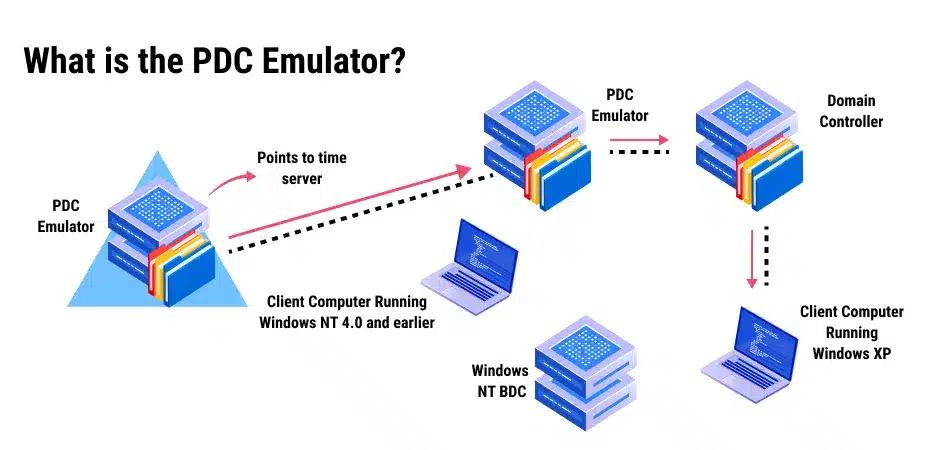
Each domain has one PDC Emulator. It carries more responsibilities than any other FSMO role and has the most direct impact on day-to-day domain operations. The PDC Emulator handles the following:
- Time synchronization: The PDC Emulator is the authoritative time source for its domain. All workstations and member servers synchronize their clocks to it. In a multi-domain forest, the PDC Emulator in the forest root domain acts as the timekeeper for all other PDC Emulators in the forest. The PDC Emulator in the root domain should synchronize with a reliable external time source. Kerberos authentication fails when the clock difference between a client and its authenticating DC exceeds five minutes; accurate time isn't optional.
- Password changes and authentication: When a user changes a password, the change replicates immediately to the PDC Emulator. If a user attempts to authenticate against a DC that hasn't yet received the updated password through normal replication, that DC forwards the authentication request to the PDC Emulator. This ensures the domain accepts valid credentials even when recent password changes haven't yet propagated through scheduled replication.
- Account lockout processing: When an account lockout occurs, the PDC Emulator processes it immediately and replicates the lockout status to all DCs in the domain. When an administrator unlocks an account, the PDC Emulator replicates the change immediately.
- Group Policy updates: Changes to a Group Policy Object are initially committed to the DC holding the PDC Emulator role. This prevents versioning conflicts that would occur if two administrators edited the same GPO on different DCs at the same time.
- DFS namespace synchronization: By default, DFS root servers request updated namespace information from the PDC Emulator. In large environments, this can create resource bottlenecks. Enabling the RootScalability parameter in Dfsutil.exe allows DFS root servers to request updates from the nearest DC instead.
Place the PDC Emulator on a high-performance DC with good network connectivity to all other controllers in the domain. Its failure has immediate, visible impact on operations.
5. Infrastructure Master
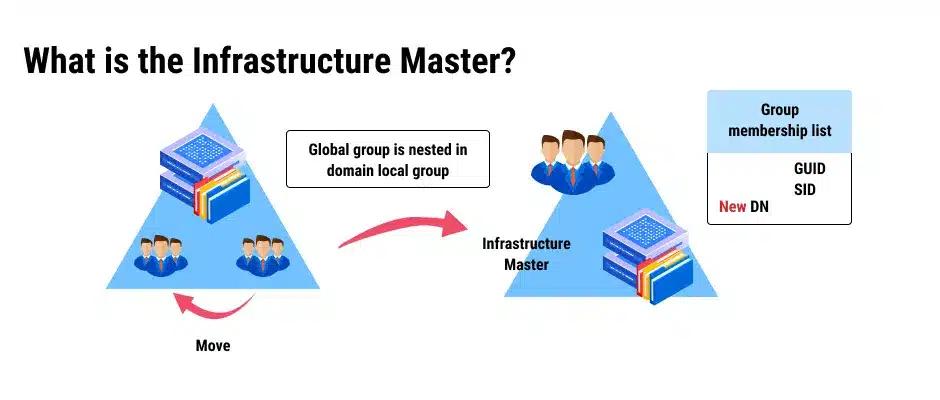
Each domain has one Infrastructure Master. Its primary responsibility is maintaining accurate cross-domain object references in a multi-domain forest.
When a user from one domain is added to a security group in another domain, Active Directory creates a placeholder object (called a phantom object) in the group's domain to represent the cross-domain user. The Infrastructure Master keeps those phantom objects up to date by synchronizing them with the global catalog. It also cleans up stale objects by removing references to objects from deleted trusts or domains.
Two conditions make the Infrastructure Master unnecessary: single-domain forests (no cross-domain references exist) and environments where every DC is also a global catalog server (common in modern environments with sufficient network bandwidth). In either case, all DCs already hold updated cross-domain information without relying on the Infrastructure Master.
If the Infrastructure Master goes offline, cross-domain object names may fail to resolve correctly. Cross-domain group memberships continue to function, so the operational impact is primarily administrative.
How to find FSMO role holders
Knowing which domain controllers hold the five FSMO roles is a prerequisite for both planned maintenance and incident response. Three methods are available using built-in Active Directory management tools.
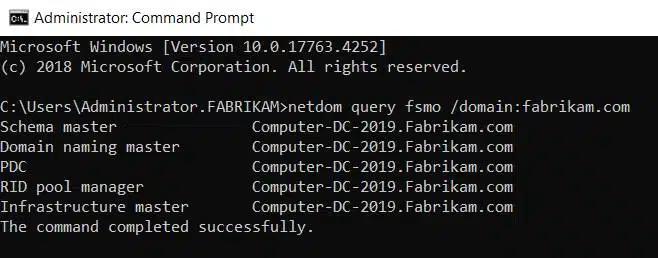
Using netdom query fsmo
The netdom command runs on any domain-joined Windows machine with RSAT installed, or directly on a domain controller. It returns all five role holders in a single query:
netdom query fsmo /domain:<DomainName>
Replace <DomainName> with the fully qualified domain name of the target domain. The output lists the hostname of the DC holding each role.
Using PowerShell
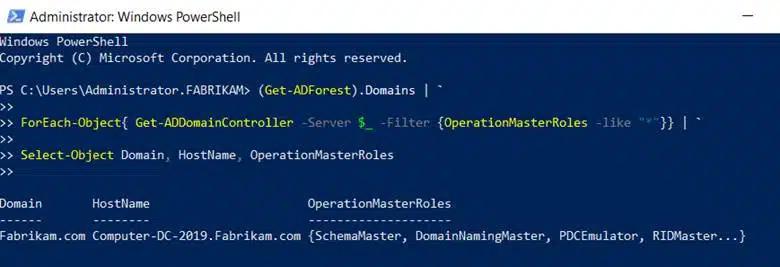
PowerShell provides finer-grained control and works well for environments with multiple domains. The following script queries all domains in the forest and returns every DC with an FSMO role assignment:
      (Get-ADForest).Domains |
ForEach-Object {
    Get-ADDomainController -Server $_ -Filter { OperationMasterRoles -like "*" }
} |
Select-Object Domain, HostName, OperationMasterRoles
For a simpler per-domain query, use Get-ADDomain and Get-ADForest directly:
      # Forest-level roles
Get-ADForest | Select-Object SchemaMaster, DomainNamingMaster

# Domain-level roles
Get-ADDomain | Select-Object PDCEmulator, RIDMaster, InfrastructureMaster
Using Active Directory administrative tools
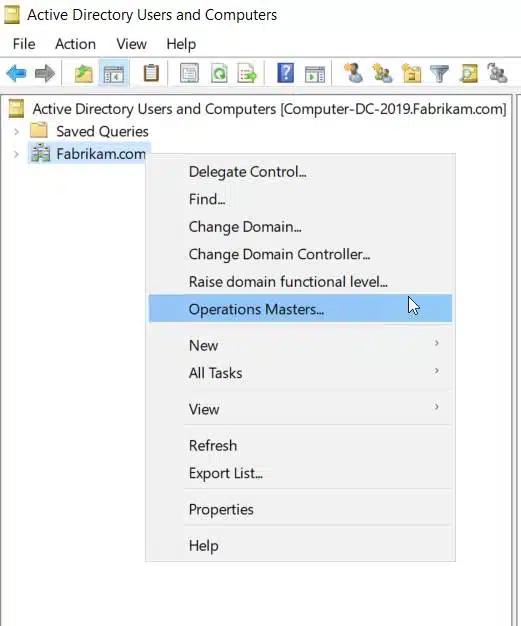
The GUI tools in Active Directory Users and Computers expose the three domain-level FSMO roles.
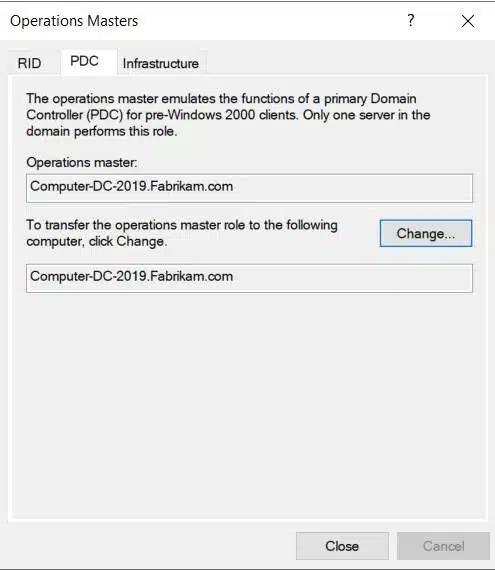
To find the RID Master, PDC Emulator, and Infrastructure Master:
- Open Active Directory Users and Computers.
- Right-click the domain name in the left pane and select Operations Masters.
- Review the RID, PDC, and Infrastructure tabs, each displaying the current role holder.
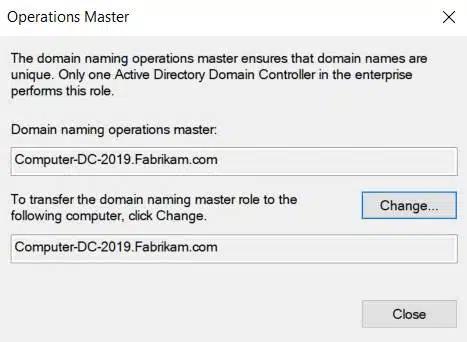
To find the Domain Naming Master:
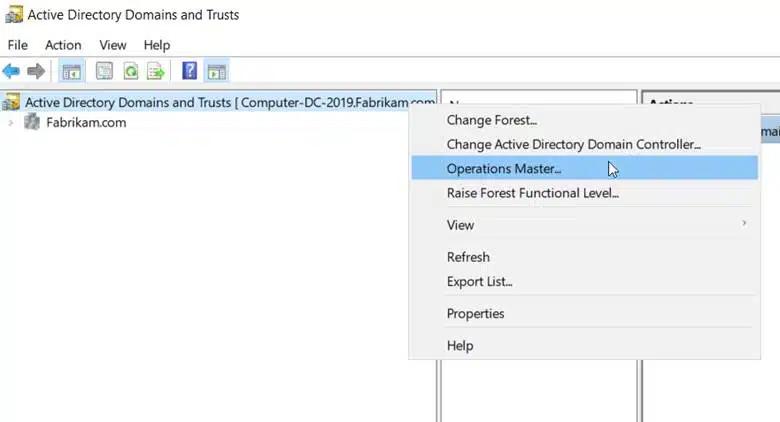
- Open Active Directory Domains and Trusts.
- Right-click Active Directory Domains and Trusts in the left pane and select Operations Master.
- The dialog shows the current Domain Naming Master.
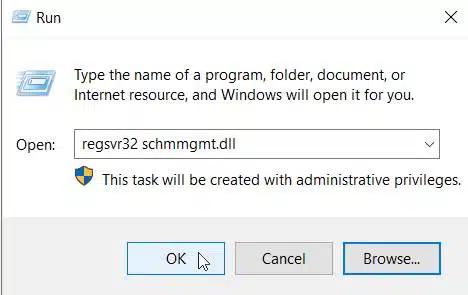
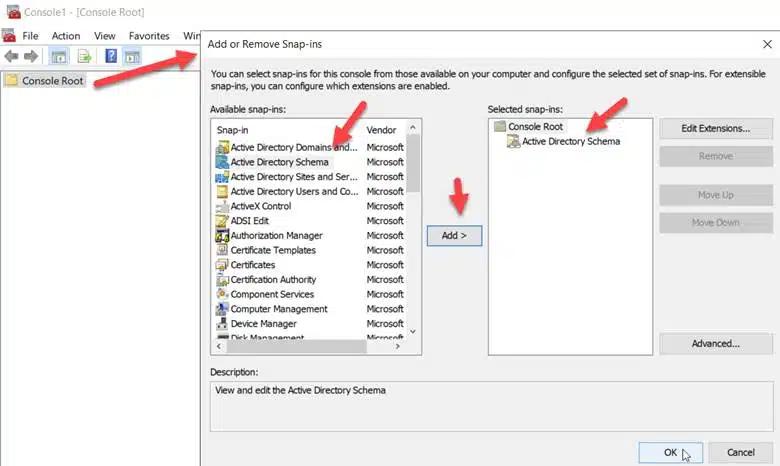
To find the Schema Master: The Active Directory Schema snap-in doesn't load by default. Register it first:
- Open a Run dialog (Win + R) and enter
regsvr32 schmmgmt.dll.Click OK.
2. Open MMC (mmc.exe), go to File > Add/Remove Snap-in, and add Active Directory Schema.
3. Right-click Active Directory Schema in the left pane and select Operations Master to view the current Schema Master.
How to transfer FSMO roles
A transfer moves an FSMO role from its current holder to another DC while both controllers are online and communicating. Use a transfer for planned operations: decommissioning a DC, redistributing roles for load or redundancy, or replacing aging hardware.
Both DCs must be online, reachable, and successfully replicating before you start a transfer. Verify replication health with repadmin /replsummary before proceeding.
Transfer via PowerShell
PowerShell is the most efficient method for transferring roles, particularly when moving multiple roles at once. The Move-ADDirectoryServerOperationMasterRole cmdlet handles all five roles.
Transfer a single role:
Move-ADDirectoryServerOperationMasterRole -Identity "TargetDCName" -OperationMasterRole PDCEmulator
Transfer all five roles at once:
      Move-ADDirectoryServerOperationMasterRole -Identity "TargetDCName" `
    -OperationMasterRole SchemaMaster, DomainNamingMaster, PDCEmulator, RIDMaster, InfrastructureMaster
Replace TargetDCName with the NetBIOS name or FQDN of the destination DC. PowerShell prompts for confirmation before transferring each role. Add -Confirm:$false to suppress prompts in scripted scenarios.
The five role name values are SchemaMaster, DomainNamingMaster, PDCEmulator, RIDMaster and InfrastructureMaster.
Transfer via the GUI:
For the RID Master, PDC Emulator, and Infrastructure Master: open ADUC, navigate to Operations Masters, select the relevant tab, and click Change. For the Domain Naming Master: use Active Directory Domains and Trusts > Operations Master > Change. For the Schema Master: use the Active Directory Schema snap-in > Operations Master > Change.
After any transfer, run netdom query fsmo to confirm the new role assignments.
How to seize FSMO roles
A seizure forcibly assigns an FSMO role to a new DC without coordination with the original holder. Use a seizure only when the current role holder is permanently offline and unrecoverable. Do not seize a role if the original holder could return to the network; bringing a former role holder back online after a seizure causes a split-brain condition that requires manual remediation.
Before seizing, attempt to restore or recover the original DC. If recovery isn't feasible, proceed with the seizure and ensure you never rejoin the original DC to the domain without first demoting it.
Seizing roles with ntdsutil:
Open an elevated Command Prompt on the DC that will receive the roles and run ntdsutil. Then follow these steps:
      ntdsutil
roles
connections
connect to server <NewDCName>
quit
After connecting, seize each role individually:
      seize pdc
seize rid master
seize infrastructure master
seize schema master
seize domain naming master
Type quit twice to exit ntdsutil after completing all seizures.
Confirm the new assignments with netdom query fsmo before bringing any services back online that depend on those roles.
Netwrix Auditor records every FSMO role seizure with account context and source workstation so your team can verify it was authorized. Get a demo
FSMO role placement best practices
Role placement directly affects AD stability and recovery time. Review the Active Directory security best practices guide for broader hardening recommendations alongside these role-specific guidelines:
- PDC Emulator and RID Master on the most reliable DC in the domain: Both roles have high availability requirements. The PDC Emulator's failure has immediate user impact; RID Master failure accumulates over time as pools deplete. Place them on the most reliable, best-connected DC in the domain.
- Schema Master and Domain Naming Master together, on a less-used DC: These forest-level roles are rarely invoked. Grouping them on the same DC simplifies administration without creating a performance bottleneck.
- Infrastructure Master off a global catalog server: In environments where not all DCs are also global catalog servers, the Infrastructure Master should run on a DC that doesn't hold a global catalog copy. An Infrastructure Master that also holds a global catalog never finds phantom objects to update, so it can't keep cross-domain references current. If all DCs in your domain are global catalog servers (common in modern environments), this restriction doesn't apply.
- Distribute roles across physical locations where possible: In multi-site environments, placing roles on DCs at your primary site reduces WAN dependency for role-dependent operations. Pair this with a documented transfer plan so roles can move quickly if the primary site goes offline.
For guidance on setting up and configuring domain controllers to support these placement decisions, review Netwrix's domain controller deployment guide.
How Netwrix Auditor helps you monitor and audit FSMO role changes
An unauthorized FSMO role transfer or seizure is a confirmed AD attack vector with consequences beyond routine operational disruption. An attacker who gains sufficient privileges on a domain controller can seize the PDC Emulator role to intercept authentication requests, manipulate time synchronization, or control Group Policy distribution across the domain. These changes may not surface in native Windows event logs with enough context to identify the actor and intent.
Active Directory records FSMO transfers in the Directory Service event log under Event ID 1458, logged on the domain controller that received the role and naming the previous holder. The event confirms that a transfer occurred, but it doesn't provide the full account context or the session details an investigation needs.
For a complete picture of what to monitor across your directory, the Active Directory auditing guidelines cover the full scope of events worth tracking.
Netwrix Auditor for Active Directory closes the gap between what native logs capture and what your security team needs to act on.
Real-time alerts on FSMO role changes
Netwrix Auditor alerts the moment an FSMO role is transferred or seized. Alerts fire regardless of whether the change was made through PowerShell, the GUI, or ntdsutil, and include the account that initiated the change, the source workstation, and the timestamp. Your team can verify planned transfers immediately and escalate unrecognized changes before further damage occurs.
Full before-and-after audit trail
Every FSMO role change is logged with the previous role holder, the new role holder, the account that performed the action, and the exact time of the change. Native Windows event logs omit this context. When an incident requires reconstruction (for an internal investigation or an external audit), the complete record is available without relying on log aggregation from multiple domain controllers.
Distinguish planned transfers from unauthorized seizures
Because Netwrix Auditor captures the full account and session context, your team can cross-reference role changes against your change management records. A transfer executed by a named admin account during a scheduled maintenance window looks different from a seizure executed by an account with no prior administrative activity. The audit trail makes that distinction clear and defensible.
Compliance-ready reporting
FSMO role assignments are part of the privileged access footprint that SOX, HIPAA, and ISO 27001 audits examine. Netwrix Auditor generates pre-built reports on Active Directory privilege changes that satisfy auditor requests without manual log extraction. Role change history is retained and searchable, so compliance evidence is available on demand rather than assembled under pressure.
Request a demo to see how Netwrix can help you audit FSMO role changes, track every Active Directory modification, and produce the investigation-ready evidence your security team needs.
Frequently asked questions about FSMO roles
Share on
Learn More
About the author

Jonathan Blackwell
Head of Software Development
Since 2012, Jonathan Blackwell, an engineer and innovator, has provided engineering leadership that has put Netwrix GroupID at the forefront of group and user management for Active Directory and Azure AD environments. His experience in development, marketing, and sales allows Jonathan to fully understand the Identity market and how buyers think.
Learn more on this subject
Who owns your AI agents? Probably no one
Govern the AI agent as the identity it is
Microsoft is retiring memberOf operator in Entra ID Dynamic Groups. What should administrators do next?
Powerful LDAP extended controls: Anti-remediation and invisible recon in AD
Create AD Users in Bulk and Email Their Credentials Using PowerShell