
Microsoft Entra ID monitoring: Detecting suspicious activity
Sep 2, 2026
Entra ID monitoring correlates sign-in, audit, and privileged-role activity to expose suspicious identity changes while evidence still exists. Native controls leave gaps in retention, licensing, and correlation, so resilient teams export data, baseline admin behavior, and connect to Entra ID, Privileged Identity Management (PIM), OAuth, Conditional Access, and on-premises Active Directory events in a single workflow.
Identity-based attacks rose 32% in the first half of 2025, and more than 97% of them were password spray or brute-force attempts, according to the Microsoft Digital Defense Report 2025. Microsoft Entra ID already logs almost every action those attacks touch, from each sign-in to each role change to each consent grant, so missing data is rarely the constraint.
The constraint is knowing which of those events deserve an alert, and whether anyone can connect them after they land in separate places. A role assignment, an OAuth consent grant, and a temporary admin activation each read as ordinary administrative work.
Licensing tiers, portal views, and hybrid directory boundaries then split the evidence across systems, so the sequence resolves into an attack only after someone stitches it back together.
Detection depends on which signals carry weight, where native tooling stops short, and how to correlate what is left into identity security posture signals.
What is Microsoft Entra ID monitoring?
Microsoft Entra ID is Microsoft's cloud-based identity and access management service. It authenticates users, enforces access policies, and issues tokens that allow people and applications to access Microsoft 365, Azure resources, and connected SaaS applications.
General Azure infrastructure monitoring covers uptime, directory sync health, and service status to confirm the platform is running. Security-focused Entra ID monitoring is different: it maintains continuous visibility into sign-in logs, audit logs, and Privileged Identity Management (PIM) activity, monitoring for patterns that indicate compromise or unauthorized changes.
Any practitioner knows monitoring must be ongoing, not periodic. What separates a working practice from a dashboard nobody reads is knowing which Entra ID signals actually matter.
That list is narrower than it looks. It covers risky sign-ins flagged by Identity Protection, Add member to role events outside PIM, OAuth consent grants like Add delegated permission grant, and Conditional Access edits that quietly loosen a policy.
Why security teams monitor Microsoft Entra ID
Entra ID sits at the center of everything else the organization runs, so monitoring it well pays off across the whole environment it controls. The Netwrix 2025 Cybersecurity Trends Report found that 46% of respondents experienced account compromise in 2025, compared with 16% in 2020
- Exposes the small changes that chain into attacks: Microsoft's responder guidance on the Midnight Blizzard intrusion describes a password spraying attack that compromised a legacy, non-production test tenant account without MFA. The actor then compromised a legacy test OAuth application holding elevated access and used it to grant itself the Office 365 Exchange Online full_access_as_app role for mailbox access. Each step resembled routine administrative activity, and the intrusion ran from late November 2023 until Microsoft detected it on January 12, 2024.
- Unifies hybrid AD and Entra ID into one detection surface: Most organizations run both directories. Monitoring them together catches an attacker pivoting across them, for example by abusing Entra Connect Sync, where the two halves would otherwise pass as unrelated low-severity events.
- Answers the question after the fact: Monitoring that exports and retains logs keeps an evidence trail with before-and-after values available to auditors, leadership, and incident responders well past native retention limits.
Where native Microsoft Entra ID monitoring falls short
Entra ID provides three core log sources. Audit logs record what changed, sign-in logs record who authenticated, from where, and at what risk level, and PIM logs record how a privilege became active. Having them is only the first step in detection.
Retention windows are shorter than most teams expect
Audit and sign-in logs persist for 30 days with a P1 or P2 license and only seven days on the free tier, per Microsoft's data retention reference. Retention upgrades are non-retroactive, so moving from Free to P1 does not recover anything that has already expired. If a team investigates an event a month later, it may find nothing left to query.
Risk detail is gated behind P1/P2 licensing
Risk policies, full risky-user detail, and risk-based Conditional Access all require Entra ID P2, per Microsoft's Identity Protection documentation. Free and P1 tenants can access sign-in logs, but risk detections, risky sign-ins, and the detailed risk context that makes anomalies actionable require Entra ID P2. Teams on lower license tiers monitor with a reduced data set.
Logs sit in separate views with no built-in correlation
Teams review sign-ins, audit events, Conditional Access changes, and PIM activity across different views, so connecting them requires exported logs or standing queries. A Conditional Access exclusion added at 2:14 and a role assignment at 2:31 never appear on the same screen. Manual cross-referencing scales poorly beyond a handful of incidents.
On-prem AD and Entra ID activity stay separated by default
Native views log a group membership change as Windows Event ID 4728 on a domain controller, separate from a role assignment in the Entra ID audit log. On-prem AD and Entra ID use different identifiers, so even exported logs require deliberate identity mapping to correlate them. A cross-directory attack path stays invisible by default.
Netwrix Threat Manager maps credential theft, lateral movement, and privilege escalation across on-premises Active Directory and Entra ID. Book a demo
How to detect suspicious activity in Microsoft Entra ID
Suspicious activity in Entra ID usually arrives as a chain of individually legitimate-looking admin actions. The detection categories below provide the highest signal-to-noise ratio for identity teams that need to prioritize their monitoring.
Watch for impossible travel and risky sign-ins
A risky sign-in is the fastest indicator of account compromise. Trigger on Microsoft Entra ID Protection's named risk detections, not raw signals alone. Atypical travel flags geographically impossible locations. Anonymous IP address flags Tor exit nodes and other anonymizing services.
Unfamiliar sign-in properties flag new or unfamiliar devices and browser combinations. Also watch legacy authentication protocols like Post Office Protocol (POP), Internet Message Access Protocol (IMAP), and Simple Mail Transfer Protocol authentication (SMTP AUTH), since none of them can enforce multifactor authentication (MFA).
Correlate geography with device, browser, and autonomous system number (ASN) signals, because attackers use residential IP services to evade geo-only detection.
Catch privilege escalation before it sticks
A directory role assignment or PIM activation is direct privilege elevation, so track it when it happens rather than periodically reviewing who has access. The Netwrix 2026 Data and Identity Security Report found that 76% of organizations can't immediately revoke standing access once it is no longer needed, which raises the value of catching every elevation event as it happens.
The same least-privilege work often continues into access certification so role ownership and approvals stay current. Trigger on the audit operations Add member to role and Add member to role completed (PIM activation) for Tier-0 roles, meaning the highest-privilege assets such as Global Administrator and Privileged Role Administrator. Role assignments made outside PIM deserve immediate escalation; Microsoft Sentinel includes a community rule that matches "Add member to role" outside of PIM for exactly this case.
Flag Conditional Access policy weakening
Conditional Access policy tampering, mapped to MITRE ATT&CK technique T1556.009, lets attackers loosen the controls that would otherwise catch them before they act. Trigger on the audit activities Update Conditional Access policy and Delete Conditional Access policy, then inspect the modified properties for a state change from enabled to report-only, new user or group exclusions, and loosened grant or session controls. The specific change is hidden within the generic update event, so alerting on the event name alone covers only half the risk.
Track OAuth app consent grants
An OAuth application with consent holds access that survives password resets and MFA changes, which makes it a persistence mechanism with more reach than any single compromised user, and one that user-focused monitoring never sees.
Trigger on the Consent to application, add an app role assignment to the service principal, and add delegated permission grant audit events, especially where admin consent covers broad Microsoft Graph scopes. As an application permission, Mail.Read reads every mailbox, and Sites.FullControl.All grants full SharePoint control with no signed-in user.
Monitor authentication method and credential changes on privileged accounts
Many account takeovers begin by taking over the ability to authenticate, not the account itself. Trigger on User registered security info, User deleted security info, and password resets on privileged accounts.
Microsoft's privileged-account guidance flags new security-info registration as a possible sign that an attacker is securing continued access, and a password reset followed by MFA re-enrollment within a short window is one of the strongest indicators of compromise in the audit log.
How to build a practical Microsoft Entra ID monitoring workflow
Detection patterns only work inside a standing workflow. Each control below depends on the one before it, and building them in order is what turns isolated log entries into a working detection program.
1. Centralize and retain logs beyond native limits
Configure Entra diagnostic settings to export sign-in, audit, and PIM activity to a security information and event management (SIEM) platform, a Log Analytics workspace, or long-term storage before any incident occurs.
Each detection pattern above depends on the data still being available when the investigation begins, and Microsoft recommends retaining data for at least 90 days for security analysis. Include the non-interactive and service principal sign-in categories in the export; they capture activity outside interactive user sign-ins.
2. Set baselines before setting alerts
Every detection category above becomes noise if it fires on every occurrence rather than on what's actually abnormal, and that noise buries the one alert that matters. Establish what normal looks like for each admin and role, covering typical sign-in locations, PIM activation frequency, and consent volume.
Alert on deviation from that baseline rather than on every occurrence of a monitored event type. Red Hound recommends running hunts over a 30-day history before converting results into alerts. Where no baseline exists yet, Microsoft's defaults are four changes in 60 minutes for users and two for privileged accounts.
3. Correlate events across sign-in, audit, and PIM logs
Build standing queries for chain patterns. Two worth starting with are a Conditional Access policy weakened and then a role assigned within 30 minutes, and a service principal created and granted tenant-wide admin consent within an hour, which Microsoft Sentinel's community rules already implement.
4. Extend correlation to include on-prem AD
Export on-prem AD security events into the same SIEM or hybrid monitoring tool as the Entra ID logs. Include group membership changes (Event IDs 4728, 4732, and 4756), directory object modifications (5136), and the replication events that indicate a DCSync attack (4662 alongside the 4932-4934 series)
Correlate by identity and time window, normalizing between on-prem SIDs and Entra Object IDs. The same admin account acting in both directories within a short window is the pattern worth flagging; either action alone looks routine. A single, correlated view across both directories is what turns two low-severity events into one clear signal.
5. Build an investigation and response playbook
Decide in advance what to pull first, starting with the audit event details, the initiator's sign-in history, and the blast radius, meaning which accounts, applications, mailboxes, and permissions the activity could affect.
Preserve evidence before containment; Microsoft's token theft playbook instructs responders to record role assignments and suspicious rules during the investigation. Define containment steps, including disabling the suspected principal and revoking refresh tokens, and remember that OAuth consent grants require separate revocation because password resets never remove an application's access. Assign a named owner to each step.
Detecting a change and knowing it was sanctioned are two different problems. A role assignment or Conditional Access edit appears the same way in the audit log, whether change management approved it in advance or an admin made the call on their own.
The playbook therefore needs a way to verify the event against an approved change ticket or maintenance window, not just confirm it happened. Teams without that reconciliation step in place end up re-litigating routine changes during every investigation.
Teams reducing persistent admin exposure ahead of the next incident should also revisit which roles still carry standing access rather than just-in-time elevation, since fewer standing admins means a smaller blast radius the next time this playbook runs.
How Netwrix supports Microsoft Entra ID monitoring
The workflow above needs two things native tooling leaves out. The first is change records that outlive Microsoft's retention window; the second is detections that read on-premises and cloud identity events together. Netwrix Auditor and Netwrix Threat Manager cover those two jobs alongside an existing SIEM, under the Data Security that Starts with Identity™ approach.
Retaining directory and permission change history past native limit
Netwrix Auditor tracks role assignments, group membership changes, and permission changes across both on-premises Active Directory and Microsoft Entra ID. Netwrix Auditor deploys in 30 minutes, with first actionable reports within hours.
Netwrix Auditor captures before-and-after values and retains audit data beyond Microsoft's native window, with long-term archive storage for investigations that open late. The correlation and playbook steps above depend on that data.
Enjoy.ing consolidated its audit trail across on-premises AD, Microsoft Entra ID, and VMware into one place ahead of GDPR and ISO 27001 work, and incident investigations that had taken hours now take minutes.
Detection for privilege escalation and suspicious sign-in patterns
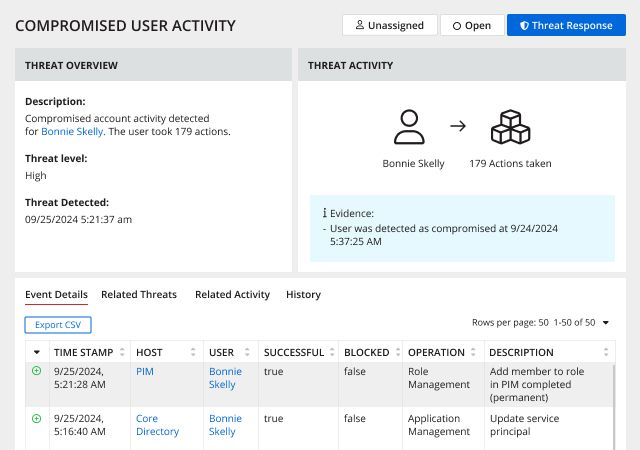
Netwrix Threat Manager natively detects several of the Entra ID patterns above, including impossible travel, sensitive role changes, and application permission changes, layering on top of Microsoft's native signals and Sentinel rather than replacing them.
For teams reducing persistent admin exposure, Netwrix Privilege Secure replaces always-on admin rights with ephemeral accounts, task-scoped privileged sessions that expire when the work ends. That is how zero standing privilege gets enforced in practice.
Answering audit and incident questions from one search
First National Bank and Trust of Beloit replaced manual evidence gathering across 17 locations with Netwrix Auditor reporting for Office of the Comptroller of the Currency (OCC) compliance, and audit preparation that once took a week now takes an hour. For broader governance programs, identity governance tools turn audit findings into access review and lifecycle controls.
Detection only works if someone is watching
Entra ID already produces the logs; most environments just need a standing practice that turns them into evidence. The five detection categories above, applied consistently across hybrid AD and Entra ID, help teams act on suspicious sequences rather than isolated events. The workflow that connects retention, baselines, correlation, and response makes it routine rather than incident-driven.
A full SIEM buildout can come later. The practical next step is to make correlation part of the standing routine, whether that means configuring diagnostic exports this week or reviewing which privileged roles still retain standing access.
Request a demo to see how Netwrix can help you monitor hybrid Entra ID and Active Directory activity, correlate identity signals across log sources, and keep audit-ready evidence on hand.
Frequently asked questions about Microsoft Entra ID monitoring
Share on
Learn More
About the author

Netwrix Team
Learn more on this subject
Microsoft RAMP stops at the edge of your certificate authority
Access whack-a-mole never ends. There's a reason for that
Govern the AI agent as the identity it is
Convergence of ITDR, PAM and IGA. Which of the three is standing there when the attack lands?
Endpoint management system breach: why privileged access management (PAM) is now critical