
PingCastle vs. Purple Knight: AD Scanner Comparison
Sep 3, 2026
AD vulnerability scanning gives buyers a point-in-time view of directory risk, while hybrid identity assessment extends that view across cloud platforms. Misconfigurations in accounts, permissions, and policies create recurring exposure, so teams need scoring, prioritized remediation, licensing clarity, reusable evidence, and a path to continuous posture management.
Active Directory (AD) misconfigurations drive most exposure that now reaches sensitive data. The Netwrix 2026 Data and Identity Security Report found that 74% of organizations aren't fully confident their AD environment is free of misconfigurations that could enable privilege escalation.
PingCastle and Purple Knight dominate the conversation about finding those misconfigurations, and Netwrix acquired PingCastle on August 1, 2024.
Netwrix PingCastle asks where AD configuration and maturity are weak. Purple Knight asks which specific indicators of exposure and indicators of compromise (IOEs and IOCs) need fixing right now across AD and Entra ID.
This comparison weighs methodology, coverage, deployment effort, and how each assessment fits into continuous identity security management.
PingCastle vs. Purple Knight at a glance
The table below maps Netwrix PingCastle and Purple Knight across the dimensions that matter most for this evaluation, plus how Netwrix's broader identity security stack extends either one. The biggest decision is whether the assessment needs deeper AD configuration scoring or broader hybrid identity coverage.
Dimension | Netwrix PingCastle | Purple Knight | Netwrix |
|---|---|---|---|
|
Primary focus |
AD security assessment and maturity-style risk scoring |
Point-in-time exposure assessment for Active Directory and Microsoft Entra ID, scanning for attack-relevant risks |
AD assessment (Netwrix PingCastle) plus continuous identity security posture management via Netwrix 1Secure™ |
|
Core problem addressed |
Misconfigurations, outdated objects, insecure policies, privilege sprawl |
Exposure indicators and active-compromise signals across hybrid identity environments |
Point-in-time scoring plus continuous drift detection, real-time attack blocking, and privileged access remediation |
|
Output style |
HTML reports and risk scorecards; Domain Risk Score, Maturity Assessment |
Color-coded report card, graded categories, prioritized remediation checklist |
Domain Risk Score and CMMI maturity scoring from Netwrix PingCastle, plus ongoing risk scoring and alerting through 1Secure |
|
Coverage |
Both on-premises Active Directory and Microsoft Entra ID, while capabilities vary by edition |
On-premises AD + Entra ID + Okta |
On-premises AD and Entra ID; Okta isn't covered |
|
Ease of setup |
Standalone executable that can produce a scored HTML healthcheck report, with scan times typically ranging from a few minutes to an hour depending on environment size |
Lightweight installed GUI tool; AD scans run with standard domain-user permissions |
Same standalone Netwrix PingCastle executable, with 1Secure layered on for ongoing monitoring |
|
Continuous monitoring |
Community Edition runs on demand; Netwrix 1Secure adds ongoing identity security posture management across AD and Entra ID |
Community Edition runs on demand; Semperis Directory Services Protector adds continuous monitoring as a separate product |
Netwrix 1Secure adds always-on identity security posture management, closing the gap that the free tier leaves between scans |
|
Deployment model and licensing |
Offline single executable; Free under the Non-Profit Open Software License 3.0 for internal use; a paid licence covers reselling assessments |
Installed executable; Community Edition free, with current commercial-use terms requiring vendor verification |
Netwrix PingCastle Community Edition free for personal use; 1Secure, Threat Prevention, Threat Manager, and Privilege Secure licensed separately for the fuller program |
|
Best for |
Admins needing fast, scored AD health checks with a path into a broader identity security program |
Teams needing a fast hybrid exposure snapshot across AD, Entra ID, and Okta with guided remediation |
Teams that want the AD assessment tool to plug directly into ongoing monitoring, real-time attack blocking, and privileged access remediation |
Note on indicator counts: exact indicator figures can change by edition and framework mapping, so treat counts as approximate rather than settled fact.
Why buyers compare PingCastle and Purple Knight
Both tools produce a point-in-time report on identity infrastructure risk, so evaluations routinely scope them together.
Joint government guidance recommends both tools
A September 2024 advisory on detecting and mitigating Active Directory compromises recommends BloodHound, Netwrix PingCastle, and Purple Knight together by name. It came from the National Security Agency (NSA), the Cybersecurity and Infrastructure Security Agency (CISA), and cyber agencies in Australia, Canada, New Zealand, and the United Kingdom.
The advisory describes Netwrix PingCastle as an Active Directory security reporting tool and Purple Knight as an application for assessing Active Directory environment security, which puts the two side by side in serious evaluations.
Configuration risk and exposure-indicator risk are different questions
Netwrix PingCastle scores configuration and policy maturity in a format built to rerun over time. Purple Knight flags specific indicators of exposure, misconfigurations, and vulnerabilities at a point in time. Buyers often recognize the difference after comparing feature lists directly, because both tools produce a numeric score from a quick scan.
Hybrid AD, Entra ID, and Okta environments raise the stakes
The Netwrix 2025 Cybersecurity Trends Report found that 77% of organizations now operate in hybrid IT environments. Purple Knight's coverage is deepest for Active Directory and Microsoft Entra ID, so any Okta requirements need to be validated specifically here.
Netwrix PingCastle's free tier focuses on on-premises AD rather than Entra ID or Okta, so hybrid buyers face a concrete coverage decision.
PingCastle's ownership and roadmap have changed
Netwrix's acquisition of PingCastle means most existing advice to run both tools predates the change, including Semperis's own September 2022 comparison. Buyers evaluating today should weigh where Netwrix PingCastle fits inside a broader identity security architecture.
Netwrix PingCastle for AD configuration and health assessment
Netwrix PingCastle is an AD security assessment tool that scores directory risk and prioritizes hardening work. It runs as a standalone executable under a standard domain user account, over Lightweight Directory Access Protocol (LDAP), Active Directory Web Services (ADWS), and Server Message Block.
Each scan is headlined by a Domain Risk Score, which takes the maximum of four category sub-scores across Privileged Accounts, Trusts, Stale Objects, and Security Anomalies, capped at 100. A separate maturity assessment based on the Capability Maturity Model Integration (CMMI) model scores 20 measures across five areas.
What stands out:
These capabilities make Netwrix PingCastle useful for repeatable AD posture tracking:
- Automated scans flag misconfigurations, stale objects, insecure policies, and risky settings attackers could exploit, organized into the four risk categories above
- HTML reports and scorecards support posture tracking across reruns; XML output feeds consolidation reports and trust-relationship maps for multi-domain environments
- Risk scoring points admins at the worst-scoring category first, which helps turn a broad health check into a remediation sequence
- Offline, single-file execution keeps the scan inside the environment, and Enterprise documentation explicitly supports air-gapped operation, which matters for regulated networks
- The Enterprise edition adds a centralized dashboard, scheduled assessments through Windows Task Scheduler, maturity score tracking over time, and color-coded status views for management reporting
- Within a broader Netwrix program, 1Secure surfaces ongoing identity risk scoring across AD and Entra ID, with 170+ checks mapped to MITRE ATT&CK
Trend tracking and management reporting stay easy to produce without changing the underlying scan workflow.
What to consider:
Buyers should also account for these limits before relying on the free scan:
- Consultants and managed service providers need a paid license, since the free license covers internal assessment but not selling assessments to others.
- Edition-specific Entra ID coverage requires verification, so hybrid buyers should confirm depth before comparing broader scanners.
- On-demand scans leave gaps between runs, so teams need continuous tooling for posture drift and evidence history.
Edition and license review belong in the Netwrix PingCastle evaluation alongside the scan results themselves.
Purple Knight for hybrid exposure and compromise assessment
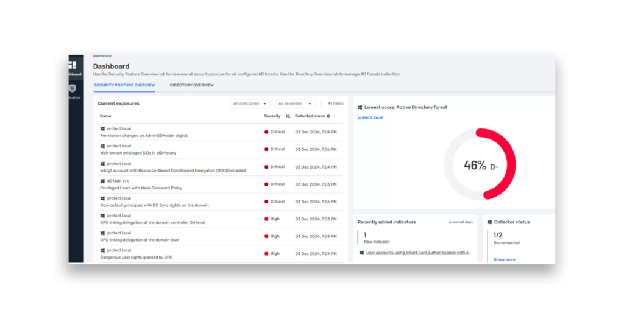
Purple Knight is a free Semperis assessment tool that runs as a graphical user interface (GUI) application and scans AD and Microsoft Entra ID for IOEs and IOCs. A scan returns an overall security score from 0 to 100, graded A+ through F.
Source: semperis.com
What stands out:
Purple Knight's strengths center on fast hybrid coverage and guided remediation:
- The color-coded, prescriptive report card is approachable for teams without deep AD security expertise and provides a checklist of remediation work
- One free scan covers AD, Entra ID, and Okta; Okta indicators include checks for privileged custom roles, recently created API tokens, and new Super Admin grants
- Every indicator maps to MITRE ATT&CK, and these indicators can help teams correlate findings with broader security frameworks where such mappings are documented, giving each finding attack-technique context
- AD scans run as a regular domain user with standard permissions; Entra ID scans require a one-time app registration performed by a Global Admin
The report routes cleanly from assessment to remediation work.
What to consider:
Teams should weigh these trade-offs against the tool's hybrid scan coverage:
- On-demand operation leaves visibility gaps between reassessments, so buyers need separate processes for drift detection.
- The score weights failed indicators, severity, and object volume, which limits maturity tracking across remediation cycles.
- The upgrade path moves buyers toward ITDR procurement, which may exceed an assessment-only budget or scope.
- Replication metadata helps identify changes, but actor attribution and LDAP reconnaissance require additional telemetry sources.
Purple Knight is strongest as a fast snapshot rather than a continuous identity security program on its own.
PingCastle vs. Purple Knight: head-to-head comparison
Configuration-and-maturity health and exposure-indicator risk answer different operational questions.
AD depth vs. hybrid breadth
Netwrix PingCastle goes deeper on AD-specific configuration and maturity tracking, with a rules engine organized around privileged accounts, trusts, stale objects, and security anomalies. Purple Knight goes wider, covering Entra ID and Okta in the same free scan.
For organizations running only on-premises AD, both tools cover the core directory use case. For hybrid environments, Purple Knight's Okta coverage is a concrete advantage that Netwrix PingCastle's Community Edition doesn't match, so the choice comes down to whether the priority is deep AD configuration scoring or a fast hybrid snapshot that includes Okta.
Reporting and usability
Netwrix PingCastle's HTML reports are more technical and suit admins comfortable reading configuration output, with drill-down details and remediation recommendations per rule. Purple Knight's graded report card and Excel checklist are faster to act on for mixed-skill teams because the output pairs a score with remediation tasks.
Teams with limited AD expertise can run both tools, though interpreting the output differs. Purple Knight's report card reads more easily for non-specialist audiences, while Netwrix PingCastle's scoring tracks improvement over time more usefully.
Ease of setup
Netwrix PingCastle runs from a single executable. Purple Knight runs as an installed GUI tool, and its longest-running indicator checks are de-selected by default so a first scan finishes quickly. Both tools deploy fast, and Netwrix PingCastle keeps a slight edge for offline or air-gapped environments during testing.
Point-in-time scan vs. continuous monitoring
The free tiers run on demand and provide snapshots, and The Netwrix 2025 Cybersecurity Trends Report found 51% of organizations faced a security incident in the past 12 months requiring dedicated response. A snapshot establishes a baseline, and drift can appear as soon as the next week.
Netwrix PingCastle's Enterprise tier adds scheduled assessments within the same tool, while Semperis Directory Services Protector serves Purple Knight users as a separate product. Netwrix 1Secure extends Netwrix PingCastle users into continuous identity security posture management across AD and Entra ID instead.
How to choose between PingCastle and Purple Knight
Both assessment approaches address the same exposure problem from different angles, and the choice depends on which question you need to answer first.
Choose Netwrix PingCastle if:
- The goal is a scored AD configuration and maturity baseline that can be rerun to track improvement over time, especially in an air-gapped or regulated environment.
- The environment is purely on-premises AD, where Purple Knight's Entra ID and Okta coverage adds little.
- Commercial use isn't a factor, or the team is ready to move to a paid Netwrix PingCastle edition
Choose Purple Knight if:
- The priority is a fast, guided hybrid snapshot across AD, Entra ID, and Okta, especially for a team without deep AD security expertise.
- Okta is part of the identity estate and needs coverage in the same scan as AD and Entra ID.
- A graded report card and remediation checklist matter more than rerunnable maturity tracking.
Compliance pressure often settles the tie. For mid-market organizations in regulated industries such as healthcare, financial services, and defense contracting, repeatable AD assessment evidence can help satisfy audit readiness, continuous compliance, and Cybersecurity Maturity Model Certification (CMMC) deadline planning.
Reports from either tool can show that teams identified, assigned, remediated, and rechecked identity risks. Teams subject to HIPAA, PCI DSS, or GDPR can lean on whichever tool already matches their AD, Entra ID, and Okta footprint.
Running both tools for cross-validation is defensible, and the six-agency advisory recommends all three assessment tools rather than choosing between them. Identity programs rarely stop at assessment, though. Teams that outgrow free assessment tools typically move toward continuous AD and Entra ID risk scoring, threat detection, and privileged access management.
When to choose Netwrix over PingCastle or Purple Knight
Netwrix fits buyers who want the assessment step to feed directly into an enforced program.
When assessment needs to run continuously
Only 36% of organizations conducted a comprehensive AD security assessment in the past 12 months, according to The Netwrix 2026 Data and Identity Security Report. Another 64% either haven't assessed their AD posture in the past year or don't know whether they have, which leaves most environments exposed to drift between scans.
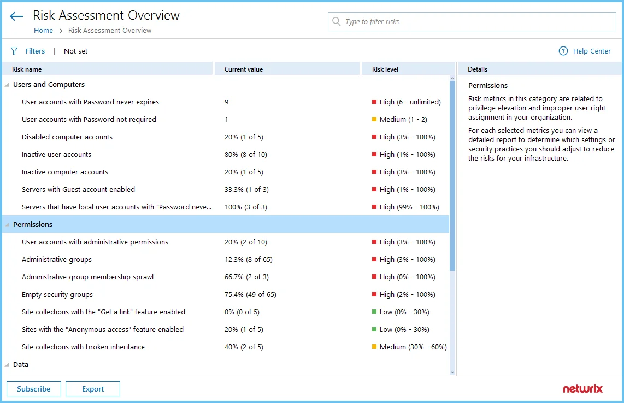
Netwrix 1Secure closes that gap by running Netwrix PingCastle's assessment engine continuously. It adds identity security posture management across AD and Entra ID, with 170+ checks mapped to MITRE ATT&CK, rather than leaving teams with a single point-in-time scorecard.
Source: Netwrix product documentation
When AD attacks need to be blocked in real time
Neither Netwrix PingCastle nor Purple Knight stops an attack in progress; both report on risk after the fact. Netwrix Threat Prevention blocks AD attacks such as DCSync, Kerberoasting, and Pass-the-Hash in real time.
Netwrix Threat Manager detects Active Directory Certificate Services (AD CS) exploitation patterns including ESC1, ESC3, ESC4, and ESC7, with that detection added in the Netwrix Threat Manager 3.2 release.
When the next step is closing standing privileged access
Assessment findings routinely surface over-provisioned privileged accounts, and Netwrix Privilege Secure replaces those standing accounts with ephemeral accounts, task-scoped privileged sessions that revoke automatically instead of sitting active between uses.
Eastern Carver County Schools eliminated standing privileged access across systems holding data for 9,300 students after an assessment turned up excessive access. The Netwrix Privilege Secure rollout finished in days, not the months a traditional PAM project would have taken.
Teams that need AD assessment, continuous monitoring, and privileged access remediation together get all three from one vendor instead of stitching Netwrix PingCastle or Purple Knight to separate tools.
Request a demo to see how Netwrix PingCastle, 1Secure, Threat Prevention, and Privilege Secure work together across hybrid Active Directory and Entra ID.
Disclaimer: The information in this article was verified as of July 2026. Please verify current capabilities and pricing directly with each provider.
Frequently asked questions about PingCastle vs. Purple Knight: AD vulnerability scanner comparison
Share on
Learn More
About the author

Netwrix Team
Learn more on this subject
Endpoint DLP as a compliance response: What regulators ask
Data classification and DLP: Prevent data loss, prove compliance
CMMC compliance and the critical role of MDM-style USB control in protecting CUI
External Sharing in SharePoint: Tips for Wise Implementation
The Importance of Data Classification for Data Loss Prevention