
Privileged Access Workstations: Securing admin access to AD
Aug 5, 2026
Privileged access workstations keep Tier 0 identity-control-plane credentials off everyday endpoints, reducing the chance that routine admin work becomes domain-wide exposure. Because stolen credentials remain a leading breach vector, PAWs should use dedicated hardware, hardened images, deny-logon Group Policy Objects (GPOs), application control, managed local administrator passwords, restricted network paths, and continuous visibility.
Most organizations still let privileged accounts roam further than they should. The Netwrix 2026 Data and Identity Security Report found that 64% have at least some overprovisioned access to critical data. Stolen credentials remain the easiest way in, too, accounting for 22% of breaches per the Verizon 2025 Data Breach Investigations Report.
For Active Directory, that combination turns an ordinary laptop into a Tier 0 risk. The device where an admin logs in carries as much trust as the identity itself.
A Domain Admin credential typed into a compromised laptop is compromised, no matter how hardened the domain controller behind it is. Attackers know this, and they steal admin credentials on the same devices where admins read email and browse the web.
Closing that gap starts with giving administrators a dedicated device for Tier 0 work, separate from everything else they do day-to-day.
What is a privileged access workstation (PAW)?
A privileged access workstation (PAW) is a dedicated, hardened device reserved for privileged administrative tasks. It runs no email client, permits no general web browsing, and accepts logons only from designated admin accounts, so the credentials that control AD and Microsoft Entra ID stay off devices exposed to everyday risk.
An admin signs into a PAW to edit GPOs, manage DNS zones, promote or demote domain controllers, or reset a Domain Admin password. None of that work touches email or a browser, so none of it needs to happen on a device that does.
A hardened everyday laptop is not the same thing as a PAW. Endpoint detection and response, disk encryption, and a strong password policy reduce risk on a device that still reads email and browses the web. A PAW removes that risk rather than managing it, since the applications that pose the greatest compromise risk (email clients, browsers, chat apps) are entirely absent from the device.
What is the difference between a PAW and a jump server?
A PAW and a jump server protect different points in the access path. A jump server routes admin sessions to their destination; a PAW is the trusted endpoint where the session itself begins. Securing the jump server alone leaves a gap, because it still inherits the trust of whatever device connects to it. That's why the admin's starting device needs to be locked down too, not just the path the session travels.
An admin protected only by a jump server still starts every session on their everyday laptop, signing in and connecting from there. If that laptop has a keylogger or an infostealer running in the background, the admin's credentials get captured the moment they type it, before the session ever reaches the jump server. The jump server never sees the compromise, because it already happened one hop earlier.
Most enterprise deployments use both together rather than choosing one. The PAW serves as the trusted device where the admin authenticates, and the jump server or bastion host adds a network segmentation layer on top of it, routing that already-trusted session to domain controllers, Entra ID, or other Tier 0 systems. Removing either piece reopens the gap the other was covering.
Why privileged access workstations matter for Active Directory
A PAW earns its place because unsecured Tier 0 access poses risks on multiple fronts. Credential exposure, audit gaps, and inconsistent policy enforcement all trace back to the same root cause: privileged sessions running on devices used for generic, broad workloads, loosely protected to allow exactly that kind of work, which generates lots of noisy log entries that make detecting suspicious privileged access harder.
Shrinking the blast radius of a compromised credential
Confining Tier 0 credentials to one hardened device means that a fully compromised everyday workstation provides an attacker with nothing that reaches Active Directory.
Without that containment, the same compromise plays out fast, as a CISA red team assessment showed when the team compromised a Windows domain controller roughly two weeks after initial access, then moved laterally to every domain-joined Windows host.
Teams that want to size that exposure in advance can use a structured privileged account attack surface assessment to identify which accounts carry that risk before an attacker does.
Closing off the path attackers use most
A PAW closes off phishing, the path attackers use most. Since a PAW has no email client and no general web browsing, a phishing message never reaches the device's inbox, and admin credentials never touch the machine where a phish would land. That cut matters, given that phishing has overtaken stolen credentials as the single most common route to a foothold, per the IBM Cost of a Data Breach Report 2025.
That block is enforced at the build level, since the PAW's hardened image excludes email and browser applications entirely rather than merely restricting them after installation.
Giving admins a clean environment for Tier 0 work
An admin making a schema change or editing a GPO from a PAW can trust the device state without accounting for unrelated productivity activity from that morning. The PAW's isolation rules reduce that contamination risk, and Microsoft Defender for Endpoint generates compliance and risk signals that back that confidence with telemetry.
Turning least privilege into an enforced control
A least privilege policy means little if privileged accounts roam freely. Domain Admin credentials get exposed on every device where members of the Domain Admins group log on to troubleshoot issues, a pattern Microsoft Incident Response has documented repeatedly. GPO deny-logon rules tied to PAWs make tier boundaries a technical fact rather than a written intention.
Giving security teams a defensible answer under audit
With a PAW architecture in place, a security team can show auditors and incident responders exactly where and how Tier 0 access happens, rather than offering a general assurance that access is controlled.
Netwrix Auditor strengthens that answer. Its AD and GPO change reports include the originating workstation where the user was logged on when they made the change, so a team can verify that every Tier 0 change came from a designated PAW. That same change visibility helps teams prove privileged group control in production environments, as Berry College did with alerts about changes to the Domain Admins and Enterprise Admins groups.
Netwrix Privilege Secure replaces standing admin accounts with just-in-time privileged sessions that revoke automatically. Download a free trial
How PAW enforces the Tier 0 model
PAWs work because they turn Microsoft's tiered administration model from a diagram into something a domain actually enforces. Without a device that physically blocks lower-trust access, tier boundaries exist only as policy documentation admins can choose to follow or ignore.
What the Tier 0 model is
The tiered administration model divides the environment by trust. Tier 0 holds the identity control plane, domain controllers, core directory services, Microsoft Entra Connect, Active Directory Federation Services (AD FS), and Active Directory Certificate Services (AD CS). Tier 1 holds servers and enterprise applications, and Tier 2 holds end-user workstations.
Each tier requires its own trust boundary and dedicated admin accounts that never cross tiers. Microsoft's current Enterprise Access Model extends this into hybrid and cloud environments, with Tier 0 mapping to the control plane.
The clean source principle
The clean source principle means every security dependency of a system must be at least as trustworthy as the system itself. A PAW only protects Tier 0 if nothing lower-trust ever touches it, directly or indirectly.
Remote-managing or configuring a PAW from an everyday laptop breaks the model in one concrete way: it makes the laptop a security dependency of the PAW and reintroduces exactly the exposure the PAW exists to prevent.
How a PAW turns the model into an enforced rule
The tier model draws the boundary, and the clean source principle explains why it has to hold, but neither enforces itself without a physical mechanism, which is exactly what a PAW supplies.
Deny-logon GPOs block a Tier 0 credential from authenticating anywhere else, application control blocks unapproved code on the device, and firewall rules block every network path except Tier 0 management.
Hardware and policy jointly close the boundary, so it holds against both accidental admin missteps and attacker attempts.
How to deploy a PAW for Active Directory Tier 0
Deploying a PAW works best as a sequence of specific, checkable controls rather than a single hardening gesture. Skipping or reordering a step often leaves a gap that later steps assume is already closed.
Step 1: Choose the form factor
Choose physical hardware for any PAW that touches Tier 0; never use a virtual machine. A compromised hypervisor can expose VM memory and snapshots directly, handing an attacker the credentials a PAW exists to protect.
Tools such as VMkatz extract NT LAN Manager (NTLM) hashes, Kerberos tickets, and domain credentials straight from a VM snapshot. New escape vulnerabilities keep surfacing, too, and CVE-2025-22226 is a recent example, leaking VM memory from the VMware vmx process in 2025.
Source a laptop that already has TPM 2.0, UEFI Secure Boot, and VBS/HVCI support built in, rather than repurposing a retired device that predates those requirements. Track each PAW as its own tagged Tier 0 asset in inventory, separate from the standard end-user refresh cycle, so it doesn't quietly drift onto a slower patch-and-replacement schedule.
Reserve virtual PAWs for lower-tier or cloud-resource administration, where the hypervisor itself sits at an appropriate trust level. Domain controllers and AD always get a dedicated physical laptop.
Step 2: Build the hardened image
Start from Windows 11 Enterprise with the current security baseline (version 25H2). This is also a good point to apply a system-hardening checklist beyond the PAW-specific controls listed below. The build requires:
- Hardware with Trusted Platform Module (TPM) 2.0, Unified Extensible Firmware Interface (UEFI) Secure Boot, BitLocker, and Virtualization-Based Security (VBS)/Hypervisor-Protected Code Integrity (HVCI) support.
- Credential Guard and Local Security Authority (LSA) protected process enabled with UEFI lock, per the baseline.
- Microsoft Defender for Endpoint onboarded following Microsoft's recommended EDR onboarding sequence, then vulnerability management, Defender protection controls, and attack surface reduction.
- No email client and no general browsing; keep productivity work on a separate account and device entirely.
- Set local administrator rights to "None" on join.
That combination gives the PAW a minimal, measurable baseline before any administrator signs in.
Treat this as a golden build and put every modification through the same change-management process as any other Tier 0 change, rather than allowing ad hoc installs on a single device.
Step 3: Create dedicated OUs and enforce logon restrictions with GPO
Build a dedicated Tier 0 organizational unit (OU) structure, separate from the rest of Active Directory. Create an Admin OU containing Admin\Tier 0\Accounts and Admin\Tier 0\Groups.
Place Domain Admins and Enterprise Admins members in the Tier 0 accounts OU, and link the PAW computer GPO to the Tier 0 devices OU. Keep this OU flat and free of nested exceptions, since a stray inherited GPO link from a parent OU is the most common way this isolation quietly breaks.
For logon restrictions, use two security groups, Tier0-Users and Tier0-Computers, and two GPOs:
- A "T0 Initial Isolation (Computer)" GPO applies all five deny rights for those groups across the domain.
- A "T0 Access (Computer)" GPO removes the denies on Tier 0 systems only.
- Link order matters, Default Domain Controllers Policy first, then T0 Initial Isolation, then T0 Access, so Tier 0 systems never lock themselves out.
This sequencing maintains the default domain restriction while keeping Tier 0 systems administrable.
Apply five User Rights Assignment settings to the deny GPO:
- Deny log on locally.
- Deny log on through Remote Desktop Services.
- Deny access to this computer from the network.
- Deny log on as a batch job.
- Deny log on as a service.
Deny rights supersede their Allow counterparts.
For application control, use App Control for Business (the current name for Windows Defender Application Control) rather than the legacy AppLocker, which still receives security fixes but no new feature investment.
Step 4: Deploy Windows LAPS to the PAW's local admin account
A static local administrator password on the PAW gives an attacker a pass-the-hash and lateral-movement path the moment it's captured. Close it with Windows LAPS, built into Windows 11 23H2 and later, which backs the password up to AD or Microsoft Entra ID and rotates it automatically rather than leaving it fixed indefinitely.
Set rotation to 30 days or less with a 14-character minimum length, and confirm post-authentication rotation is active so the password changes the moment the managed account logs on rather than waiting for the fixed schedule alone.
That second rotation matters more than the calendar-based one, since it's what limits how long a captured clear-text password stays usable if someone does get to it. Retire any Legacy Microsoft LAPS deployment first, since Microsoft deprecated it as of Windows 11 23H2, and it won't receive further updates.
Enable Windows LAPS through the LAPS Group Policy template (Administrative Templates, System, LAPS in the Group Policy Management Console), and set Configure password backup directory to Microsoft Entra ID for Entra-joined PAWs or to Active Directory for domain-joined ones. On Intune-managed devices, apply the same setting via an Account protection configuration profile rather than GPO.
Step 5: Restrict network access and reach Tier 0 through RDP only
Configure a Privileged firewall profile on the PAW with tight inbound and outbound controls, closing off every path except what Tier 0 management needs:
- Block all inbound traffic, including locally defined rules.
- Restrict outbound traffic to explicit rules for Domain Name System (DNS), Dynamic Host Configuration Protocol (DHCP), Network Time Protocol (NTP), Network Connectivity Status Indicator (NCSI), Hypertext Transfer Protocol (HTTP), and Hypertext Transfer Protocol Secure (HTTPS).
- Block rule merging so local admins can't add their own exceptions.
- Scope outbound internet access to patching and management endpoints only.
- Keep the ProxyOverride list limited to what the device needs to authenticate to Microsoft Entra ID and reach management interfaces.
These controls keep the PAW limited to the management paths required for Tier 0 work.
For Remote Desktop Protocol (RDP) into domain controllers, use Restricted Admin mode rather than a standard session, launching mstsc.exe with/RestrictedAdmin so credentials never reach the destination and can't be reused after disconnection.
Common mistakes that undermine a PAW deployment
A PAW deployment can fail even when every technical control is in place, usually because of day-to-day management rather than how it is built. Most failures trace back to convenience, an admin, a policy exception, or a management tool that routes around the boundary instead of through it.
Managing the PAW from a lower-trust device
An admin who configures or remote-manages their PAW from their everyday laptop has made that laptop a Tier 0 dependency. Any tool used to manage or monitor the PAW must be trusted at or above the PAW's level, since a lower-trust management path gives an attacker the same access the PAW exists to deny. Run PAW management and monitoring from Tier 0-equivalent trust, even when the lower-trust path is more convenient.
Letting the PAW drift into a second everyday laptop
A browser extension here, a chat app there, and within a year the PAW no longer matches its golden image. Enforce drift control technically instead of relying on a policy memo. App Control for Business blocks unapproved software from running at all, and change management keeps the PAW aligned to the golden image.
Locking it down until admins route around it
Over-restrict the PAW and admins will do Tier 0 tasks from an unmanaged device instead, defeating the entire model. A difficult-to-use PAW pushes people to route around. A workable exception process names an approver, usually the PAW's platform owner, and adds the requested tool to the App Control policy as a vetted rule rather than a blanket bypass. Set a review date on each exception so temporary approvals don't become permanent gaps.
Treating the rollout as all or nothing
Teams that try to cover every admin role at once stall before Tier 0 is even protected. Roll out in phases instead: start with AD admins, then expand to all admins, and add further controls after that. Securing domain admins and AD/Microsoft Entra admins first delivers measurable risk reduction in weeks.
Leaving PAW management infrastructure at a lower tier
The imaging system, GPO delegation, and LAPS backend that manage PAWs are Tier 0 assets, regardless of labels. Compromising Microsoft Endpoint Configuration Manager can enable code execution on domain controllers, as documented by SpecterOps in Tier Zero: Members and Modification.
Hold anyone with GPO delegation rights to Domain Admin standards, since GPO delegation is a direct path to code execution on every device the policy touches. Apply the same tiering and access restrictions to the PAW management infrastructure as to the PAWs it manages.
Where PAW fits in a complete privileged access strategy
Privileged Access Management (PAM) adds approval, elevation, and session controls that govern how long privileged rights persist and what admins can do with them.
PAW controls where; PAM controls how and when
A PAW confines Tier 0 work to a trusted device, while PAM limits elevated rights on that device to the time required for the task. In a paired deployment, the PAM tool checks device compliance and confirms that the request originates from an approved PAW before granting a time-boxed elevation and automatically revoking it when the session or time window ends.
No single control completely secures Tier 0 access, since attackers route around whatever isolated defense they encounter first. Pairing PAW's device-level containment with PAM's time-boxed elevation closes both routes at once, since a stolen credential still needs an approved device, and an approved device still needs an active, time-limited grant to do anything.
PAW is the foundation MFA and conditional access build on
Multifactor authentication (MFA) and conditional access confirm who is logging in and from what context. The Microsoft Digital Defense Report 2025 credits MFA with blocking 99% of unauthorized access attempts. Those checks only mean something if the device itself hasn't already been compromised by unrelated activity, since a keylogger sees the session after MFA succeeds.
Conditional access device filters can then require that privileged roles activate only from a compliant PAW, tying the identity check to the device check. In practice, that means creating a Conditional Access policy scoped to the privileged role's group, with a device filter that requires membership in a compliance group or tag reserved for PAWs.
Set the grant control to block access outright when that tag is missing, rather than falling back to a weaker verification step. Netwrix's guide to getting to zero trust for privileged users covers this identity-plus-device pairing in greater depth, and identity security posture checks help teams identify excessive standing access before it becomes a privileged access path.
PAW checklist for AD/Entra admins
Use this checklist to decide whether the pilot is ready for production use. Each item needs both an owner and a way to prove the control works.
- Separate accounts for daily use vs. privileged operations?
- Privileged accounts used only from PAWs, never from general user machines?
- Hardened, minimal OS image with limited software?
- Network access restricted to management systems and domain controllers?
- PAW activity monitored and logged?
- Documented plan to rebuild a PAW quickly if the team suspects compromise?
Move a pilot forward only when each item has an owner and a validation method. Teams that want a broader baseline before that pilot can pair this checklist with an identity and access management risk assessment covering the accounts and groups feeding into it.
How Netwrix helps with privileged access workstation
Standing admin accounts are the gap a PAW alone doesn't close. A PAW confines those accounts to a trusted device, but the accounts themselves often stay provisioned indefinitely once granted.
The same Netwrix 2026 Data and Identity Security Report found that 76% of organizations can't immediately revoke standing access once it's no longer needed.
The report separately found that organizations where AI significantly expanded the number of identities requiring access reported a 43% breach rate over the past 12 months, compared with 11% where AI had not materially changed access patterns. Eliminating standing privilege addresses both problems at once, since no persistent account exists for a compromised PAW to expose.
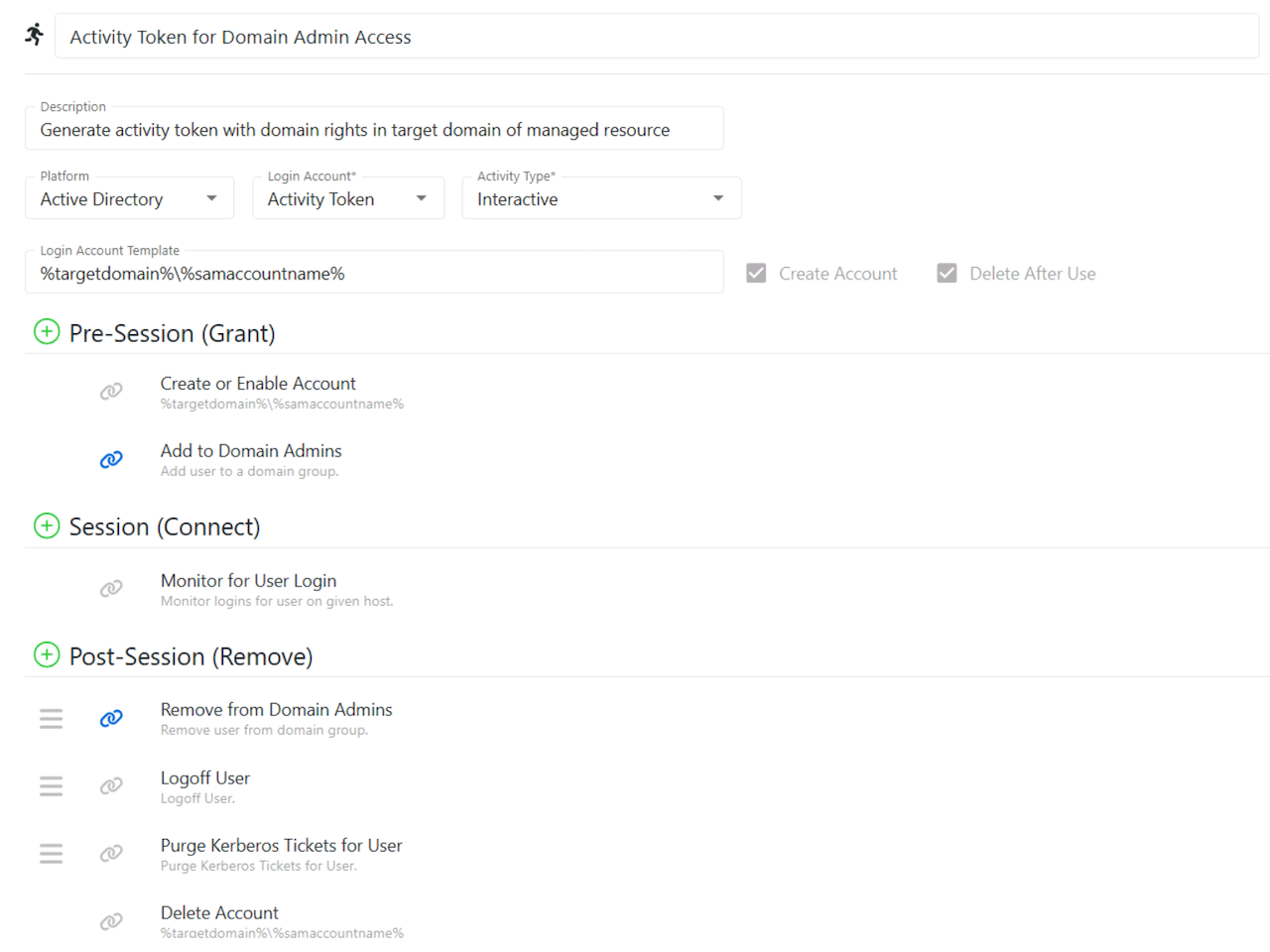
Netwrix Privilege Secure operationalizes zero-standing privileges by provisioning an ephemeral account only when a user requests access, and it is scoped to that single session. The v26.03 documentation calls this account an Activity Token. Netwrix Privilege Secure destroys it when the session ends, while post-session cleanup and session recording help close the access window and preserve audit evidence.
Eastern Carver County Schools, a Minnesota district with 9,300 students, more than 2,000 staff, and limited IT resources, eliminated standing privileged accounts that penetration testers had repeatedly exploited. Replacing them with just-in-time access through Netwrix Privilege Secure completed the rollout in days and delivered compliance proof for stress-free audits.
For an internal business case, those outcomes connect PAW architecture to faster time-to-value, lower operational burden, and audit readiness. Information Systems Administrator Craig Larsen put it this way. "Netwrix Privilege Secure is so simple to install and get running that we could not have solved our privileged account management problem without it."
Request a demo to see how Netwrix can help you replace standing Tier 0 privileges with just-in-time access and prove every privileged session end to end.
Frequently asked questions about privileged access workstations (PAW): securing admin access to Active Directory
Share on
Learn More
About the author

Netwrix Team
Learn more on this subject
Microsoft RAMP stops at the edge of your certificate authority
Access whack-a-mole never ends. There's a reason for that
Govern the AI agent as the identity it is
Convergence of ITDR, PAM and IGA. Which of the three is standing there when the attack lands?
Endpoint management system breach: why privileged access management (PAM) is now critical