
Using PowerShell to List Scheduled Tasks on Windows Machines
Native Solution
- Open the PowerShell ISE and create a new file with the following PowerShell script, being sure to input the computer name and output path:
      $cred = Get-Credential
$comp = "PDC"
$session = New-PSSession -ComputerName $comp -Credential $cred
$script = {
"Services:"
Get-WmiObject win32_service -ErrorAction Stop| where {$_.StartMode -like 'Auto' -and $_.Startname -notlike '*local*' -and $_.Startname -notlike '*NT AU*'}| Select-Object Name, DisplayName, State, StartMode, StartName | Format-Table -Property * -AutoSize| Out-String -Width 4096
# To output to CSV, add this string to the previous command: | Export-Csv c:\Out\filename.csv - NoTypeInformation

"ScheduledTasks"
schtasks.exe /query /V /FO CSV | ConvertFrom-Csv | Where { $_.TaskName -ne "TaskName" -and $_.TaskName -like "*powershell*"}|Select-Object @{ label='Name'; expression={split-path $_.taskname -Leaf} }, Author ,'run as user','task to run'| Format-Table -Property * -AutoSize| Out-String -Width 4096
# To export to CSV, add this string to the previous command: | Export-Csv c:\Out\filename.csv - NoTypeInformation
}
Invoke-Command -Session $session -ScriptBlock $script
- Run the script using the credentials for an account that has administrator rights on the local computer in question.
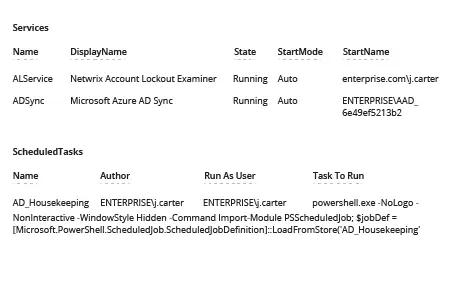
- Review the resulting report:
Netwrix Auditor for Windows Server
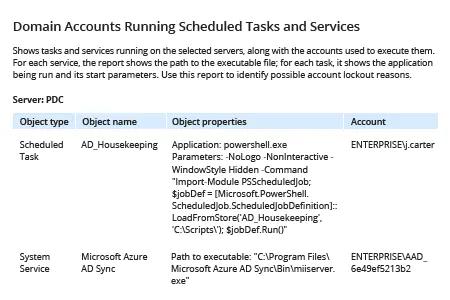
- Run Netwrix Auditor. Navigate to “Reports” -> Click “Predefined” -> Expand the “Windows Server” section -> Click “Windows Server – State-in-Time” -> Choose “Domain Accounts Running Scheduled Tasks and Services” -> Click “View”.
- To limit the report to a particular server or workstation: Type the machine name in the “Server name” field in the filters -> Click “View Report”.
Share on