
简介
Microsoft SharePoint 让用户只需几次点击就能与同事共享文件。然而,外部共享同样轻松——这会使您的敏感数据安全面临风险。
为帮助您在不干扰合法协作的情况下控制文件和文件夹的外部共享,本文详细介绍了 Microsoft 管理界面中可用的外部共享设置,并提供了配置这些设置的最佳实践。我们将介绍 Microsoft 365 Admin Center、SharePoint 和 OneDrive for Business 管理中心、经典 SharePoint Online Admin Center 以及现代 SharePoint Online Admin Center 中的相关设置。
精选相关内容
Microsoft 365 Admin Center:外部共享的租户级设置
在 Microsoft SharePoint 中配置外部共享时,建议由您的管理员团队从租户(组织)级别开始。打开 Microsoft 365 Admin Center(原 Office 365),然后进入 Settings –> Services & add-ins –> Sites 。
然后,您可以指定用于控制租户级外部共享的选项:
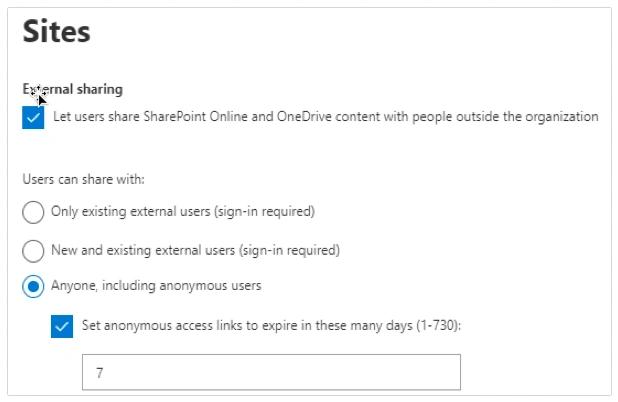
在大多数情况下,建议选择第二个选项“新用户和现有外部用户(需要登录)”,因为它在灵活性与控制之间提供了平衡。以下是关于如何为您的组织选择最佳选项的更详细建议:
Choose this option: | If your objective is to… |
|---|---|
|
Let users share SharePoint Online and OneDrive content with people outside the organization |
Enable external sharing at the tenant level, subject to the constraints you specify below. |
|
Only existing external users (sign-in required) |
Require external users (guests) to sign in with a Microsoft account before accessing content, and limit sharing to external users who already exist in your directory because they either have already been shared with or were manually imported. |
|
New and existing external users (sign-in required) |
Allow both existing and new external users to access shared content once they have signed in with a Microsoft account. |
|
Anyone, including anonymous users |
Allow use of anonymous links, which do not require sign-in to access |
|
Set anonymous links to expire in these many days |
If you allow anonymous access links, specify automatic expiration dates for them. |
用于外部共享的站点集和 OneDrive for Business 设置
在配置了整个租户的共享设置之后,就该在各自的管理中心中开始配置 SharePoint Online 和 OneDrive for Business 的顶级外部共享设置了。
如您所见,在 SharePoint Online 中用于控制共享链接的选项与上文讨论的类似:
Choose this option: | If your objective is to |
|---|---|
|
Anyone |
Allow users to share files and other site content with anyone. |
|
Allow users to share files and other site content with anyone. |
Allow users to share content with external users, but require them to sign in with a Microsoft account to access it. This option is usually best for site collections with external collaborators, especially if you’re in the process of migrating to a newer version of SharePoint. |
|
Existing external users |
Allow external sharing only with users who already exist in your directory. |
|
Only people in your organization |
Do not allow any external sharing. |
OneDrive 的外部共享选项也非常相似,只是文字说明略有不同:
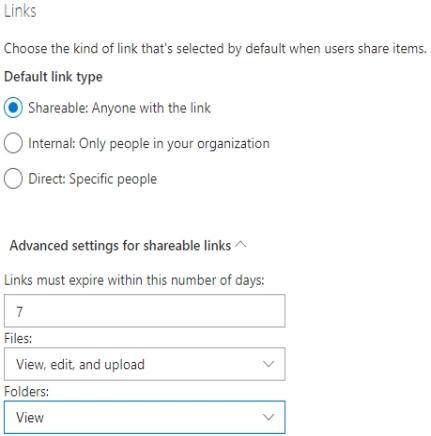
再强调一次:允许用户与任何拥有该链接的人共享内容,会让你的文件面临重大风险。要求外部用户先登录,可以提供更强的控制。由于用户往往更倾向于在 OneDrive 中保存更敏感的信息,因此通常建议比 SharePoint 更严格地配置 OneDrive 的设置。
SharePoint 管理中心
经典版 SharePoint Online 管理中心可让你为每个 SharePoint 站点创建外部共享设置。进入“Site Collections(站点集合)”部分,然后点击 Sharing:
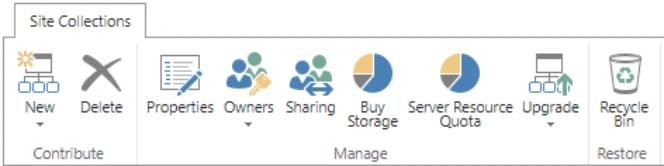
下图展示了可用的选项:
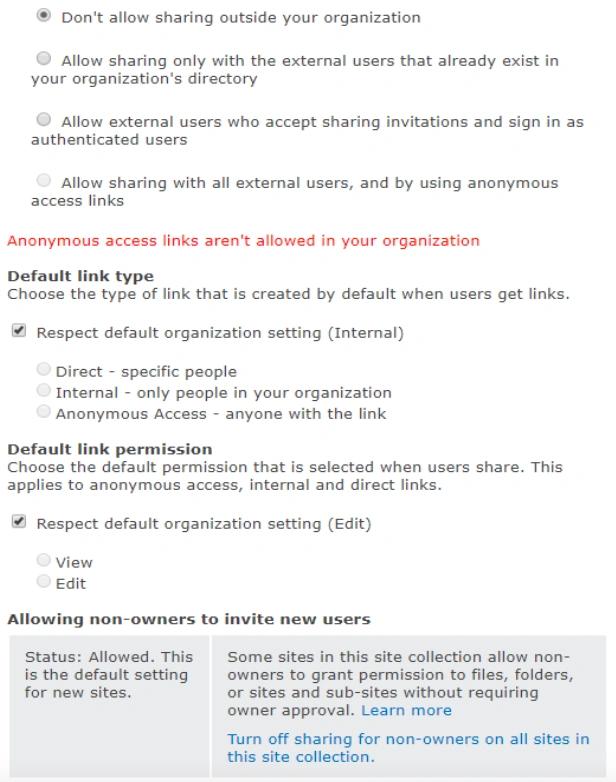
默认情况下不允许外部共享,但你可以选择在指定的任意站点上启用外部共享,并选择允许的共享类型。例如,你可以为包含敏感数据的站点设置更严格的控制,而为更偏向协作的站点设置更宽松的控制。你也可以选择谁被允许向站点邀请新用户;不过,通常最好的做法是将这一决定交给站点所有者。
现代 SharePoint 管理中心
在现代 SharePoint 管理中心中,这些设置已更改为反映前面讨论的相同选项:
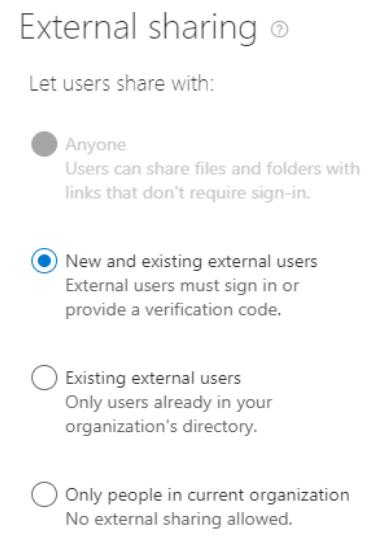
使用以下选项,您可以实现更强的访问控制:
- 非受管设备 — 您可以限制来自不符合要求或未加入域的设备的访问。选项从允许完全访问、仅允许 Web 访问(不包含桌面或移动端),到完全阻止访问不等。
- 空闲会话注销 — 您可以自动从处于非活动状态的浏览器会话中注销用户。
- 网络位置 — 只能允许来自特定 IP 地址的访问。
- 不使用现代身份验证的应用 — 您可以拒绝对依赖传统身份验证协议的应用的访问。
其他安全控制
其他安全控制可能会影响 SharePoint 和 OneDrive for Business 的外部共享。尤其是,以下控制可以阻止用户将某些文档和其他内容在外部共享:
- 数据丢失防护(DLP)策略
- 将记录保留策略应用到外部。
- eDiscovery 要求
- Microsoft Purview Information Protection(原为 Microsoft Information Protection)的安全控制
此外,以下审计和告警功能可以帮助管理员随时掌握文档向外共享的情况:
- 与共享文件相关的所有用户活动都可在审计日志中查看。
- 管理员可以选择在用户在 SharePoint 或 OneDrive for Business 中执行特定操作时收到通知。
使用 PowerShell 以深入了解外部共享
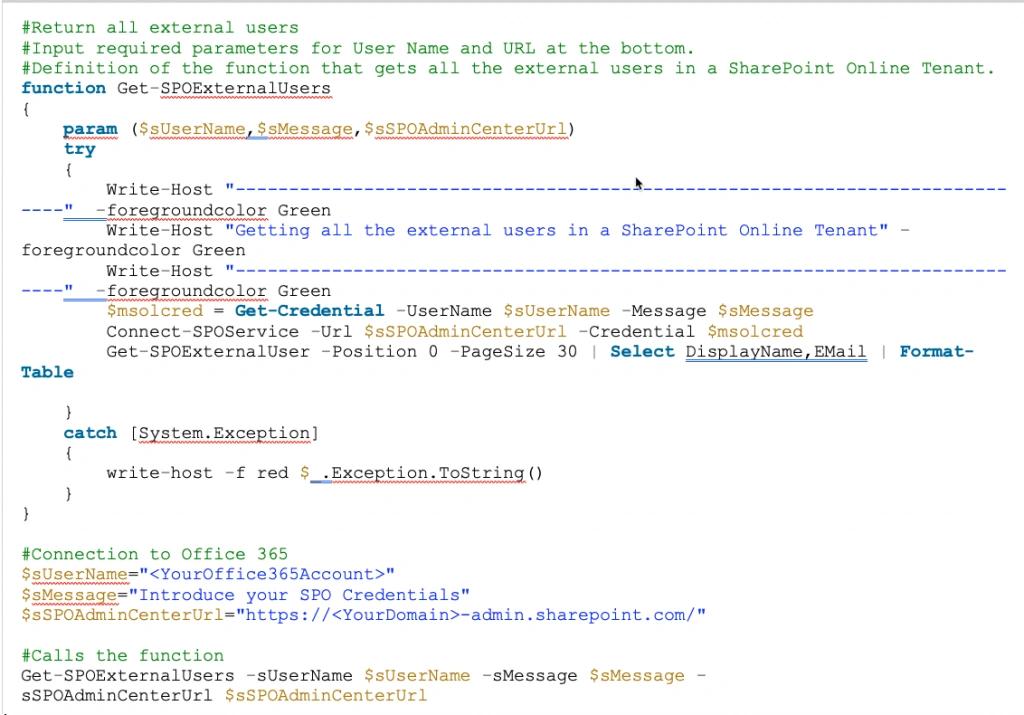
PowerShell 脚本可以帮助您深入了解外部共享。例如,下面的脚本将返回租户中的所有外部用户(需要 SharePoint 管理员权限):
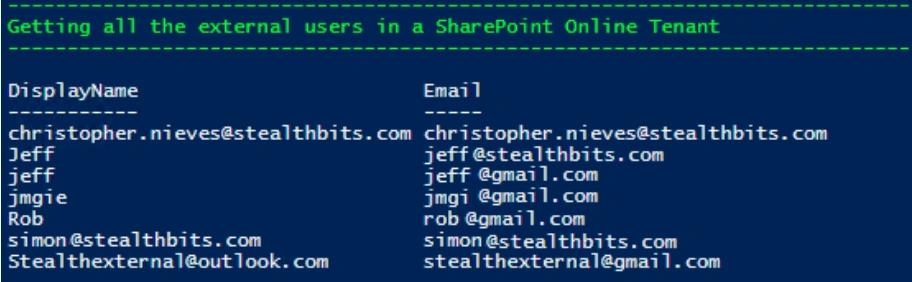
输出将如下所示:
Netwrix 如何提供帮助
仔细配置上面详细说明的设置,可以让您的组织在内容如何向外部共享方面拥有显著的控制力。然而,第三方工具可以提供更好的可视性和控制能力,而这对于确保 data security 至关重要。
Netwrix 的数据访问治理软件可帮助您通过减少敏感数据的暴露来降低 data breach 的风险。它还可以帮助您遵从诸如 GDPR 之类的法规,因为该法规要求组织实施 data protection by design and default。
尤其是,Netwrix 解决方案可帮助您:
- 识别您最关键的数据。
- 将对敏感数据的访问权限降低到所需的最低限度,以降低 insider threat 的风险,并将勒索软件和其他攻击造成的损害降到最低。
- 通过数据所有者简化定期的权限证明(privilege attestations)。
- 只要对内容进行准确且一致的标记(tagging),敏感数据在任何传输过程中都能得到保护。
- 对整个 IT 生态系统中的活动进行审计,并快速发现与拦截威胁。
分享到
了解更多
关于作者

Farrah Gamboa
产品管理高级总监
Netwrix 产品管理高级总监。Farrah 负责制定并推进与 Data Security 以及 Audit & Compliance 相关的 Netwrix 产品与解决方案路线图。她拥有超过 10 年在企业级数据安全解决方案领域的经验,曾从 Stealthbits Technologies 加入 Netwrix。在加入 Netwrix 之前,她担任技术产品经理以及质量控制(QC)经理。Farrah 拥有 Rutgers University 的工业工程学士学位(BS)。