
Kerberos 委派的目的
Kerberos 委派已经存在很长时间了(准确来说是自 Windows Server 2000 起)。但在很多情况下,使用 Active Directory 的工程师并不熟悉 Kerberos 委派的各种实现方式、它们的用途以及可能被滥用的方式。甚至还有人会把 Kerberos 委派和被委派的权限混为一谈。
Kerberos 委派的实际用途是让应用程序能够访问托管在另一台服务器上的资源。一个常见示例是:当某个应用(例如 Web 服务器)需要访问托管在其他地方的网页所对应的资源时(例如 SQL 数据库)。在不直接向运行 Web 服务器的服务帐户授予对数据库的访问权限的情况下,你可以允许该服务帐户将其权限委派给 SQL 服务器服务。当用户登录到网站后,服务帐户会代表该用户请求对 SQL 服务器服务的访问权限。这样,用户就能在无需为 Web 服务器的服务帐户本身配置任何访问权限的前提下,访问他们被授权访问的数据库内容。
Kerberos 委派的类型
多年来,Kerberos 委派已经发展出了几种不同的形式。Windows Server 2000 中最初的实现是无约束委派(unconstrained delegation)。此后,又出现了更严格、能提升安全性的委派版本:受约束委派(constrained delegation)以及基于资源的受约束委派(resource-based constrained delegation)。下面我将更深入地介绍每一种委派类型。
要在计算机或用户帐户上配置委派,请使用下图所示的 Active Directory Users and Computers 中的“委派(Delegation)”选项卡。注意:用户帐户必须设置 servicePrincipalName (SPN)。
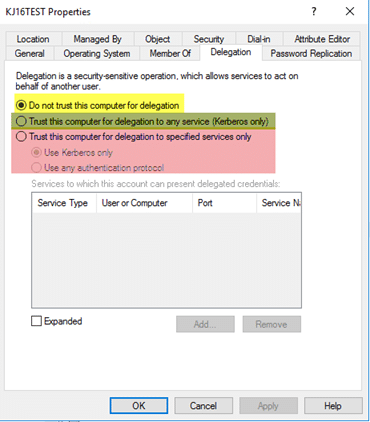
图 1. Active Directory Users and Computers 中的“委派(Delegation)”选项卡
第一个选项(黄色)允许你配置一个帐户,使其不被允许被信任用于委派;这通常用于需要绝对不能用于委派的敏感或管理帐户。第二个选项(绿色)允许你配置一个帐户用于“非约束委派”(unconstrained delegation)。第三个选项(红色)允许你配置一个帐户用于“约束委派”(constrained delegation)。
非约束委派(Unconstrained Delegation)
这是委派(delegation)的最初实现方式,而且也是安全性最低的。非约束委派(unconstrained delegation)到底会做什么呢?在幕后,当启用并配置了非约束委派时,对象的 userAccountControl 属性会被更新,以包含“TRUSTED_FOR_DELEGATION”标志。当某个对象对配置了非约束委派的主机进行身份验证时,该帐户的“票据授权票据”(ticket-granting ticket,TGT)会被存储在内存中,以便在需要时,配置了非约束委派的主机可以稍后冒充该用户。
设想这样一种情景:一个特权帐户对配置了非约束委派的主机进行身份验证。该帐户将能够以该特权用户的身份访问域内任何已配置的服务。进一步设想,如果能用某种方式强制特权帐户自动向你的主机进行身份验证会怎样?通过使用“打印漏洞(printer bug)”,你可以让域控制器对你的主机进行身份验证,从而使该帐户的 TGT 留在内存中。
由于存在诸如“打印机漏洞(printer bug)”之类的机制,无限制委派(unconstrained delegation)非常不安全,除非绝对必要,否则不应使用。需要注意的一点是:默认情况下,域控制器会配置为使用无限制委派。然而,由于你的域控制器应当比托管某项服务的随机应用服务器安全得多,因此通常不会造成问题。
受限委派
受限委派(constrained delegation)是在 Windows Server 2003 中引入的,它允许你配置某个账户可以被委派到哪些服务。理论上,这能在发生入侵或被攻破时,限制潜在暴露的范围。
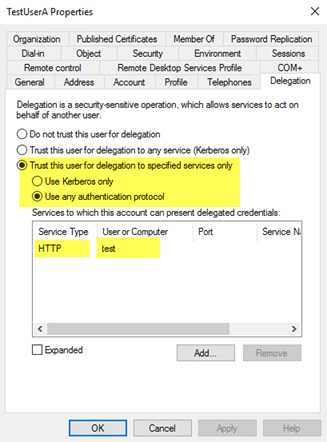
图 2. TestUserA 可以被委派到 HTTP/test 服务。
受限委派需要注意的一个限制是:它不支持跨林(cross-forest)工作。
当在账户上启用“受限委派(constrained delegation)”时,底层会发生两件事:
- 该对象的 userAccountControl 属性会使用“TRUSTED_TO_AUTHENTICATE_FOR_DELEGATION”标志进行更新。
- msDS-AllowedToDelegateTo 属性会填充为委派选项卡中配置的 SPN。
滥用受限委派(constrained delegation)与滥用非受限委派(unconstrained delegation)不同。一个常见的滥用方式是:如果攻击者能够窃取或破解为受限委派配置的用户账户的明文密码或 NTLM 哈希。使用类似 Kekeo 之类的工具,他们就能为其掌握密码的账户请求 TGT,为任意用户执行 TGS 请求(前提是该用户未被标记为“Sensitive”),然后注入票据并以该用户身份访问其请求的服务。
基于资源的受限委派(Resource-Based Constrained Delegation)
资源基于约束的委派(resource-based constrained delegation)在 Windows Server 2012 中引入,它改变了配置约束委派的方式,并且可以跨信任工作。它不再指定哪个对象可以委派到哪个服务,而是由托管该服务的资源来指定哪些对象可以委派给它。从管理角度来看,这使得资源所有者能够控制谁可以访问它。例如,不必使用约束委派来指定 WebServer 服务帐户可以委派到 SQL Service 以访问数据库,你可以在 SQL 服务器服务帐户上指定 WebServer 服务帐户具有向其委派访问的权限。
资源基于约束的委派通过在目标资源上填充 msDS-AllowedToActOnBehalfOfOtherIdentity 属性来配置,并将允许委派给该资源的对象的 SID 写入该属性。要配置资源基于约束的委派,你需要使用 PowerShell;在 Active Directory Users and Computers 中没有对应的 GUI 组件,而且 Attribute Editor 页面不允许手动修改该属性。
你可以在此了解有关资源基于约束的委派(Resource-Based Constrained Delegation)及其被滥用的方法 这里。
识别现有的 Kerberos 委派
既然你已经了解了不同类型的委派的一些基础知识以及它们可能被滥用的方法,我想与你分享一种你可以用来快速梳理环境中已配置了哪些委派类型的方法。我们将重点强调不安全的场景,例如在域控制器之外的对象上配置了无约束委派(unconstrained delegation)。
下面是一段脚本,最初发布在 Microsoft Technet 站点的图库中。它能够识别已配置无约束委派(unconstrained)、约束委派(constrained)以及基于资源的约束委派(resource-based constrained)的账号,并突出显示其所列配置的相关信息和潜在警告:
<#.Synopsis Search the domain for accounts with Kerberos Delegation..DESCRIPTION Kerberos Delegation is a security sensitive configuration. Especially full (unconstrained) delegation has significant impact: any service that is configured with full delegation can take any account that authenticates to it, and impersonate that account for any other network service that it likes. So, if a Domain Admin were to use that service, the service in turn could read the hash of KRBRTG and immediately effectuate a golden ticket. Etc :) This script searches AD for regular forms of delegation: full, constrained, and resource based. It dumps the account names with relevant information (flags) and adds a comment field for special cases. The output is a PSObject that you can use for further analysis. Note regarding resource based delegation: the script dumps the target services, not the actual service doing the delegation. I did not bother to parse that out. Main takeaway: chase all services with unconstrained delegation. If these are _not_ DC accounts, reconfigure them with constrained delegation, OR claim them als DCs from a security perspective. Meaning, that the AD team manages the service and the servers it runs on..EXAMPLE .Search-KerbDelegatedAccounts.ps1 | out-gridview.EXAMPLE .Search-KerbDelegatedAccounts.ps1 -DN "ou=myOU,dc=sol,dc=local".NOTES Version: 0.1 : first version. 0.2 : expanded LDAP filter and comment field. Author: Willem Kasdorp, Microsoft. Creation Date: 1/10/2016 Last modified: 4/11/2017#>[CmdletBinding()]Param( # start the search at this DN. Default is to search all of the domain. [string]$DN = (Get-ADDomain).DistinguishedName)$SERVER_TRUST_ACCOUNT = 0x2000$TRUSTED_FOR_DELEGATION = 0x80000$TRUSTED_TO_AUTH_FOR_DELEGATION= 0x1000000$PARTIAL_SECRETS_ACCOUNT = 0x4000000 $bitmask = $TRUSTED_FOR_DELEGATION -bor $TRUSTED_TO_AUTH_FOR_DELEGATION -bor $PARTIAL_SECRETS_ACCOUNT# LDAP filter to find all accounts having some form of delegation.# 1.2.840.113556.1.4.804 is an OR query.$filter = @"(& (servicePrincipalname=*) (| (msDS-AllowedToActOnBehalfOfOtherIdentity=*) (msDS-AllowedToDelegateTo=*) (UserAccountControl:1.2.840.113556.1.4.804:=$bitmask) ) (| (objectcategory=computer) (objectcategory=person) (objectcategory=msDS-GroupManagedServiceAccount) (objectcategory=msDS-ManagedServiceAccount) ))"@ -replace "[sn]", ''$propertylist = @( "servicePrincipalname", "useraccountcontrol", "samaccountname", "msDS-AllowedToDelegateTo", "msDS-AllowedToActOnBehalfOfOtherIdentity")Get-ADObject -LDAPFilter $filter -SearchBase $DN -SearchScope Subtree -Properties $propertylist -PipelineVariable account | ForEach-Object { $isDC = ($account.useraccountcontrol -band $SERVER_TRUST_ACCOUNT) -ne 0 $fullDelegation = ($account.useraccountcontrol -band $TRUSTED_FOR_DELEGATION) -ne 0 $constrainedDelegation = ($account.'msDS-AllowedToDelegateTo').count -gt 0 $isRODC = ($account.useraccountcontrol -band $PARTIAL_SECRETS_ACCOUNT) -ne 0 $resourceDelegation = $account.'msDS-AllowedToActOnBehalfOfOtherIdentity' -ne $null $comment = "" if ((-not $isDC) -and $fullDelegation) { $comment += "WARNING: full delegation to non-DC is not recommended!; " } if ($isRODC) { $comment += "WARNING: investigation needed if this is not a real RODC; " } if ($resourceDelegation) { # to count it using PS, we need the object type to select the correct function... broken, but there we are. $comment += "INFO: Account allows delegation FROM other server(s); " } if ($constrainedDelegation) { $comment += "INFO: constrained delegation service count: $(($account.'msDS-AllowedToDelegateTo').count); " } [PSCustomobject] @{ samaccountname = $account.samaccountname objectClass = $account.objectclass uac = ('{0:x}' -f $account.useraccountcontrol) isDC = $isDC isRODC = $isRODC fullDelegation = $fullDelegation constrainedDelegation = $constrainedDelegation resourceDelegation = $resourceDelegation comment = $comment }}
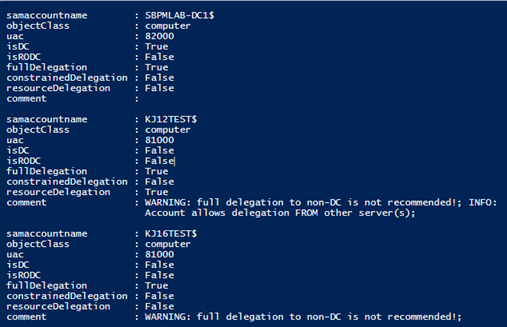
图 3. 用于识别有问题委派的示例脚本
Netwrix 如何提供帮助
该 Netwrix Active Directory security solution 可帮助你从端到端保护 Active Directory。你可以:
- 识别并缓解 Active Directory 中的漏洞:过多的权限、所谓“shadow”(影子)管理员、过期的账号、 弱口令 等。
- 控制 AD 配置和权限,实施强有力的 密码策略,并防止凭证被盗。
- 检测甚至最先进的威胁,在恶意行为者完成任务之前将其拦截。
- 通过自动化响应操作立即遏制安全漏洞,最大限度减少对业务造成的损失。
- 以最少的停机时间回滚或恢复恶意或其他不当的更改。
分享到
了解更多
关于作者

Kevin Joyce
产品管理总监
Netwrix 产品管理总监。Kevin 对网络安全充满热情,尤其致力于理解攻击者为利用组织环境所采用的策略与技术。凭借八年的产品管理经验,并专注于 Active Directory 和 Windows 安全,他将这种热情投入到帮助构建解决方案中,助力组织保护其身份、基础设施和数据。