
原生审计
- 运行 gpedit.msc → 创建新的 GPO → 编辑它:转到 "计算机配置" → 策略 → Windows 设置 → 安全设置 → 本地策略 → 审核策略:
- Audit account management → Define → Success.
- Go to Event Log → Define:
- Set the maximum security log size to 4 GB
- Set the retention method for the security log to "Overwrite events as needed".
- Link the new GPO to OU with User Accounts: Go to "Group Policy Management" → Right-click the defined OU → Choose "Link an Existing GPO" → Choose the created GPO.
- 强制更新组策略:转到 "Group Policy Management" → 右键单击已定义的 OU → 点击 "Group Policy Update"。
- 运行 adsiedit.msc → 连接到默认命名上下文(Default naming context)→ 右键单击名称为您域的域 DNS 对象 → 点击“Properties” → 选择“Security(Tab)”→ 点击“Advanced(Button)”→ 选择“Auditing(Tab)”→ 添加主体“Everyone” → 输入“Success” → 将此应用于“This object and descendant objects” → 点击“Permissions” → 选择除以下内容之外的所有复选框:
- 完全控制
- 列出内容
- 读取所有属性
- 读取权限 → 单击“确定”。
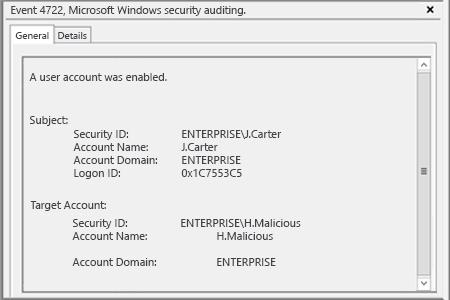
- 打开事件查看器,并在安全日志中搜索事件 ID 4722(用户帐户已启用)。
Netwrix Auditor for Active Directory
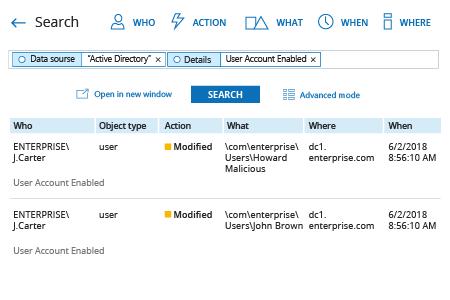
- 运行 Netwrix Auditor → 转到“Search(搜索)”→ 如果未选择,单击“Advanced mode(高级模式)”→ 设置以下筛选条件:
- 筛选条件 = “Data source”
运算符 = “Equals”
值 = “Active Directory” - 筛选器 = “Details”
运算符 = “Contains”
值 = “User Account Enabled”
- 筛选条件 = “Data source”
- 单击“Search”按钮,并查看在 Active Directory 中是谁启用了哪些用户帐户。
为了创建一个警报:每当有人启用用户帐户时都会触发:
- 在搜索结果中,依次进入“Tools” → 单击“Create alert” → 指定新警报的名称。
- 切换到“Recipients”选项卡 → 单击“Add Recipient” → 指定要将警报发送到的电子邮件地址。
- 单击“添加”以保存警报。
分享到