
适用于 Active Directory 的 Netwrix Auditor
- 运行 Netwrix Auditor → 单击“Reports(报告)”→ 导航到 Active Directory → “Active Directory State-in-Time(时间点状态)”→ 选择“User Accounts(用户帐户)”→ 单击“View(查看)”。
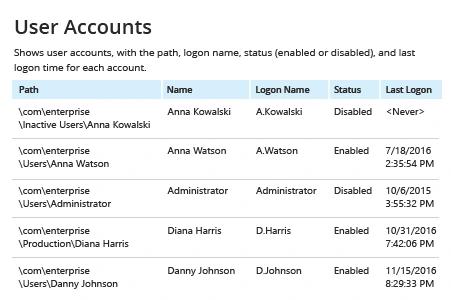
- 要将报告导出为 CVV 文件,请单击“Export”按钮 → 选择“CSV” → 单击“Save”。
了解更多:Netwrix Auditor for Active Directory
原生审计
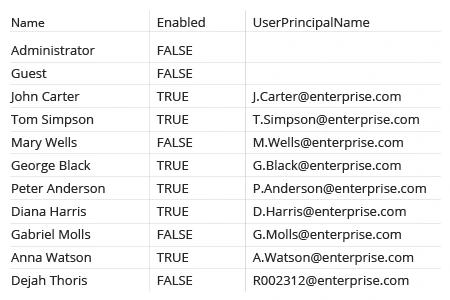
- 在域控制器上运行以下 PowerShell 脚本,并指定输出 CSV 文件的所需名称:
      $Path = 'C:\Temp\Users.csv'
Get-ADUser -Filter * -Properties * | Select-Object Name, Enabled, UserPrincipalName | Export-Csv -Path $Path –notypeinformation
如果需要从特定组织单元导出用户列表,请在 Get-ADUser cmdlet 中添加以下参数:
-SearchBase “CN = CommonName, OU = OrganizationalUnit, DC = DomainComponent”
- Open the file produced by the script in MS Excel.
更快将当前 Active Directory 用户列表导出为易读格式
IT 专业人员经常需要从 Active Directory 获取用户列表,并且往往需要将所有 AD 用户帐户导出为 CSV,因为这种结构化格式便于对数据进行处理。Active Directory Users and Computers 不具备内置的导出功能,因此,导出 AD 用户名到 CSV 文件的可用免费工具是 PowerShell。不幸的是,并非每位管理员都具备 PowerShell 脚本编写能力;此外,为了让任何需要执行简单任务的人都能访问域控制器,这本身就是巨大的安全风险。因此,IT 专业人员需要一种工具,使他们能够在不受这些限制的情况下将 Active Directory 用户导出为 CSV 格式。
Netwrix Auditor for Active Directory 使 IT 管理员能够在短短几秒钟内将 AD 用户导出为 CSV 或其他格式。无需浪费时间编写和维护复杂脚本;此外,你还可以让报告自动发送到你选择的任意电子邮件地址——在不授予他们访问关键 IT 系统权限的情况下,为相关方提供所需信息。
该解决方案提供的远不止是 Active Directory 中的用户列表。例如,它还包括状态在指定时间点(state-in-time)的报告,使你能够查看有关组策略(Group Policies)设置和用户权限的详细信息。你可以轻松筛选和优化任何报告,以在几分钟内获得你所需的准确信息。
分享到