
Netwrix Auditor for Active Directory
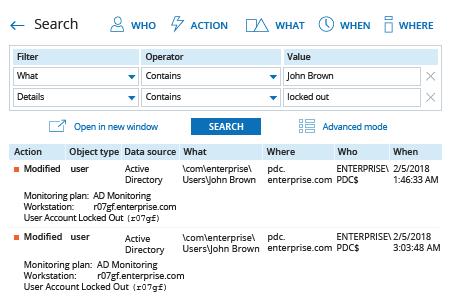
- 运行 Netwrix Auditor → 进入 "Search" → 指定以下条件:
- 筛选器 – "What"
运算符 – "Contains"
值 – "<帐户用户名>" - 筛选器 – "Details"
运算符 – "Contains"
值 – "Locked out"
- 筛选器 – "What"
- 单击“Search”,并查看结果。
了解更多:Netwrix Auditor for Active Directory
原生审计
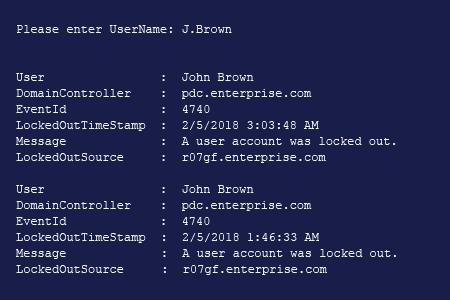
- 打开 Powershell ISE → 运行以下脚本,并输入被锁定用户的名称:
      Import-Module ActiveDirectory
$UserName = Read-Host "Please enter username"
#Get main DC
$PDC = (Get-ADDomainController -Filter * | Where-Object {$_.OperationMasterRoles -contains "PDCEmulator"})
#Get user info
$UserInfo = Get-ADUser -Identity $UserName
#Search PDC for lockout events with ID 4740
$LockedOutEvents = Get-WinEvent -ComputerName $PDC.HostName -FilterHashtable @{LogName='Security';Id=4740} -ErrorAction Stop | Sort-Object -Property TimeCreated -Descending
#Parse and filter out lockout events
Foreach($Event in $LockedOutEvents)
  {
    If($Event | Where {$_.Properties[2].value -match $UserInfo.SID.Value})
    {

      $Event | Select-Object -Property @(
        @{Label = 'User'; Expression = {$_.Properties[0].Value}}
        @{Label = 'DomainController'; Expression = {$_.MachineName}}
        @{Label = 'EventId'; Expression = {$_.Id}}
        @{Label = 'LockoutTimeStamp'; Expression = {$_.TimeCreated}}
        @{Label = 'Message'; Expression = {$_.Message -split "`r" | Select -First 1}}
        @{Label = 'LockoutSource'; Expression = {$_.Properties[1].Value}}
      )

    }}
- 查看结果以查找锁定的来源。
使用 PowerShell 或 Netwrix Auditor 查找账户锁定的来源以及锁定原因
在多次身份验证失败后锁定 Active Directory 账户,是 Microsoft Windows 环境中的常见策略。锁定可能由多种原因导致,包括忘记的密码、缓存中已过期的服务凭据、域控制器复制错误、错误的驱动器映射、Windows Server 上断开的终端会话,以及移动设备访问 Exchange Server。
在解锁账户之前,需要先找出锁定发生的原因,以降低安全风险并防止同类问题再次发生。PowerShell 是你可以使用的工具之一。上面提供的脚本通过检查 Securitylog 中所有 ID 为 4740 的事件,帮助你确定单个用户账户的账户锁定来源。PowerShell 输出包含用于进一步调查的相关细节:发生账户锁定的计算机以及锁定发生的时间。
Netwrix Auditor 提供了更便捷的方式来查找帐户锁定的来源。该平台会监控环境中所有用户的活动,并在一份易于阅读的报告中提供关于一个或全部帐户锁定的详细信息;你只需点击几次即可生成该报告。
分享到