
Netwrix Auditor for Active Directory
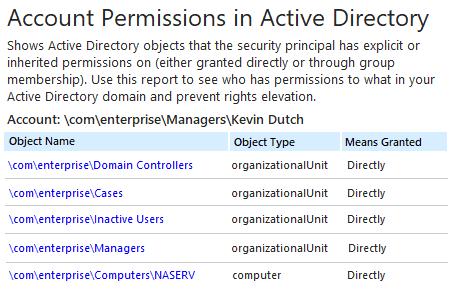
- 运行 Netwrix Auditor → 进入“Reports” → 展开“Active Directory”部分 → 转到“Active Directory - State-in-Time” → 选择“Account Permissions in Active Directory” → 点击“View”。
- 指定以下筛选条件的值,然后单击“View Report”:
- 帐户 UNC 路径
- 授予的含义
- 权限
- 要保存报告,请单击“Export”按钮 → 从下拉菜单中选择一种格式 → 单击“Save”。
了解更多:Netwrix Auditor for Active Directory
原生审计
- 打开 PowerShell ISE → 使用以下代码创建一个新脚本,并指定用于导出的用户名和路径 → 运行脚本。
      Import-Module ActiveDirectory
# Array for report.
$report = @()
$schemaIDGUID = @{}
# ignore duplicate errors if any #
$ErrorActionPreference = 'SilentlyContinue'
Get-ADObject -SearchBase (Get-ADRootDSE).schemaNamingContext -LDAPFilter '(schemaIDGUID=*)' -Properties name, schemaIDGUID |
 ForEach-Object {$schemaIDGUID.add([System.GUID]$_.schemaIDGUID,$_.name)}
Get-ADObject -SearchBase "CN=Extended-Rights,$((Get-ADRootDSE).configurationNamingContext)" -LDAPFilter '(objectClass=controlAccessRight)' -Properties name, rightsGUID |
 ForEach-Object {$schemaIDGUID.add([System.GUID]$_.rightsGUID,$_.name)}
$ErrorActionPreference = 'Continue'
# Get a list of AD objects.
$AOs  = @(Get-ADDomain | Select-Object -ExpandProperty DistinguishedName)
$AOs += Get-ADOrganizationalUnit -Filter * | Select-Object -ExpandProperty DistinguishedName
$AOs += Get-ADObject -SearchBase (Get-ADDomain).DistinguishedName -SearchScope Subtree -LDAPFilter '(objectClass=*)' | Select-Object -ExpandProperty DistinguishedName
# Loop through each of the AD objects and retrieve their permissions.
# Add report columns to contain the path.
ForEach ($AO in $AOs) {
    $report += Get-Acl -Path "AD:\$AO" |
     Select-Object -ExpandProperty Access |
     Select-Object @{name='organizationalunit';expression={$AO}}, `
                   @{name='objectTypeName';expression={if ($_.objectType.ToString() -eq '00000000-0000-0000-0000-000000000000') {'All'} Else {$schemaIDGUID.Item($_.objectType)}}}, `
                   @{name='inheritedObjectTypeName';expression={$schemaIDGUID.Item($_.inheritedObjectType)}}, `
                   *
} # Filter by single user and export to a CSV file.
$User ='Username'
$report | Where-Object {$_.IdentityReference -like "*$User*"} | Select-Object IdentityReference, ActiveDirectoryRights, OrganizationalUnit, IsInherited -Unique |
Export-Csv -Path "C:\data\explicit_permissions.csv" -NoTypeInformation
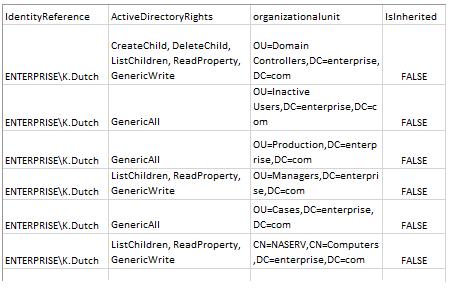
- 启动 MS Excel,并打开脚本生成的文件。
示例报告:
通过持续检查 Active Directory 用户权限报表,减少攻击面
为实现对 Active Directory 的正确管理并提升安全性,最佳实践要求权限应通过 Active Directory 组成员身份继承,而不是被明确分配。但要确保访问权限遵循这一原则可能会面临挑战。IT 管理员需要定期查看 Active Directory 用户权限报表,了解权限是如何授予的,以便移除任何被明确分配的权限;同时还要与数据所有者协作,从那些授予用户其日常工作不需要的权限的组中移除用户。定期的权限审查与清理有助于将特权滥用和数据泄露的风险降到最低。不过,依赖 PowerShell 等报表工具生成报表,并对晦涩难懂的输出进行审阅,既耗时又容易出错。
Netwrix Auditor for Active Directory 通过生成一份全面的报表来克服 PowerShell 脚本编写的限制:该报表会列出某个特定用户可访问的所有对象,并说明相应权限是通过组成员身份授予还是被明确分配。你可以轻松下钻查看更多细节,例如用户在某个特定对象上具有哪些确切权限。
分享到