
Netwrix Auditor for Active Directory
要使用 Netwrix Auditor 获取计算机组成员关系,请按照以下步骤操作:
- 运行 Netwrix Auditor
- 依次进入“Reports” -> 选择“Predefined” -> 展开“Active Directory”部分 -> 转到“Active Directory – State-in-Time” -> 选择“Users and Computers – Effective Group Membership” -> 点击“View”。
- 在“Account Name”字段中,指定要生成报告的计算机。
- 在“Membership type”字段中,指定“Directly”。
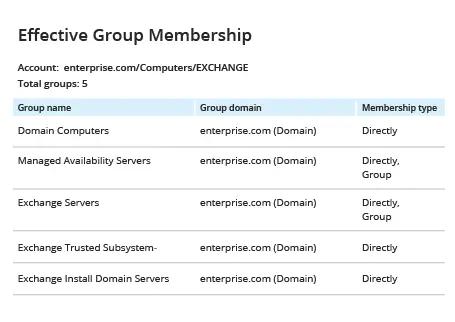
- 查看您的报告。 请注意,在下面的示例报告中,Netwrix Auditor 已将左侧原始报告中的难懂字符串“$H31000-K5769ISACFFV”翻译为易读的组名“Exchange Install Domain Servers”。
Native Auditing
要使用 PowerShell 获取计算机的组成员身份,请按以下步骤操作:
- 在你的域控制器上打开 Powershell ISE。
- 运行以下 Powershell 脚本,提供 CSV 文件的报告输出路径以及计算机名称:
      $Path= "C:\Temp\ComputerGroups.csv"
$Name= "EXCHANGE"
Get-ADComputer -Filter {Name -like $Name} | ForEach-Object {
$computer= $_
Get-ADPrincipalGroupMembership -Identity $_|
Select-Object @{Name = 'Computer Name'; Expression =
{$computer.SamAccountName}},@{Name = 'GroupName'; Expression =
{$_.SamAccountName}},@{Name = 'Distinguished Name'; Expression =
{$_.distinguishedname}}, @{Name = 'Member'; Expression = {$computer.DNSHostName}}
}| Export-Csv -Path $Path -NoTypeInformation
请注意,通过指定 $Name = "*",你可以获取所有域计算机帐户的汇总;不过,此报告生成将花费较长时间。
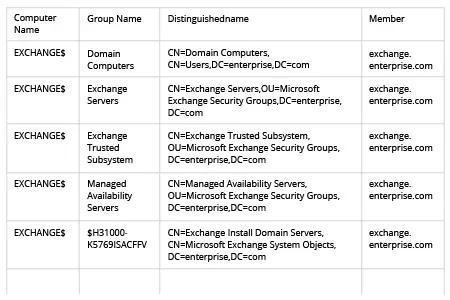
- 查看 .csv 报告:
更快地调查冲突策略
在组织内将 GPO 和 WSUS 设置部署到计算机和服务器的正确做法,是将其链接到 AD 组。然而,随着企业规模的增长,AD 组结构可能会变得相当复杂,从而导致策略冲突。通过手动浏览所有信息来排查错误和其他问题可能会耗费大量时间。PowerShell 可以提供帮助;例如,如果你需要列出某个特定计算机帐户所属的所有 Active Directory 组,可以使用 ActiveDirectory 模块中的 PowerShell Get-ADPrincipalGroupMembership cmdlet,然后将结果导出为 CSV 或其他格式。
不过,PowerShell 脚本编写依然很耗时,而且只能显示系统的当前状态。Netwrix Auditor for Active Directory 可为企业管理员提供对其 Active Directory 配置更深入的可视性。你无需费力地编写脚本并手动处理输出结果,只需直接运行预定义的报表即可。报表包含所有必要的细节,包括计算机名称和域,你还可以轻松将报表导出为 PDF、CSV 或 Microsoft Excel 格式。你也可以使用“Interactive Search”功能来查找所需数据。更进一步,你可以跟踪 AD 结构的变更,或将当前 AD 结构状态与过去任意时间点进行对比,从而在发生入侵或业务中断之前主动发现并修复问题。
分享到