
Netwrix Auditor for Exchange
运行 Netwrix Auditor → 单击“Reports”→ 选择 Exchange Online → 选择 State-in-Time Reports → 选择“ Mailbox Non-Owner Permission Details”→ 单击“View”。
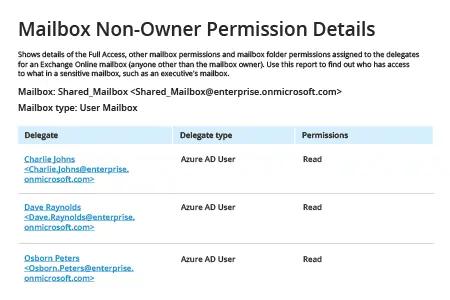
原生解决方案
1. 以管理员身份运行 PowerShell ISE,并执行以下命令以连接到 Office 365 PowerShell:
Set-ExecutionPolicy RemoteSigned
2. 运行以下命令以请求 Windows PowerShell 凭据:
$Cred = Get-Credential
输入账号和密码,然后 单击“确定”。
3. 使用以下命令创建会话,并根据您的 Exchange Online 位置修改 –ConnectionUri 参数:
$Session = New-PSSession -ConfigurationName Microsoft.Exchange -ConnectionUri https://outlook.office365.com/PowerShell-liveid/ -Credential$Cred -Authentication Basic –AllowRedirection
4. 连接到 Exchange Online:
Import-PSSession$Session -DisableNameChecking
5. 生成用户权限报告,请执行以下任一操作:
- 要获取用户权限的完整摘要,请使用以下 Get-Mailbox 命令:
Get-Mailbox -resultsize unlimited | Get-MailboxPermission | Select Identity, User, Deny, AccessRights, IsInherited| Export-Csv -Path "c:\temp\mailboxpermissions.csv" –NoTypeInformation
- 如果你需要针对特定用户的报告,请使用 -identity 参数,而不是 -resultsize unlimited。
- 要筛选具有完全访问权限的用户,请使用参数 where {($_.accessrights -contains "FullAccess")}:
Get-Mailbox -resultsize unlimited | Get-MailboxPermission| where {($_.accessrights -contains "Fullaccess")} | Select AccessRights,Deny,InheritanceType,User,Identity,IsInherited | Export-Csv -Path "c:\temp\fullaccess.csv" -NoTypeInformation
- 默认情况下,你将获得包含非所有者访问在内的用户完整列表。若只想获取直接用户权限的信息,请使用以下任一项:{($_.user -ne "NT AUTHORITY\SELF")} 或 {($_.user -like '*@*')}:
Get-Mailbox -resultsize unlimited | Get-MailboxPermission | Select Identity, User, Deny, AccessRights, IsInherited| Where {($_.user -ne "NT AUTHORITY\SELF")}| Export-Csv -Path "c:\temp\NonOwnerPermissions.csv" -NoTypeInformation
- 要查看“Send As(以发送者身份)”权限的信息,请使用 Get-RecipientPermission cmdlet:
Get-Mailbox -resultsize unlimited | Get-RecipientPermission| where {($_.trustee -ne "NT AUTHORITY\SELF")}|select Identity,Trustee,AccessControlType,AccessRights,IsInherited | Export-Csv -Path "c:\temp\sendaspermissions.csv" –NoTypeInformation
- 要生成包含“Send on Behalf”权限的邮箱报告,请使用以下脚本:
      $GrantSendOn= Get-Mailbox-resultsize unlimited| where {($_.GrantSendOnBehalfTo -ne "")}

$Out=foreach ($user in $GrantSendOn.GrantSendOnBehalfTo) {

$obj= New-Object System.Object

$obj|Add-MemberNoteProperty eMail$GrantSendOn.WindowsEmailAddress

$obj|Add-Member NoteProperty DisplayName $GrantSendOn.DisplayName

$obj|Add-Member NoteProperty User $user

$obj }

$Out| Export-Csv -Path "c:\temp\sendonbehalfpermissions.csv" –NoTypeInformation
6. 查看报告:
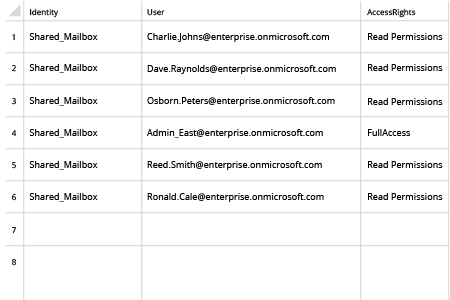
7. 使用以下命令终止你的会话:
Remove-PSSession$Session
分享到