
Netwrix Auditor for Active Directory
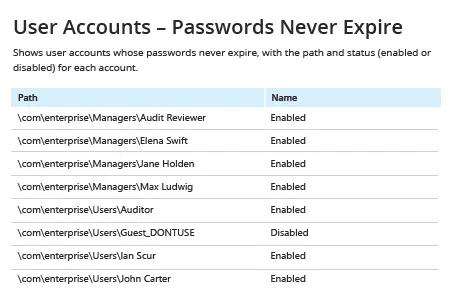
- 运行 Netwrix Auditor → 转到“Reports” → 打开“Active Directory” → 进入“Active Directory - State-in-Time” → 选择“User Accounts – Passwords Never Expire” → 点击“View”。
- 如需通过电子邮件定期接收报告,请单击“Subscribe”按钮并选择您偏好的计划。
原生审计
- 打开 Powershell ISE → 使用以下代码创建新脚本并运行,指定导出路径:
      # Import the AD module to the session

Import-Module ActiveDirectory

#Search for the users and export report

get-aduser -filter * -properties Name, PasswordNeverExpires | where {
$_.passwordNeverExpires -eq "true" } | Select-Object DistinguishedName,Name,Enabled |
Export-csv c:\data\pw_never_expires.csv -NoTypeInformation
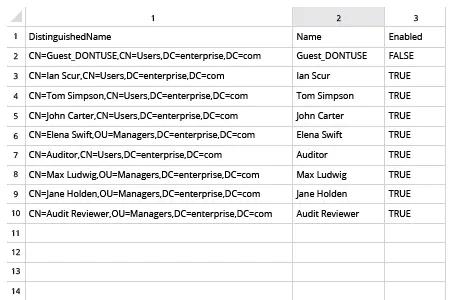
- 在 MS Excel 中打开脚本生成的文件。
分享到