
原生审计
- 打开 Powershell ISE。
- 运行以下脚本,并调整 “OutFile” 和 “RootPath” 字段:
      $OutFile = "C:\Temp\Permissions.csv" # Insert folder path where you want to save your file and its name
$RootPath = "\\Pdc\Shared" # Insert your share directory path
$Header = "Folder Path,IdentityReference,AccessControlType,IsInherited,InheritanceFlags,PropagationFlags"
# $Header = "Folder Path,IdentityReference,AccessControlType,IsInherited,InheritanceFlags,PropagationFlags,FilesystemRights"
$FileExist = Test-Path $OutFile
If ($FileExist -eq $True) {Del $OutFile}
Add-Content -Value $Header -Path $OutFile
$Folders = dir $RootPath -recurse | where {$_.psiscontainer -eq $True}
foreach ($Folder in $Folders){
$ACLs = get-acl $Folder.fullname | ForEach-Object { $_.Access }
Foreach ($ACL in $ACLs){
$OutInfo = $Folder.Fullname + "," + $ACL.IdentityReference + "," + $ACL.AccessControlType + "," + $ACL.IsInherited + "," + $ACL.InheritanceFlags + "," + $ACL.PropagationFlags
# If you need detailed file system rights in your report, add the following at the end of previous line:
# + "," + ($ACL.FileSystemRights -replace ',','/' )
Add-Content -Value $OutInfo -Path $OutFile
}}
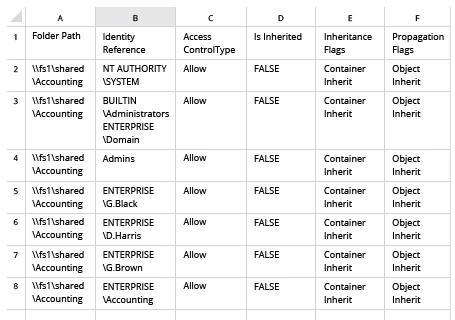
- 在 Microsoft Excel 中打开脚本生成的文件:
Netwrix Auditor for Windows File Servers
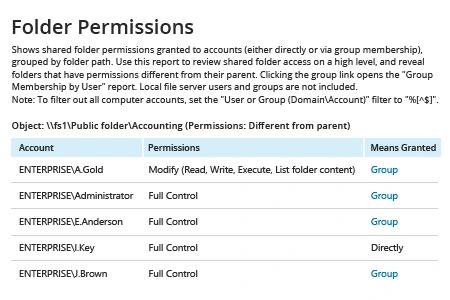
- 运行 Netwrix Auditor → 转到 “Reports” → 打开 “File Servers” → 进入 “File Servers – State-in-Time” → 选择 “Folder Permissions” 报告。
- 在 “Object UNC Path” 筛选器中,指定文件共享的路径(例如,“\\Myserver\Myshare”)。
- 点击“查看报告”。
要定期通过电子邮件接收报告,只需点击“订阅”选项,然后指定计划和收件人。
分享到