
Netwrix Auditor for Active Directory
- 运行 Netwrix Password Expiration Notifier → 选择你的域 → 单击“Edit”→ 单击“Enable password expiration alerting” → 单击“Save”。
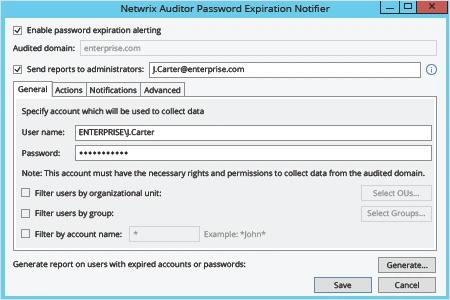
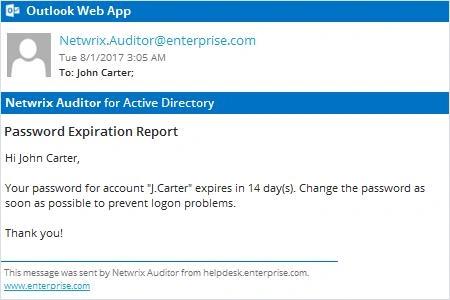
Netwrix Auditor 将自动向每位其密码即将到期的帐户所有者发送一封 Active Directory 密码到期通知电子邮件。
原生审计
- 使用 PowerShell ISE 复制、修改并保存以下脚本:
      #requires -module ActiveDirectory

<#
.SYNOPSIS
Script will scan Active Directory for accounts with expiring passwords

.DESCRIPTION
Script will scan Active Directory for accounts with expiring passwords and will send customized email to users

.PARAMETER Domain
.PARAMETER specifies which domain search will be performed against

.PARAMETER Cred
The PS credential to use to query AD (if not using the logged in credential)

.PARAMETER SearchBase
The OU path to search for user accounts in

.PARAMETER PasswordExpirationThreshold
Specifies accounts where this value exceeded will be emailed

.PARAMETER Subject
Which subject shall be put into email

.PARAMETER From
Which address shall be used as a FROM field in Email

.PARAMETER EmailServerAddress
SMTP relay address

.PARAMETER FailoverEmail
Emails address where all errors will be sent to

.PARAMETER LogFilePath
The path to where the informational log file is generated by this script.
#>

[CmdletBinding()]
Param(
[string]$Domain = $env:USERDNSDOMAIN,
[PSCredential]$cred,
[string]$SearchBase,
[string]$UserSearchString = '*',
[int]$PasswordExpirationThreshold = 14,
[string]$Subject = "Password Expiration Notification",
[string]$From = "J.Carter@enterprise.com",
[string]$EmailServerAddress = "mail.enterprise.com",
[string]$FailoverEmail = "J.Carter@enterprise.com",
[string]$LogFilePath = 'D:\Temp\ServiceAccountExpirations.log'
)

begin {
function Write-Log($Message) {
$MyDateTime = Get-Date -Format 'MM-dd-yyyy H:mm:ss'
Add-Content -Path $LogFilePath -Value "$MyDateTime - $Message"
}
try {
$MaxPasswordAge = (Get-ADDefaultDomainPasswordPolicy -Server $Domain).MaxPasswordAge.Days
Write-Log -Message "The max password age for the $Domain domain is $MaxPasswordAge"
if ($PasswordExpirationThreshold -gt $MaxPasswordAge) {
throw "The value '$PasswordExpirationThreshold' specified as the password expiration threshold is greater than the max password age for the domain" }

[string]$EmailTemplate = @'
<html> <body> <font SIZE="6" COLOR="#ff0000"> <p ALIGN="CENTER" style='font-size:20.0pt;font-family:"Times New Roman";color:#CC0000;mso-bidi-font-weight: bold'>Password Expiration Notice</p> </font><font style='font-size:14.0pt;font-family:"Times New Roman";color:#1C1C1C;mso-bidi-font-weight:bold'> <p>Dear $FirstName $LastName,</p> <p>Your password in <U> $domain </U> domain will expire in $DaysBeforeExpiration days. Please change it as soon as possible to make sure your account does not get locked out. To change your password press CTRL+ALT+DEL and select "Change Password". </p> <p>Please review the guidelines below as they are necessary for successfully updating your password.</p> <p>PASSWORD MUST:</p> <dir> <p>Be at least 8 total characters</p> <p>Contain at least one uppercase character</p> <p>Contain at least one numeral</p> <p>Not be the same or similar to the last 5 used passwords</p> <p>Be used for at least 24 hours before changing again</p> </dir> <p></p> <p>If you enter an incorrect password 5 or more times, your account will be locked and you will need to contact the Help Desk for assistance. </p> </font><font SIZE="4" style='font-size:13.0pt;font-family:"Times New Roman";color:#CC0000'> <p ALIGN="CENTER">*** Please do not respond to this e-mail. <BR>Direct any questions or concerns regarding this issue to the IT Help Desk. <BR> For information on how to contact the Help Desk, please visit </font> <a HREF="http://helpdesk.enterprise.com"> <font SIZE="4" COLOR="#0000ff"><u> http://helpdesk.enterprise.com/ </u></font> </dir> </font></b> </body> </html>
'@
} catch {
Write-Log -Message $_.Exception.Message
exit
}
}
process {
try {
$GetAdUserParams = @{
'Filter' = { (Enabled -eq $True) -and (PasswordNeverExpires -eq $false) -and (samAccountName -like $UserSearchString)}
'Properties' = 'PasswordLastSet', 'PasswordExpired', 'PasswordNeverExpires','EmailAddress'
}
if ($SearchBase) {
$GetAdUserParams.SearchBase = $SearchBase
}
if ($Cred) {
$GetAdUserParams.Credential = $cred
}
$Today = Get-Date
$Users = Get-ADUser @GetAdUserParams | Where-Object { $_.PasswordLastSet -and !$_.PasswordExpired }
Write-Log -Message "Found '$($Users.Count)' total expirable AD user accounts"
$ExpiringUsers = [System.Collections.ArrayList]@()
foreach ($User in $Users) {
$UserPwdExpireDate = $User.PasswordLastSet.AddDays($MaxPasswordAge)
$DaysUntilExpire = ($UserPwdExpireDate - $Today).Days
$FirstName = $User.GivenName
$LastName = $User.Surname
if ($DaysUntilExpire -le $PasswordExpirationThreshold) {
Write-Log -Message "The user $($User.samAccountName)'s password will expire in $DaysUntilExpire days"
$EmailBody = $EmailTemplate.Replace('$FirstName', $FirstName).Replace('$LastName', $LastName).Replace('$DaysBeforeExpiration', $DaysUntilExpire).Replace('$domain', $Domain)
Send-MailMessage -To $User.EmailAddress -From $From -Subject $Subject -BodyAsHtml $EmailBody -SmtpServer $EmailServerAddress -Priority High -UseSsl
$ExpiringUsers.Add($User) | Out-Null
}
}
Write-Log -Message "'$($ExpiringUsers.Count)' accounts found with expiring passwords within $PasswordExpirationThreshold days"
} catch {
Write-Log -Message "$($_.Exception.Message) - $($_.InvocationInfo.ScriptLineNumber)"
}
}
- 使用任务计划程序(Task Scheduler)自动执行脚本。
了解更多:Netwrix Auditor for Active Directory
提醒用户更改密码:提升用户效率,减少帮助台工作负担
许多最佳实践都要求定期更改密码,以加强企业数据和关键系统的安全性,抵御来自内部和外部的威胁。但如果用户忽略了更改密码的通知,或根本没有收到通知——例如他们在远程办公——就只能等待帮助台管理员重置已过期的密码,从而在各方面都损害工作效率。为了在维持强有力的密码安全策略的同时尽量减少帮助台工作量,IT 专业人员需要一种更高效的方式来提醒用户密码即将到期。
Netwrix Auditor for Active Directory 让 IT 专业人员能够全面了解 Active Directory 和组策略中正在发生的情况。它还可以发送通知电子邮件,提醒用户在密码到期前进行更改;IT 管理员甚至可以自定义 这些告警,以指定密码到期前剩余的确切天数。此外,IT 管理员还能获得汇总报告,显示哪些用户帐户的密码即将到期。这些告警和报告使 IT 专业人员能够在不牺牲用户或帮助台效率的情况下增强安全性。
分享到