
Cognitive surrender in your ERP or CRM: AI-written changes that nobody checked
Oct 19, 2026
Cognitive surrender is what happens when people accept AI output with little or no scrutiny. In an ERP or CRM, it shows up as AI-written scripts, formulas, and automation rules reaching production before anyone checks what they touch.
An AI assistant can draft a script, a report formula, or an automation rule in under a minute. The answer arrives fluent and sure of itself, and in a sandbox it often runs. In an ERP or CRM with years of customization behind it, running in a sandbox proves very little.
Accuracy follows the AI, right or wrong
Wharton researchers Steven Shaw and Gideon Nave named the pattern cognitive surrender: adopting an AI's answer with little scrutiny. In one of their experiments, accuracy rose 25% when the AI was right and fell 15 points when it was wrong. Using the AI also raised confidence, even after errors.
Admins and developers work under the same pressure. The backlog is long, and the assistant answers instantly.
The assistant sees your prompt, not your system
Customizations in business systems are often linked to each other. A field feeds a report; the report feeds an automation rule, and the rule triggers a script. The assistant can't know that the field it just renamed sits inside a formula, or that the report it edited drives an integration. The reviewer sees working code and clicks approve. Nobody looked at the dependency.
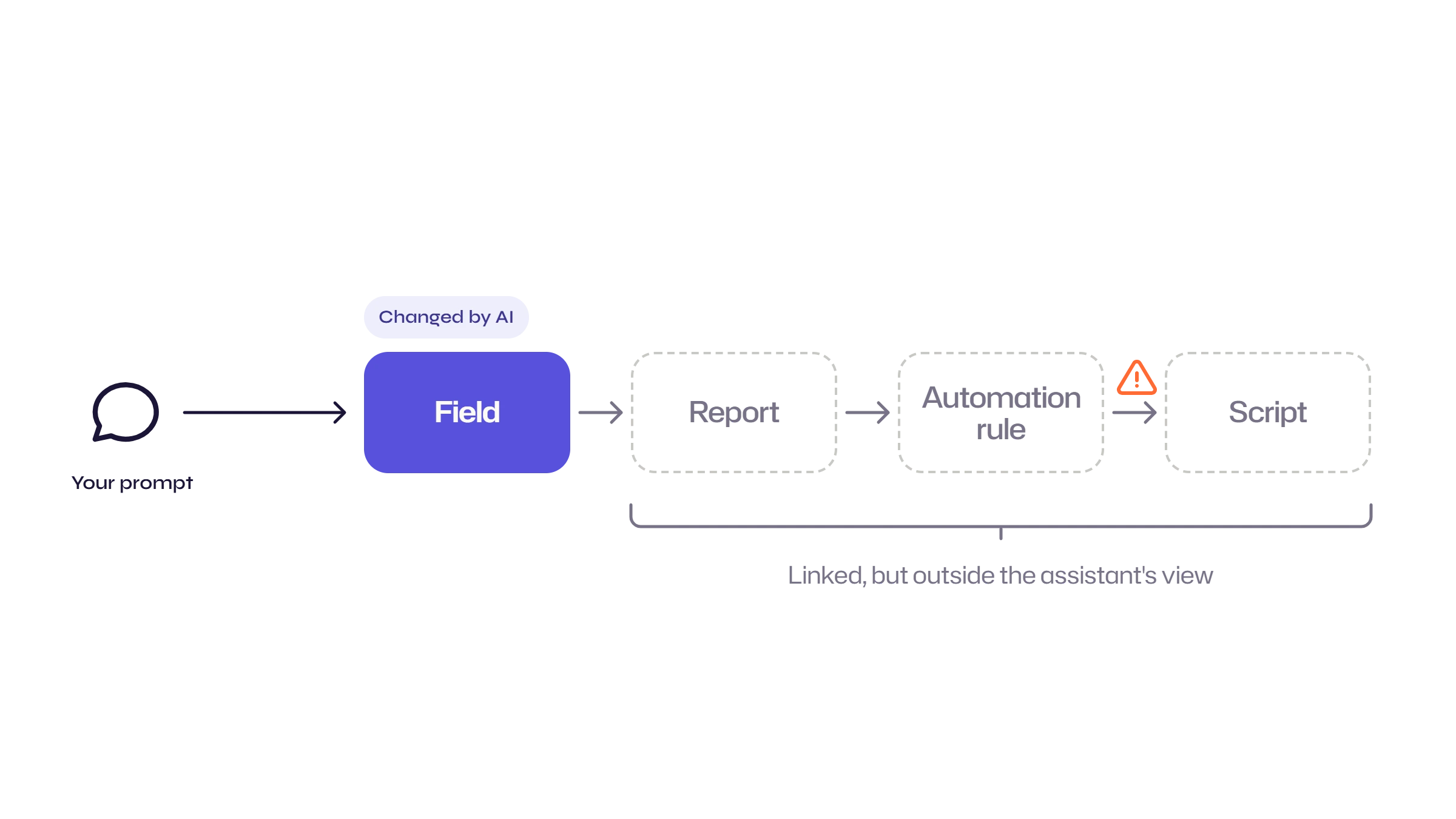
Then come the failed deployments, the automations that quietly stop firing, the reports with wrong numbers, and the audit question months later about who approved the change.
Put a checkpoint in front of AI-written changes
Strongpoint doesn't care who wrote a change. It runs the same checks on everyone.
It documents your customizations automatically and maps the links between them. Before anyone touches an object, you can see which scripts, reports, workflows, and integrations depend on it.
Impact analysis runs when someone saves a change request or can be used as a standalone tool. It flags dependent scripts, workflows, and critical searches, plus anything used recently.
Policies set how much review each type of object needs, so a script or formula will require stringent approvals vs a change to a saved search. A change made without the required approval shows up as non-compliant.
After deployment, environment comparison shows the differences between sandbox and production to ensure your changes have migrated as expected, and the change log records show you what changed, who changed it, and when.
Here is how that plays out for the changes AI assistants write most often.
AI-assisted change | What can break | What Strongpoint shows before approval |
|---|---|---|
|
AI-written script |
Breaks a field, workflow, or integration the assistant never saw |
Dependency map and impact analysis flag the dependent scripts, workflows, fields and integrations |
|
Report or search formula |
Returns wrong numbers without throwing an error |
Impact analysis flags critical searches that use the changed field |
|
Automation rule or workflow |
Stops firing, or fires on the wrong records |
Related customizations listed on the change request, with approvers set by policy |
|
Field or record edit |
Removes something another customization relies on |
A "cannot be safely deleted or modified" warning that names the dependent objects |
|
Role or access change |
Grants permissions nobody reviewed |
Change request approval, plus a change log of what changed, who changed it, and when |
Where to start
Route AI-drafted changes through a change request. Read the impact analysis before you approve anything. Raise the review level for scripts and formulas. Compare environments after each deployment. You keep the speed of AI-assisted work, and a person stays in the review.
See Netwrix Strongpoint in action. Request a demo.
FAQs
Share on
Learn More
About the author

Valerie Callahan
Product Manager
With more than 15 years in ERP, product management, and finance, Valerie Callahan is intimately familiar with the compliance and change management challenges NetSuite teams face today. Currently, she serves as Product Manager for Strongpoint, Netwrix's governance solution for NetSuite, where her responsibilities include shaping the product roadmap, working closely with customers and auditors, and ensuring the platform meets the real-world needs of finance and IT teams. Her professional experience spans system analysis, process improvement, and ERP optimization across the technology industry. She is known for simplifying complex processes with practical, innovative solutions.