
SharePoint governance: Policies, permissions, and controls
Sep 26, 2026
SharePoint governance should control permission drift and site sprawl before overshared content reaches Microsoft 365 Copilot responses. Broken inheritance creates independent scopes that increase review effort and weaken audit readiness. Clear ownership, lifecycle policies, group-based access controls, external-sharing limits, and continuous evidence strengthen security posture.
Permission drift undermines SharePoint governance long before anyone notices a policy failed. According to the Netwrix 2026 Data and Identity Security Report, 75% of incident-based data exposures begin with a compromised identity or misconfigured permissions. SharePoint governance breaks down for a structural reason, since directly sharing a file or folder can break permission inheritance and create an independent permission scope that SharePoint requires manual cleanup to fix.
Microsoft 365 Copilot raises the stakes because ungoverned permissions can shape the answers it surfaces. Effective governance connects ownership, lifecycle policies, access controls, external sharing, and audit evidence to continuous detection and remediation across the environment.
What is SharePoint governance?
SharePoint governance is the set of policies, roles, and technical controls that determine how teams create, manage, and retire sites, content, and access. In practice, it spans five areas: ownership and accountability, site lifecycle, permissions, external sharing, and monitoring. A framework is enforceable when each policy includes a mechanism to detect and correct drift, plus evidence an auditor can inspect. Effective programs close the gap between documented policy and that standard.
Data access governance tools help teams turn these policies into repeatable permission reviews and remediation workflows.
Why governance fails without enforcement
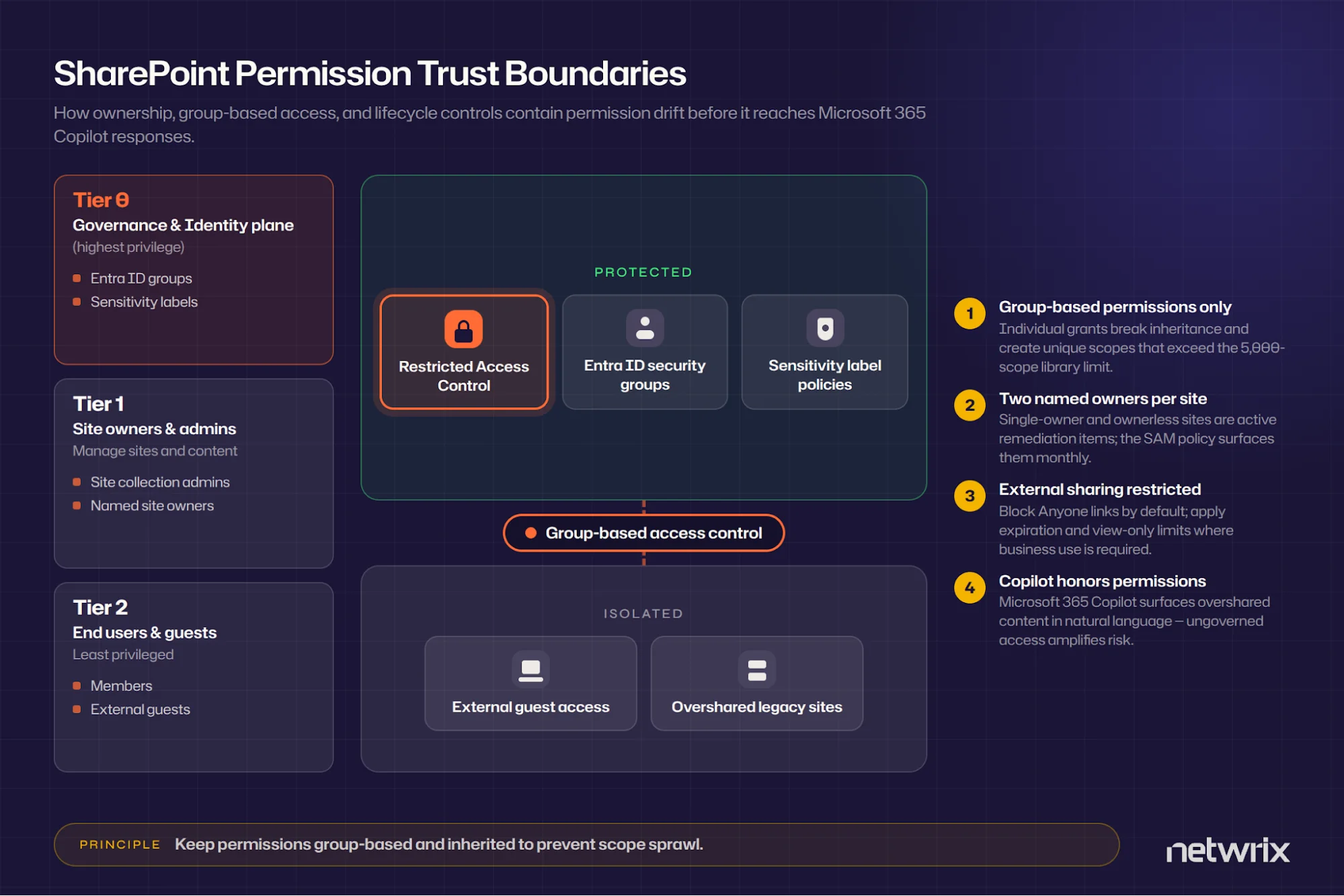
Breaking permission inheritance is one of the most common ways governance quietly fails. File, folder, and item-level grants can create unique scopes, and each broken scope counts against a recommended performance limit of 5,000 unique permissions per library (50,000 supported). As these independent scopes accumulate, administrators should review and maintain each one separately. External sharing drifts the same way, especially where users can create public links that expose sensitive information.
Many teams can't answer "who has access to what" on demand because access reviews are too time-consuming to run regularly. Configuring Microsoft 365 audit logging provides useful evidence, but only when teams review it and act on the results.
Copilot makes continuous permission visibility more important. The semantic index is tenant-wide, updates daily for new documents, and administrators can't disable it. Copilot respects existing permissions, which means users can query every pre-existing oversharing condition in natural language.
Gaps in governance, including over-permissioned sites, inherited access, or missing sensitivity label protections, become amplified once Copilot is involved. The Netwrix 2026 Data and Identity Security Report found that 64% of organizations say their data-access governance is behind the pace of AI adoption.
Netwrix Access Analyzer resolves effective SharePoint access instead of listing raw ACLs, so a governance team can see exactly who reaches what before Copilot does. Request a demo.
The core pillars of a SharePoint governance framework
An enforceable framework pairs each governance pillar with a mechanism to detect drift and support remediation.
Roles and ownership
Name a governance lead who owns the framework, two site owners for every active site, and a compliance or legal stakeholder who signs off on retention and audit requirements. A cross-discipline governance team should span executive stakeholders, business division leaders, IT, and compliance.
Ownerless sites deserve specific attention because Microsoft's native remedy leaves tenant administrators to find and assign owners individually after the ownerless group policy sends weekly invitations and then stops. SharePoint Advanced Management (SAM)'s site ownership policy can require a minimum owner count and runs monthly in active mode, though its hard enforcement actions apply only to zero-owner sites. Treat single-owner sites that its reports flag as a standing remediation queue.
Site and content lifecycle policies
Apply controls at each stage of the site and content lifecycle:
- Gate provisioning, name consistently, and define what triggers archive and decommission. Restricted site creation limits who can create sites, and the Microsoft Entra ID naming policy enforces conventions at creation time.
- For inactivity, SAM's inactive site policy notifies owners monthly for three months and then can set sites to read-only or archive them through Microsoft 365 Archive after a configurable read-only period of 3, 6, 9, or 12 months.
- For retention, follow the Microsoft distinction between the two mechanisms. Retention policies apply at the site or mailbox container level and don't travel with content, while retention labels apply at the item level and follow the document within the tenant.
Use policies for uniform site-wide retention and labels for individual documents with regulatory obligations, or that need event-based disposition review (an E5 feature). Plan decommissioning around two hard limits. SharePoint retains a deleted site for 93 days, while Microsoft Entra ID retains a deleted Microsoft 365 group for only 30 days.
Access and permission controls
Grant access through SharePoint groups mapped to Entra ID security groups following role-based access control principles, and hold every grant to least privilege. Individual permission grants break governance at scale. Sharing 10,000 files one by one costs 10,000 permission scopes, double the recommended library limit, whereas sharing one folder costs a single scope.
Each unique scope has its own access control list (ACL), which administrators should review separately. Site collection administrators retain broad administrative access under SharePoint's site permission model, including for items with broken inheritance. Proving least privilege requires seeing effective access rather than raw ACLs.
Raw ACL entries name containers such as groups, links, and inherited scopes. Effective access shows which individual people can read, write, or administer content after resolving nested group membership, sharing links, and unique scopes. The Netwrix 2026 Data and Identity Security Report found that 74% of organizations can't get a single unified view of where sensitive data is and which identities can access it.
External sharing controls
Tenant-level configuration should actively restrict external sharing, since it's enabled by default across the entire SharePoint and OneDrive environment.
- Block Anyone links by default at the tenant level.
- Where the business needs Anyone links, apply link expiration controls and restrict the links to view-only.
- Configure guest access to expire automatically from 30 to 730 days at the tenant level.
Drive per-site restrictions through sensitivity labels for containers. These labels can cap a site's external sharing level, attach Conditional Access, and restrict unmanaged-device access. Items inside a labeled container don't inherit the label, so item-level protection needs its own labeling.
Two dates matter for planning around Entra guest changes. Starting May 2026, Microsoft enables Entra business-to-business (B2B) integration for all tenants regardless of prior settings. Starting July 2026, guests without an Entra B2B guest account will see access denied.
Monitoring, auditing, and compliance controls
Native audit retention falls short of what compliance frameworks demand:
- Microsoft Purview Audit (Standard) retains logs for 180 days.
- Audit (Premium) retains SharePoint, Exchange, and Entra records for one year by default and requires E5.
- Compare those periods with the applicable documentation and record-retention requirements under the Health Insurance Portability and Accountability Act (HIPAA), the Public Company Accounting Oversight Board (PCAOB), and Cybersecurity Maturity Model Certification (CMMC), based on the records and controls in scope. The 10-year retention add-on is prospective only.
Native visibility windows remain narrow, since Microsoft Data Access Governance (DAG) activity reports cover only the last 28 days and snapshot reports show data only from the generation date.
Auditors typically need point-in-time permission evidence, attested access reviews with the reviewer and date, and audit trail retention that spans the framework's retention period.
Building a SharePoint governance policy step by step
![Infographic titled "SharePoint Governance Access Tiers" showing tiered controls for regulated content, site lifecycle management, monitoring, protected access, isolated sharing risks, audit practices, and policy gates to limit permission drift and AI oversharing.][image2]
The pillars define what to control; the following sequence turns them into a working policy.
1. Define scope and risk tiers
Inventory your sites and classify which carry regulated or business-critical content, then apply the strictest controls to the top tier. Restricted Access Control requires both content permission and membership in a specified group, and Microsoft 365 Copilot honors it. Add block download policies and Conditional Access authentication contexts for high-risk sites, and apply standard group-based permissions and lifecycle policies everywhere else.
2. Assign ownership
Appoint the governance lead, require two named owners per site, and bring in the compliance stakeholder before writing rules, since retention and audit requirements shape everything downstream. Turn on the site ownership policy in active mode so ownership gaps surface monthly, not at audit time.
3. Codify permission and sharing rules
Grant access through groups mapped to Entra ID, prohibit individual grants, and preserve inheritance. Use tenant-level sharing settings as the ceiling that site sharing limits can tighten but never loosen, and tie sensitivity labels to sharing restrictions so classification drives enforcement automatically.
4. Set lifecycle triggers
Define the provisioning approval path, the inactivity threshold that starts the notification clock, the read-only period before archive, and the decommission process. Document who decides when records management requirements prohibit deletion.
5. Establish an audit and review cadence
Run site permission snapshot reports quarterly and share activity reports monthly. The Payment Card Industry Data Security Standard (PCI DSS) v4.0 requires access reviews at least every six months, an explicit numeric minimum, so pair that cadence with a documented policy review schedule.
Common SharePoint governance mistakes
These failure patterns account for most of the drift a governance framework should catch.
Writing policy with no enforcement mechanism behind it
The UK Information Commissioner's Office (ICO) demonstrated the cost in a December 2025 reprimand of Post Office Limited. A communications team without access to the Freedom of Information (FOI) team's SharePoint folder kept copies of documents on their own OneDrive instead, and the resulting disclosure exposed personal data belonging to 502 postmasters. The ICO said a monetary penalty of up to £1.094 million would have been appropriate if the public-sector exemption had not applied.
Granting permissions to individuals instead of groups
This is the quiet version of the same failure. Scopes accumulate past performance limits, and long-term users accumulate privileges as roles change, increasing the impact of insider abuse or account takeover. Skipping a recurring review cadence can leave permission changes unchecked between reviews.
Setting a sharing policy without accounting for Copilot's indexing scope
Restricted Content Discovery hides high-risk sites from Copilot but doesn't change permissions or remove anything from the index, and Restricted SharePoint Search blocks new enablement starting July 31, 2026. Discovery suppression provides time for remediation, but permission remediation delivers the durable improvement and should come first.
How Netwrix helps make SharePoint governance provable
Netwrix Access Analyzer supports the evidence work a governance framework depends on. Its SharePoint reporting resolves effective access across the environment, showing which permissions actually apply rather than just listing raw ACLs. It flags stale users and unresolved security identifiers (SIDs) for remediation review, and it calculates the probable owner of resources nobody has claimed.
Netwrix Auditor extends that evidence trail to the audit side of SharePoint governance. First National Bank and Trust of Beloit, a family-run bank with 17 locations, turned Office of the Comptroller of the Currency (OCC) audit preparation from a recurring scramble into a repeatable, evidence-backed process.
Netwrix Auditor tracks changes across Active Directory, Exchange, SQL Server, and SharePoint for the bank, cutting preparation time from one week to one hour and reducing daily activity review to 15 minutes.
CoastHills Credit Union used Netwrix Auditor the same way across its SharePoint environment, replacing manual log review with instant alerts that identify the root cause of a security violation, and cutting 10 hours a month from its auditing workload.
Turning governance evidence into an audit-ready habit
A governance framework only proves itself the moment someone asks for evidence, whether that's an auditor, a regulator, or Copilot surfacing something it shouldn't. Run the site inventory, confirm every grant traces back to a group rather than an individual, and put the quarterly permission review on the calendar before drift accumulates past what that review can catch in one pass.
Request a demo to see how Netwrix Access Analyzer and Netwrix Auditor turn SharePoint permissions and activity into evidence you can hand an auditor without a week of manual review.
Frequently asked questions about SharePoint governance
Share on
Learn More
About the author
