
SPN and its role in Active Directory and security
Sep 4, 2026
Service Principal Names (SPNs) are unique identifiers in Active Directory that map service instances to service accounts for Kerberos authentication. Any SPN registered to a user account rather than a managed service account creates a direct path to Kerberoasting, where an attacker cracks the account's password offline. Detect it through Event ID 4769, and close it off with Group Managed Service Accounts, strong passwords, and AES-only Kerberos encryption.
An Active Directory environment running SQL Server, IIS, Exchange, and custom applications needs each service to authenticate without prompting users for credentials on every request or embedding passwords in config files. Service Principal Names are what make that possible.
They are also the attack surface for Kerberoasting. Any domain-authenticated user can request a Kerberos service ticket for an SPN-bearing account and crack it offline to obtain the account's password, without triggering a lockout threshold.
An SPN registered to a personal user account rather than a managed service account makes that attack viable. The defense is service account hygiene. Use Group Managed Service Accounts. Enforce long, randomly generated passwords on any account that still holds an SPN. Monitor Event ID 4769 for spikes in ticket requests that give the attack away.
What is SPN?
A Service Principal Name (SPN) is a unique identifier that links a specific service instance to the Active Directory account running it. SPNs must be unique across the entire Active Directory forest.
If two accounts hold the same SPN, the domain controller cannot determine which one to issue a ticket against, and authentication fails. If no account holds the SPN, the request fails entirely, and the client typically falls back to NTLM, which carries its own risks.
SPNs exist on computer objects and service accounts as a multi-value attribute called servicePrincipalName. Each entry in that attribute represents one registered service. An account that runs multiple services, or a service accessible via multiple hostnames, has multiple SPN entries.
Role of SPNs in Kerberos authentication
When a client requests access to a service, the Kerberos authentication flow follows a defined sequence:
- The client constructs an SPN for the service it wants to access.
- The client requests a service ticket from the domain controller using that SPN.
- The domain controller looks up the SPN in Active Directory.
- Once found, the domain controller issues a service ticket encrypted with the service account's credentials.
- The client presents the ticket to the service for authentication, and no password is transmitted over the network.
This sequence is why SPN accuracy matters. A missing, duplicate, or misconfigured SPN breaks the lookup at step 3, causing authentication to fail or to fall back to NTLM.
SPN structure and components
An SPN is not a single value but a structured string made up of several components. Understanding that structure is essential for correct registration, troubleshooting, and security review.
Components of an SPN
Each SPN follows a defined format that identifies the service, the host it runs on, and optionally the port it uses. The components are:
- Service class: the name of the service type, such as
MSSQLSvcfor Microsoft SQL Server orHTTPfor web services. - Hostname: the server or host where the service is running, expressed as either a NetBIOS name (e.g.,
FileServer) or a fully qualified domain name (e.g.,fileserver.company.com). - Port (optional): included when the service runs on a non-standard port (e.g.,
MSSQLSvc/host.domain.com:1433). - Account: the Active Directory account associated with the service. This is not part of the SPN string itself but is the object to which the SPN is registered.
Common SPN formats in Active Directory
The format ServiceClass/Hostname: Port produces predictable, recognizable strings across service types. Common examples include:
- Web services:
HTTP/webserver.netwrix.com - SQL Server:
MSSQLSvc/myhost.redmond.microsoft.com:1433 - File shares:
CIFS/fileserver.contoso.com - Remote Desktop Services:
TERMSRV/rdserver.abcdomain.com - LDAP authentication:
LDAP/domaincontroller.fabrikam.com
Netwrix Threat Manager maps credential theft, lateral movement, and privilege escalation across on-premises Active Directory and Entra ID. Get a demo.
How Active Directory stores and resolves SPNs
SPNs are attributes associated with AD objects such as user accounts, service accounts, or computer objects. They act as labels indicating which services run under which accounts. This connection allows computers to use Kerberos for secure authentication without sending passwords across the network.
When you install or configure a service, it registers an SPN that lets Kerberos map authentication requests to the correct account. Without a properly configured SPN, Kerberos authentication will fail, potentially causing authentication errors and service disruptions.
The servicePrincipalName attribute
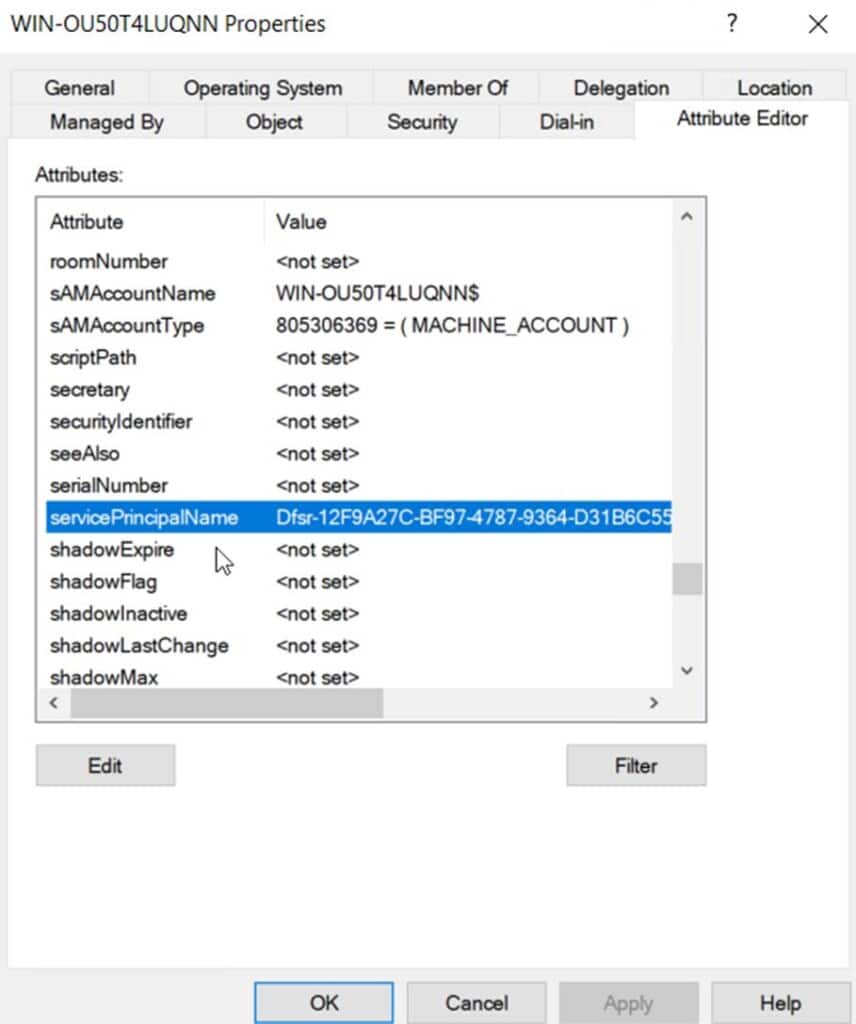
SPNs are stored in Active Directory as part of an object's servicePrincipalName attribute. This attribute exists on computer accounts and service accounts and contains a list of all SPNs registered to that object. You can view it through the tab of an object’s properties in Active Directory Users and Computers, as shown in the screenshot below.
When a client requests access to a service, it constructs an SPN for that service, submits it to the domain controller, and the DC looks up that SPN in the directory. If found, it issues a Kerberos service ticket. No password is transmitted across the network.
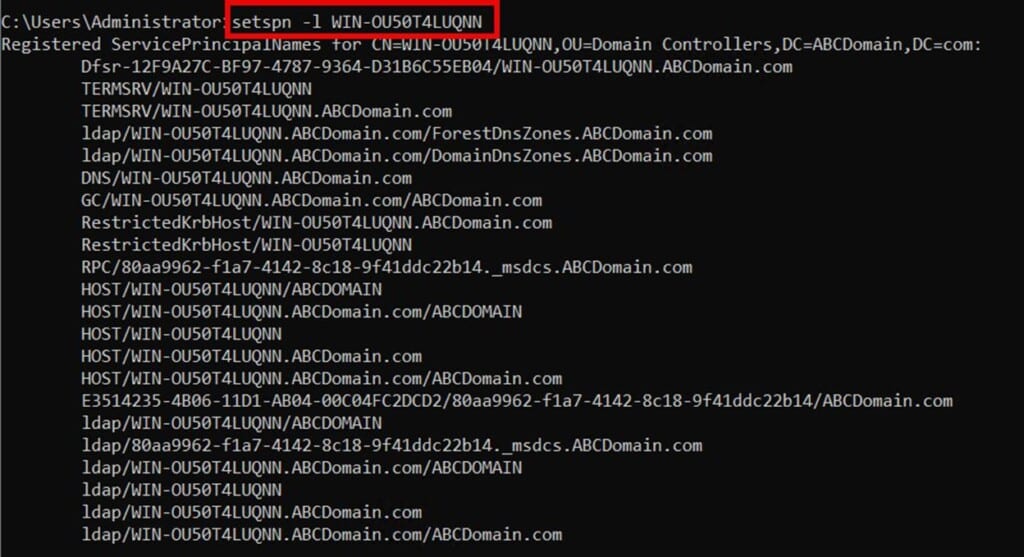
You can view the SPNs for an AD object using the command: setspn –L hostname. In the example below, the command was used to view the list of SPNs generated by a domain controller for a domain called ABCDomain.com.
How SPN uniqueness enables correct service resolution
Each SPN must be unique across the entire Active Directory forest. This uniqueness is what enables Kerberos authentication to route service requests to the correct account. If two accounts hold the same SPN, the domain controller cannot determine which one to use, resulting in authentication failures, intermittent login errors, and broken service connections.
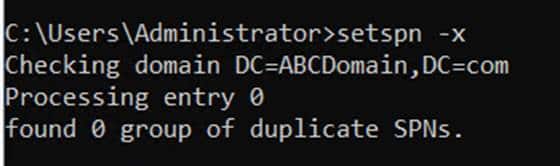
When troubleshooting authentication issues, duplicate SPNs should be among the first things checked. Use setspn -X to detect duplicates within a domain, and setspn -F to search the entire forest.
HOST SPNs and when AD manages them automatically
HOST SPNs are a special category of SPNs that are automatically registered on computer objects by Active Directory. They act as a universal identifier for services running under the Local System or Network Service account on a machine, covering many standard Windows services without requiring manual SPN entries.
The table below summarizes when to use HOST SPNs versus custom SPNs:
Scenario | Use HOST SPN | Use custom SPN |
|---|---|---|
|
Service running as Local System |
Yes |
No |
|
Service running as Network Service |
Yes |
No |
|
Service running as a domain user account |
No |
Yes |
|
Multi-host or load-balanced service |
No |
Yes |
Never manually modify HOST SPNs. Active Directory manages them automatically, and changes can disrupt core services.
How to configure and manage SPNs
Correct SPN configuration is a prerequisite for Kerberos authentication to work. The process follows a consistent sequence regardless of the service type, and skipping steps is the most common source of SPN-related problems.
Step 1: Identify the service and target account
Before registering an SPN, identify two things: the service class and format needed, and the Active Directory account that will run the service. For standard services (SQL Server, IIS, Exchange), the service class is well-documented. For the account, prefer a dedicated Active Directory service account or, where possible, a Group Managed Service Account (gMSA) rather than a shared or personal account.
Step 2: Check for existing or duplicate SPNs
Before registering, confirm that the SPN does not already exist on another account. Use the following commands to query the directory:
      # Check if a specific SPN already exists anywhere in the domain
setspn -Q HTTP/webserver1.domain.com

# Detect all duplicate SPNs within the domain
setspn -X

# Detect duplicates across the entire forest
setspn -F -X
Registering a duplicate SPN can cause authentication failures and be difficult to diagnose after the fact.
Step 3: Register the SPN with setspn
Use setspn -S (safe add) to register the SPN. The -S flag automatically checks for duplicates before creating the entry, making it safer than the older -A flag:
setspn -S HTTP/webserver1.domain.com domain\serviceaccount
For SQL Server running on a non-standard port:
setspn -S MSSQLSvc/sqlserver.domain.com:1433 domain\sqlserviceaccount
You can also register SPNs via PowerShell using the Set-ADUser or Set-ADComputer cmdlets, which is useful for scripted deployments or bulk registrations.
Step 4: Verify the registration
After registering, confirm the SPN appears on the correct account:
setspn -L domain\serviceaccount
You can also verify using PowerShell:
Get-ADUser -Identity serviceaccount -Properties servicePrincipalName | Select-Object -ExpandProperty servicePrincipalName
The output should list the newly registered SPN alongside any others already assigned to that account.
Step 5: Test Kerberos authentication
With the SPN registered, test that Kerberos authentication succeeds. Connect to the service using domain credentials, then run klist to confirm that the DC issued a Kerberos service ticket (not an NTLM ticket).
In Windows Event Viewer, a successful Kerberos service ticket request appears as Event ID 4769. If authentication falls back to NTLM, the SPN is likely missing, malformed, or registered on the wrong account.
Fixing common SPN misconfigurations
Most SPN problems fall into a small number of categories. Each requires a targeted fix:
- Duplicate SPNs: Use
setspn -Dto remove the SPN from the incorrect account, then verify it remains on the correct one. Duplicates often appear after server renames or account migrations. - Missing SPNs: If Kerberos fails and falls back to NTLM, check whether the SPN exists at all using
setspn -Q. Register it if absent. - SPNs registered on the wrong account: Remove with
setspn -Dand re-register on the correct service account. - Stale SPNs after a server rename: Old SPNs referencing the previous hostname must be removed, and new ones registered under the current name.
SPN registration best practices
Establishing consistent practices for SPN management reduces both operational failures and security risk:
- Use
setspn -S(not -A) when registering to prevent accidental duplicates. - Run regular PowerShell audits to identify SPNs registered to inappropriate accounts.
- Assign SPNs to dedicated service accounts, not to personal user accounts or Domain Admin accounts.
- Use a standardized naming format across your environment to simplify audits.
- Grant accounts the minimum permissions needed. SPN registration requires write access to the
servicePrincipalNameattribute, which should not be granted broadly.
Netwrix Auditor continuously monitors authentication events across hybrid Microsoft environments. Download a free trial.
Security risks of misconfigured SPNs
Service accounts associated with SPNs are among the most targeted identities in Active Directory. Unlike standard user accounts, they often carry elevated privileges, maintain persistent access to critical systems, and are rarely reviewed once created. This combination creates the security risks associated with misconfigured SPNs.
Kerberoasting
Kerberoasting is the most prevalent SPN-based attack technique. Any domain-authenticated user, including low-privileged accounts, can request a Kerberos service ticket for any SPN in the directory. That ticket is encrypted with the service account's password hash.
An attacker can request the ticket, extract it, and perform offline password cracking without triggering lockouts or generating significant network noise.
RC4 encryption makes this attack significantly faster because RC4‑encrypted Kerberos tickets are easier to crack than modern AES‑protected ones, which is why Microsoft is actively deprecating RC4 in AD environments.
If the service account uses a weak or reused password, the attacker can recover the plaintext credentials and gain access to the service, often with elevated privileges.
Silver ticket attacks
A natural follow-on to Kerberoasting is the silver ticket attack. Once an attacker cracks a service account's password hash, they can use it to forge Kerberos service tickets entirely offline, without further interaction with the domain controller. These silver tickets grant persistent access to the targeted service and are particularly difficult to detect because they bypass the DC entirely.
Lateral movement via compromised service accounts
Service accounts commonly hold access to multiple systems. When an attacker compromises one, they gain a foothold that enables lateral movement across the environment. Because service accounts are often excluded from standard monitoring and anomaly detection rules, this movement can go unnoticed for extended periods.
Privilege escalation through high-privilege SPNs
SPNs registered on accounts with excessive permissions, particularly accounts with Domain Admin rights or unrestricted access to critical systems, represent the highest-risk configurations. A successful Kerberoasting attack against one of these accounts does not just compromise a service; it can give an attacker domain-level control.
How to defend against SPN-based attacks
Defense against SPN-based attacks operates across three areas: detecting abuse early, responding effectively when it occurs, and hardening the environment to reduce the attack surface before an incident happens.
Detecting Kerberoasting and SPN enumeration
Continuous monitoring of your AD environment is the first line of defense. Indicators to watch for include:
- Unusual SPN enumeration queries. Attackers commonly use LDAP tools to list all SPNs in a domain during reconnaissance.
- A sudden spike in Event ID 4769 (Kerberos service ticket requests), particularly those using RC4 encryption (encryption type 0x17), strongly indicates Kerberoasting, as attackers prefer RC4 tickets for faster cracking.
- Service account logins from unexpected hosts or at unusual times.
- Repeated failed authentication attempts, which may indicate brute-force or password-spraying attacks against compromised credentials.
Restricting who can query SPNs by modifying permissions in Active Directory reduces the reconnaissance window available to low-privileged attackers.
Containing and responding to SPN abuse
When SPN-based abuse is detected, the priority is limiting the attacker's ability to use the compromised credentials:
- Immediately reset the affected service account password with a long, randomly generated credential.
- Review all systems the service account has access to and audit recent activity for signs of lateral movement.
- Revoke any active Kerberos tickets issued to the account by resetting the account's Kerberos encryption keys (a krbtgt reset isn't needed for silver ticket mitigation; resetting the service account password invalidates forged tickets).
- Review whether the account holds more privileges than its function requires and reduce them.
Hardening SPN-enabled service accounts
Proactive hardening eliminates many of the conditions that make SPN-based attacks viable:
- Use long, randomly generated passwords (minimum 25 characters) for service accounts and rotate them on a defined schedule.
- Apply the principle of least privilege. Service accounts should have access only to the systems and data their function requires.
- Never assign SPNs to accounts with Domain Admin or other high-privilege group memberships.
- Disable interactive login for service accounts to limit their usefulness if compromised.
- Migrate to Group Managed Service Accounts wherever possible, as they automate password management and make Kerberoasting significantly harder.
Using gMSAs and AES encryption to eliminate standing risk
Group Managed Service Accounts (gMSAs) are specialized service accounts that eliminate the need for manual password management entirely. Active Directory manages gMSA passwords automatically, rotating them on a defined schedule using long, randomly generated credentials that service and domain administrators never see or handle directly.
By default, Windows rotates gMSA passwords every 30 days, and the interval is controlled by the msDS‑ManagedPasswordInterval attribute (or the ManagedPasswordIntervalInDays parameter when creating the gMSA), which can only be set at creation time.
For services that do not support gMSAs, enforce AES-128 or AES-256 Kerberos encryption, and explicitly disable the weaker RC4 and DES encryption types in Active Directory. RC4 encryption is the default used in Kerberoasting attacks; removing it forces requests to use AES, which is significantly more resistant to offline cracking.
SPNs in hybrid and modern environments
The role of SPNs has expanded beyond traditional on-premises Active Directory as organizations adopt hybrid architectures and containerized workloads. SPNs remain relevant wherever Kerberos authentication is in use, and in some newer contexts, they enable authentication patterns that did not exist in the original AD design.
SPNs and Microsoft Entra Connect
Microsoft Entra Connect uses SPNs for its synchronization services between on-premises Active Directory and Entra ID (formerly Azure AD). The synchronization service account requires correctly configured SPNs to authenticate to both directories. Misconfigured or missing SPNs can silently break directory synchronization, causing identity data to go stale across the hybrid environment.
SPNs in containerized environments
Containerized workloads running on Windows Server can use gMSAs, and, by extension, SPNs, for Active Directory security. Kubernetes and Docker deployments on domain-joined hosts can be configured to request gMSA credentials, allowing containerized services to authenticate to AD-integrated resources using Kerberos without embedding credentials in container images.
Delegated authentication in multi-tier applications
Kerberos delegation allows a service to authenticate to downstream resources on behalf of a user. This is common in multi-tier applications where a web front-end needs to pass the user's identity to a backend database.
SPNs are central to this: delegation is configured on the service account holding the SPN, and each hop in the authentication chain depends on correctly registered SPNs.
Unconstrained delegation, where a service can impersonate any user to any resource, represents a significant attack surface and should be replaced with constrained or resource-based constrained delegation wherever possible.
SPNs are foundational and increasingly targeted
Service Principal Names have been a cornerstone of Kerberos authentication since Active Directory's inception. They enable secure, passwordless service authentication across enterprise environments, but only when correctly configured, regularly audited, and tightly governed.
As organizations expand into hybrid infrastructure, containers, and cloud-integrated identity systems, SPNs are appearing in more places and tied to accounts with broader access than ever before.
The threat calculus has shifted accordingly. Kerberoasting has become one of the most commonly observed lateral movement techniques in enterprise breaches, precisely because SPNs are both ubiquitous and undermonitored. Misconfigurations that once caused authentication failures are now part of the attack surface.
Understanding SPNs, how they are structured, how AD resolves them, and how attackers exploit weak configurations is the first step toward securing them. The operational steps covered in this article provide a foundation. Building on that, continuous monitoring, regular SPN audits, and, where possible, migration to gMSAs help organizations stay ahead of the threat.
How Netwrix can help
Netwrix offers purpose-built tools for the two highest-priority SPN security challenges: detecting attacks in progress and maintaining visibility into AD changes that introduce risk.
Netwrix Threat Manager detects identity-based attacks, including Kerberoasting, SPN enumeration queries, and suspicious service ticket requests across on-premises Active Directory and Entra ID.
It correlates with anomalous activity at the account level. When a low-privileged user suddenly requests 50 service tickets, security teams see it as a single consolidated alert rather than isolated log entries.
Netwrix Auditor tracks every change to the servicePrincipalName attribute across your AD environment, with before-and-after values and the account responsible for each change. When an SPN is registered on a high-privilege account or unexpectedly removed from a service account, Auditor surfaces that change immediately.
Request a demo to see how Netwrix can help you detect SPN abuse, audit AD changes in real time, and reduce the attack surface before adversaries exploit it.
Frequently asked questions about SPN and its role in Active Directory and security?
Share on
Learn More
About the author

Joe Dibley
Security Researcher
Security Researcher at Netwrix and member of the Netwrix Security Research Team. Joe is an expert in Active Directory, Windows, and a wide variety of enterprise software platforms and technologies, Joe researches new security risks, complex attack techniques, and associated mitigations and detections.