
ネイティブ監査
- "Site Settings" に移動 → "Site Collection Administration" をクリック → "Site collection features" に進む → "Reporting" を選択 → "Activate" をクリックします。
- 「Site Settings」→「Site Collection Administration」をクリック→「Site collection audit settings」に移動→「List Libraries and Sites」の設定の下で監査するために「Editing Users and Permissions」イベントを選択します。
- 「Site Settings」→「Site Collection Administration」をクリック→「Site collection audit settings」に移動→「Automatically trim the audit log for this site?」を「Yes」に設定→ 切り詰め(トリミング)する範囲の時間を設定(デフォルト値は30日)→ 切り詰め前にログを保存する場所を設定→「OK」をクリックします。
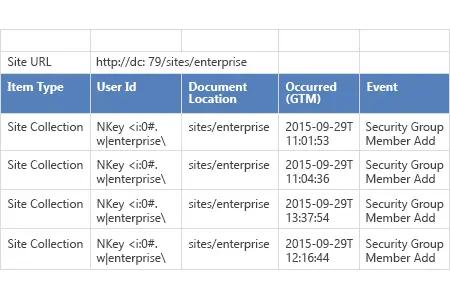
- 「Site Settings」→「Site Collection Administration」をクリック→「Audit log reports」に移動→「Security Settings」レポートを選択して、SharePoint 環境で行われたすべての権限変更を表示します。
Netwrix Auditor for SharePoint
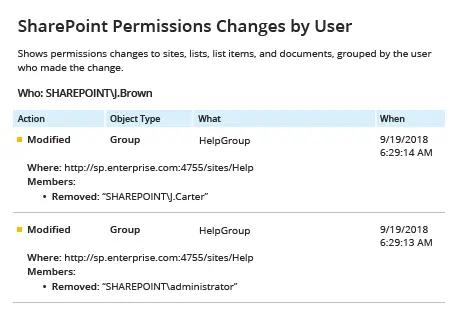
- Netwrix Auditor を実行 →「Reports」に移動 →「SharePoint」セクションを展開 →「SharePoint Permissions Changes by User」を選択 →「View」をクリックします。
- レポートを保存するには、"Export" ボタンをクリック → ドロップダウン メニューから形式を選択 → "Save" をクリックします。
共有する